

What’s supported
Supported actions
This connector supports:- Proxy Actions, using the base URL
https://my.jumpapp.com/enterprise/graphql.
Example integration
To define an integration for Jump, create a manifest file that looks like this:Before You Get Started
To use the Jump connector, you’ll need an API Key from your Jump account. Here’s how to get it:- Sign in to the Jump homepage.
- In the lower-right corner of the homepage, click Profile & settings.
- Click Account settings.
- Navigate to API.
- Click Create API Key.
- Enter a name and select scopes.
- Save the key, then copy the generated key.
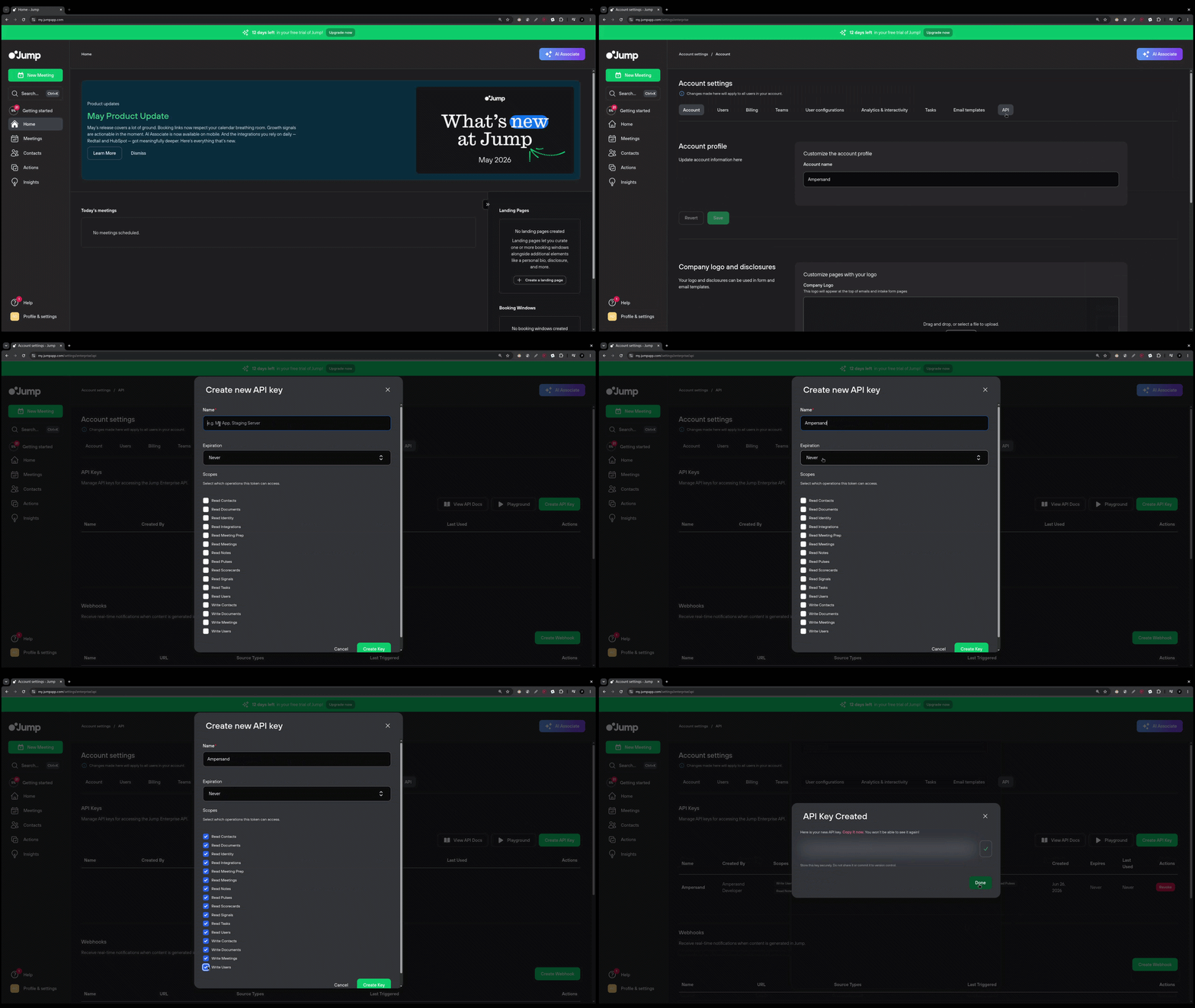
Using the connector
This connector uses API Key authentication, which means that you do not need to set up a Provider App before getting started. (Provider apps are only required for providers that use OAuth2 Authorization Code grant type.) To integrate with Jump:- Create a manifest file like the example above.
- Deploy it using the amp CLI.
- Embed the InstallIntegration UI component. The UI component will prompt the customer for their API Key.
- Start making Proxy Calls, and Ampersand will automatically attach the API Key supplied by the customer.