

What’s Supported
Supported actions
This connector supports:- Read Actions, including full historic backfill and incremental read.
- Write Actions.
- Proxy Actions, using the base URL
https://api.devrev.ai.
Incremental read
Incremental read is available for every object that supports read, except the following. For these objects, each scheduled read is a full read.articlesauth-tokenscode-changesdirectoriesorg-schedulesquestion-answersschemas.subtypeswebhooksvistas.groups
Supported Objects
The DevRev connector supports the following objects.- accounts (read, write)
- articles (read, write)
- auth-tokens (read, write)
- dev-orgs.auth-connections (read, write)
- chats (write)
- code-changes (read, write)
- commands (read, write)
- content-template (read, write)
- conversations (read, write)
- custom-objects (write)
- dev-users (read, write)
- directories (read, write)
- engagements (read, write)
- groups (read, write)
- incidents (read, write)
- link-types.custom (read, write)
- meetings (read, write)
- metric-definitions (read, write)
- org-schedule-fragments (write)
- org-schedules (read, write)
- parts (read, write)
- question-answers (read, write)
- rev-orgs (read, write)
- rev-users (read, write)
- roles (write)
- schemas.custom (read, write)
- schemas.stock (read, write)
- schemas.subtypes (read, write)
- sla-trackers (read, write)
- service-accounts (write)
- slas (read, write)
- snap-widgets (write)
- stage-diagrams (read, write)
- stages.custom (read, write)
- states.custom (read, write)
- surveys (read, write)
- surveys.responses (read, write)
- sys-users (read, write)
- tags (read, write)
- uoms (read, write)
- vistas (read)
- vistas.groups (read)
- web-crawler-jobs (read, write)
- webhooks (read, write)
- works (read, write)
Example integration
For an example manifest file of a DevRev integration, visit our samples repo on GitHub.Before you get started
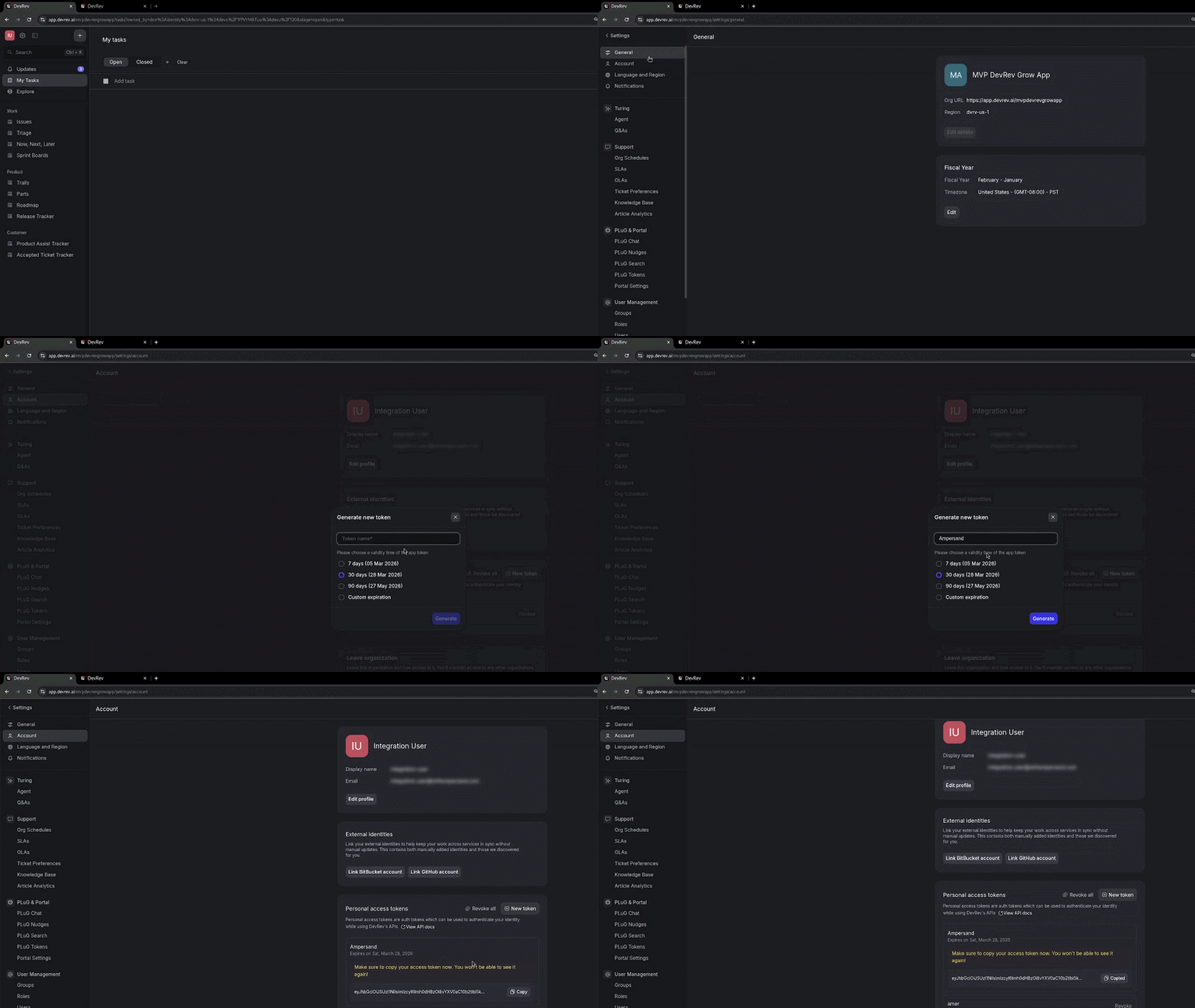
To use the DevRev connector, you’ll need a Personal Access Token (PAT) from your DevRev account. Here’s how to get it:- In the DevRev app, go to the relevant dev org.
- Go to Settings > Account > Personal Access Token.
- Click New token and follow the workflow to create your PAT.
Using the connector
This connector uses Personal Access Token (PAT) authentication, which means that you do not need to set up a Provider App before getting started. (Provider apps are only required for providers that use OAuth2 Authorization Code grant type.) To start integrating with DevRev:- Create a manifest file like the example.
- Deploy it using the amp CLI.
- If you are using Read Actions, create a destination.
- Embed the InstallIntegration UI component. The UI component will prompt the customer for an API key.
- Start using the connector!
- If your integration has Read Actions, you’ll start getting webhook messages.
- If your integration has Write Actions, you can start making API calls to our Write API.
- If your integration has Proxy Actions, you can start making Proxy API calls.