> ## Documentation Index
> Fetch the complete documentation index at: https://docs.withampersand.com/llms.txt
> Use this file to discover all available pages before exploring further.
# Teamleader
## What's Supported
### Supported Actions
This connector supports:
* [Read Actions](/read-actions), including full historic backfill. Please note that incremental read is supported only for `companies`, `contacts`, `creditNotes`, `deals`, `invoices`, `products` and `projects` currently. For all other objects, a full read of the Teamleader instance will be done per scheduled read.
* [Write Actions](/write-actions).
* [Proxy Actions](/proxy-actions), using the base URL `https://api.focus.teamleader.eu`.
### Supported objects
The teamleader connector supports reading from the following objects:
* [activityTypes](https://developer.focus.teamleader.eu/docs/api/activity-types-list)
* [callOutcomes](https://developer.focus.teamleader.eu/docs/api/call-outcomes-list)
* [calls](https://developer.focus.teamleader.eu/docs/api/calls-list)
* [closingDays](https://developer.focus.teamleader.eu/docs/api/closing-days-list)
* [commercialDiscounts](https://developer.focus.teamleader.eu/docs/api/commercial-discounts-list)
* [companies](https://developer.focus.teamleader.eu/docs/api/companies-list)
* [contacts](https://developer.focus.teamleader.eu/docs/api/contacts-list)
* [creditNotes](https://developer.focus.teamleader.eu/docs/api/credit-notes-list)
* [customFieldDefinitions](https://developer.focus.teamleader.eu/docs/api/custom-field-definitions-list)
* [dealPhases](https://developer.focus.teamleader.eu/docs/api/deal-phases-list)
* [dealPipelines](https://developer.focus.teamleader.eu/docs/api/deal-pipelines-list)
* [dealSources](https://developer.focus.teamleader.eu/docs/api/deal-sources-list)
* [deals](https://developer.focus.teamleader.eu/docs/api/deals-list)
* [departments](https://developer.focus.teamleader.eu/docs/api/departments-list)
* [events](https://developer.focus.teamleader.eu/docs/api/events-list)
* [files](https://developer.focus.teamleader.eu/docs/api/files-list)
* [invoices](https://developer.focus.teamleader.eu/docs/api/invoices-list)
* [mailTemplates](https://developer.focus.teamleader.eu/docs/api/mail-templates-list)
* [meetings](https://developer.focus.teamleader.eu/docs/api/meetings-list)
* [milestones](https://developer.focus.teamleader.eu/docs/api/milestones-list)
* [orders](https://developer.focus.teamleader.eu/docs/api/orders-list)
* [paymentMethods](https://developer.focus.teamleader.eu/docs/api/payment-methods-list)
* [priceLists](https://developer.focus.teamleader.eu/docs/api/price-lists-list)
* [productCategories](https://developer.focus.teamleader.eu/docs/api/product-categories-list)
* [products](https://developer.focus.teamleader.eu/docs/api/products-list)
* [projects](https://developer.focus.teamleader.eu/docs/api/projects-list)
* [quotations](https://developer.focus.teamleader.eu/docs/api/quotations-list)
* [subscriptions](https://developer.focus.teamleader.eu/docs/api/subscriptions-list)
* [tags](https://developer.focus.teamleader.eu/docs/api/tags-list)
* [tasks](https://developer.focus.teamleader.eu/docs/api/tasks-list)
* [taxRates](https://developer.focus.teamleader.eu/docs/api/tax-rates-list)
* [teams](https://developer.focus.teamleader.eu/docs/api/teams-list)
* [tickets](https://developer.focus.teamleader.eu/docs/api/tickets-list)
* [ticketStatus](https://developer.focus.teamleader.eu/docs/api/ticket-status-list)
* [timeTracking](https://developer.focus.teamleader.eu/docs/api/time-tracking-list)
* [unitsOfMeasure](https://developer.focus.teamleader.eu/docs/api/units-of-measure-list)
* [users](https://developer.focus.teamleader.eu/docs/api/users-list)
* [withholdingTaxRates](https://developer.focus.teamleader.eu/docs/api/withholding-tax-rates-list)
* [workTypes](https://developer.focus.teamleader.eu/docs/api/work-types-list)
The teamleader connector supports writing to the following objects:
* [calls](https://developer.focus.teamleader.eu/docs/api/calls-add)
* [contacts](https://developer.focus.teamleader.eu/docs/api/contacts-add)
* [companies](https://developer.focus.teamleader.eu/docs/api/companies-add)
* [deals](https://developer.focus.teamleader.eu/docs/api/deals-create)
* [events](https://developer.focus.teamleader.eu/docs/api/events-create)
* [dealPipelines](https://developer.focus.teamleader.eu/docs/api/deal-pipelines-create)
* [dealPhases](https://developer.focus.teamleader.eu/docs/api/deal-phases-create)
* [quotations](https://developer.focus.teamleader.eu/docs/api/quotations-create)
* [subscriptions](https://developer.focus.teamleader.eu/docs/api/subscriptions-create)
* [tasks](https://developer.focus.teamleader.eu/docs/api/tasks-create)
* [timeTracking](https://developer.focus.teamleader.eu/docs/api/time-tracking-add)
* [tickets](https://developer.focus.teamleader.eu/docs/api/tickets-create)
## Before You Get Started
To connect Teamleader with Ampersand, you will need a [Teamleader Account](https://www.teamleader.eu/).
Once your account is created, you'll need to configure an app in Teamleader and obtain the following credentials from your app:
* Client ID
* Client Secret
You will use these credentials to connect your application to Ampersand.
### Create a Teamleader Account
Here's how you can sign up for a Teamleader account:
1. Go to the [Teamleader Sign Up page](https://signup.focus.teamleader.eu/?_gl=1*9qfeak*_gcl_au*Mjc4MzM1MzY4LjE3MjI0MTA5MDU.).
2. Sign up using your preferred method.
### Creating a Teamleader App
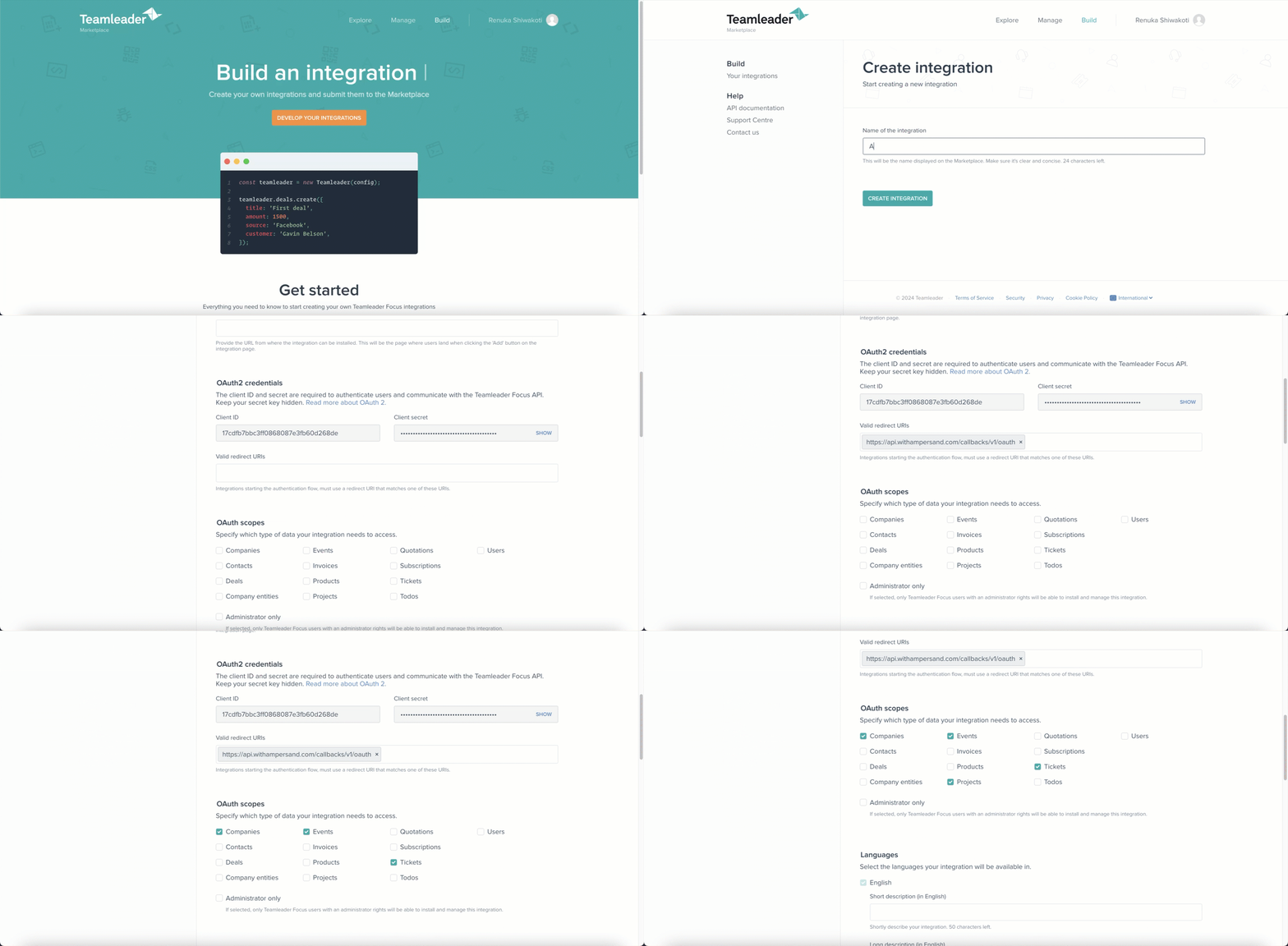
Follow the steps below to create a Teamleader app and add the Ampersand redirect URL:
1. Log in to your [Teamleader Marketplace](https://marketplace.teamleader.eu/eu/en/build) account using your credentials.
2. Click **Develop Your Integration**.
3. Go to the **My Apps** tab.
4. Click **Create New Integration**.
5. Enter a name for the integration and click **Create Integration**.
6. In the **Oauth2 Credentials >> Valid redirect URIs**, enter the Ampersand redirect URL `https://api.withampersand.com/callbacks/v1/oauth`.\
\*\*Note: \*\*The *Oauth2 Credentials* section also displays the **Client ID** and **Client Secret** of your application. Note these keys, as they are essential for connecting your app to Ampersand.
7. Select the necessary scopes based on your App's requirements.
8. Click **Save**.\\
 ### Add Your Teamleader App Info to Ampersand
1. Log in to your [Ampersand Dashboard](https://dashboard.withampersand.com).
2. Choose the project where you want to integrate Teamleader.
### Add Your Teamleader App Info to Ampersand
1. Log in to your [Ampersand Dashboard](https://dashboard.withampersand.com).
2. Choose the project where you want to integrate Teamleader.
 3. Navigate to the **Provider Apps** section.
4. Select *Teamleader* from the **Provider** list.
5. Enter the **Client ID** and **Client Secret** obtained from Teamleader into the respective fields in Ampersand.
3. Navigate to the **Provider Apps** section.
4. Select *Teamleader* from the **Provider** list.
5. Enter the **Client ID** and **Client Secret** obtained from Teamleader into the respective fields in Ampersand.
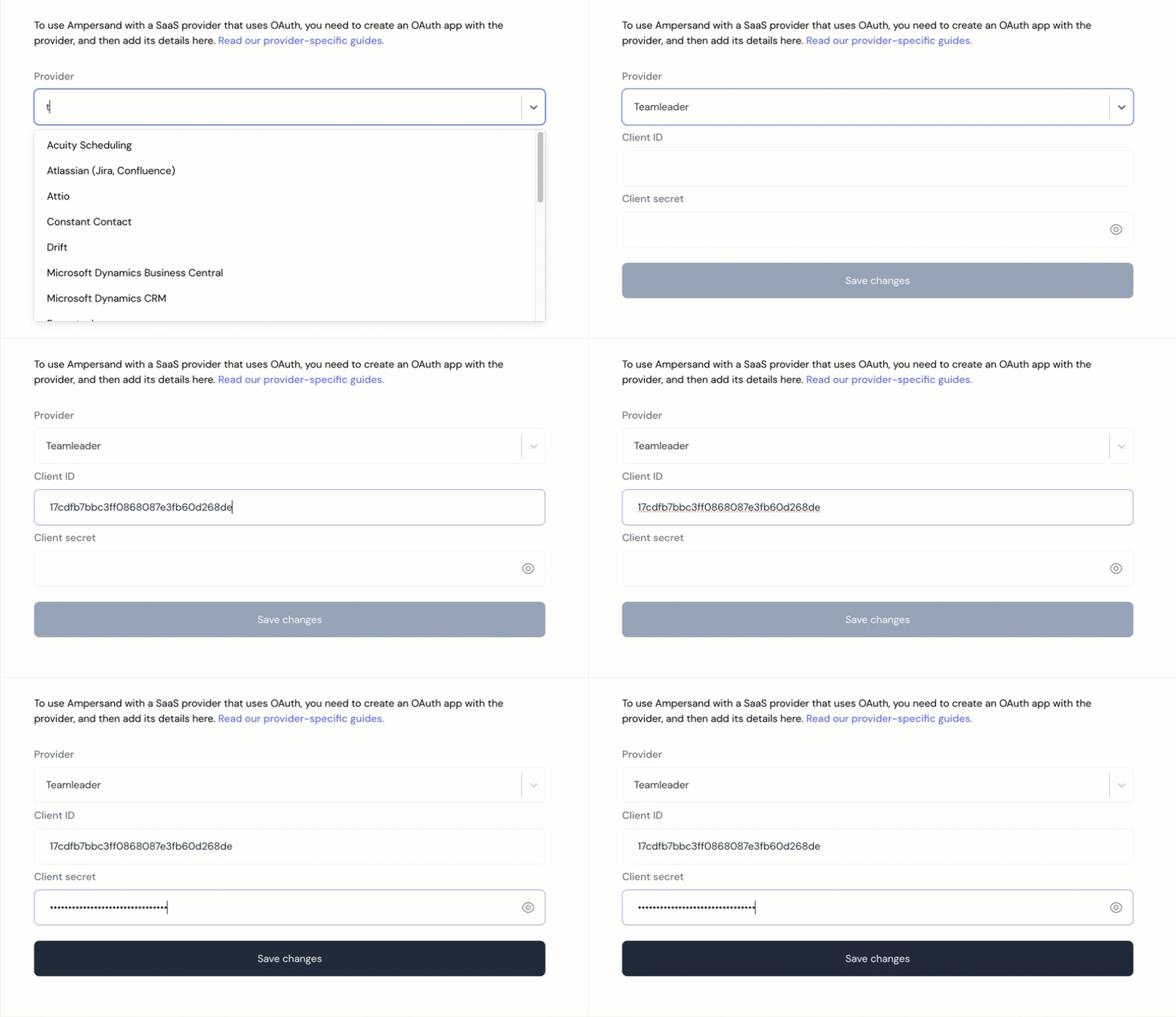 6. Click **Save Changes**.
To start integrating with teamleader:
* Create a manifest file using the [example](https://github.com/amp-labs/samples/blob/main/teamleader/amp.yml).
* Deploy it using the [amp CLI](/cli/overview).
* If you are using Read Actions, create a [destination](/destinations).
* Embed the [InstallIntegration](/embeddable-ui-components#install-integration) UI component.
* Start using the connector!
* If your integration has [Read Actions](/read-actions), you'll start getting webhook messages.
* If your integration has [Write Actions](/write-actions), you can start making API calls to our Write API.
* If your integration has [Proxy Actions](/proxy-actions), you can start making Proxy API calls.
6. Click **Save Changes**.
To start integrating with teamleader:
* Create a manifest file using the [example](https://github.com/amp-labs/samples/blob/main/teamleader/amp.yml).
* Deploy it using the [amp CLI](/cli/overview).
* If you are using Read Actions, create a [destination](/destinations).
* Embed the [InstallIntegration](/embeddable-ui-components#install-integration) UI component.
* Start using the connector!
* If your integration has [Read Actions](/read-actions), you'll start getting webhook messages.
* If your integration has [Write Actions](/write-actions), you can start making API calls to our Write API.
* If your integration has [Proxy Actions](/proxy-actions), you can start making Proxy API calls.