> ## Documentation Index
> Fetch the complete documentation index at: https://docs.withampersand.com/llms.txt
> Use this file to discover all available pages before exploring further.
# Talkdesk
## What's Supported
### Supported Actions
This connector supports:
* [Read Actions](/read-actions), including full historic backfill. Please note that incremental read is supported for `do-not-call-lists`, `record-lists`, `prompts` and `campaigns` only. For all other objects, a full read of the Talkdesk instance will be done for each scheduled read.
* [Write Actions](/write-actions).
* [Proxy Actions](/proxy-actions), using the base URL `https://api.talkdeskapp.com`.
### Supported Objects
The Talkdesk connector supports reading from the following objects:
* [contacts](https://docs.talkdesk.com/reference/contacts)
* [ring-groups](https://docs.talkdesk.com/reference/list-all-ring-groups)
* [do-not-call-lists](https://docs.talkdesk.com/reference/do-not-call-lists)
* [campaigns](https://docs.talkdesk.com/reference/campaigns-list)
* [record-lists](https://docs.talkdesk.com/reference/record-lists)
* [identity/activities](https://docs.talkdesk.com/reference/activities-list)
* [attributes](https://docs.talkdesk.com/reference/attributes-list)
* [attributes-categories](https://docs.talkdesk.com/reference/attributes-categories-list)
* [fsi/contacts](https://docs.talkdesk.com/reference/fetch-contacts)
* [prompts](https://docs.talkdesk.com/reference/list-a-prompt)
* [prompts-usage](https://docs.talkdesk.com/reference/get-a-prompt-usage)
* [live-queries](https://docs.talkdesk.com/reference/list-available-queries)
* [guardian/users](https://docs.talkdesk.com/reference/guardianusers)
* [guardian/logs/sessions](https://docs.talkdesk.com/reference/guardianlogssessions)
* [guardian/cases](https://docs.talkdesk.com/reference/guardian-cases)
* [guardian/calls/call-quality](https://docs.talkdesk.com/reference/calls-quality)
* [users](https://docs.talkdesk.com/reference/users)
* [scim/v2/Users](https://docs.talkdesk.com/reference/get-users)
* [scim/v2/ResourceTypes](https://docs.talkdesk.com/reference/get-service-providers-resource-types)
* [scim/v2/ResourceTypes/User](https://docs.talkdesk.com/reference/check-user-resource-type)
* [scim/v2/ServiceProviderConfig](https://docs.talkdesk.com/reference/get-service-provider-configurations)
* [account](https://docs.talkdesk.com/reference/account)
* [account/wallets](https://docs.talkdesk.com/reference/account-wallet-list)
* [account/bucket-configurations](https://docs.talkdesk.com/reference/bucket-configurations)
* [cm/core/va/cases](https://docs.talkdesk.com/reference/get-case-list)
* [cm/meta/va/fields](https://docs.talkdesk.com/reference/get-a-list-of-case-fields)
* [bulk-imports/users](https://docs.talkdesk.com/reference/get-list-of-imports)
* [cfm/flows/external/results](https://docs.talkdesk.com/reference/collect-feedback-data)
* [express/accounts](https://docs.talkdesk.com/reference/billing-insights-get-accounts)
* [express/products](https://docs.talkdesk.com/reference/billing-insights-get-products)
* [express/subscriptions](https://docs.talkdesk.com/reference/billing-insights-get-subscriptions)
* [express/invoices](https://docs.talkdesk.com/reference/billing-insights-get-invoices)
* [express/usage/month](https://docs.talkdesk.com/reference/billing-insights-get-monthly-usage)
* [industries-scheduler/teams](https://docs.talkdesk.com/reference/get-teams)
* [industries-scheduler/appointments](https://docs.talkdesk.com/reference/get-appointments)
The Talkdesk connector supports writing to the following objects:
* [do-not-call-lists](https://docs.talkdesk.com/reference/do-not-call-lists-1)
* [campaigns](https://docs.talkdesk.com/reference/createduplicate-campaign)
* [record-lists](https://docs.talkdesk.com/reference/record-lists-1)
* [digital-connect/conversations](https://docs.talkdesk.com/reference/start-conversation)
* [attributes](https://docs.talkdesk.com/reference/new-attribute)
* [attributes-categories](https://docs.talkdesk.com/reference/new-attribute-category)
* [wfm/aion/externals/schedules/time-offs](https://docs.talkdesk.com/reference/create-a-time-off)
* [fsi-workspace/contacts/synchronizations-from-core](https://docs.talkdesk.com/reference/sync-a-talkdesk-contact)
* [fsi/transfers/internal](https://docs.talkdesk.com/reference/create-transfer-internal)
* [fsi/transfers/external](https://docs.talkdesk.com/reference/create-a-transfer-external)
* [fsi/transfers/international](https://docs.talkdesk.com/reference/create-a-transfer-international)
* [prompts](https://docs.talkdesk.com/reference/create-a-prompt)
* [prompts-requests](https://docs.talkdesk.com/reference/request-link-to-upload-audio-file)
* [live-subscriptions](https://docs.talkdesk.com/reference/subscribe-to-a-new-stream)
* [interaction-custom-fields](https://docs.talkdesk.com/reference/interaction-custom-fields)
* [scim/v2/Users](https://docs.talkdesk.com/reference/create-user)
* [cm/core/va/cases](https://docs.talkdesk.com/reference/create-a-new-case)
* [express/provisioning/account](https://docs.talkdesk.com/reference/instantiate-a-trial)
* [eas/simulated-emails](https://docs.talkdesk.com/reference/send-a-simulated-message)
* [industries-scheduler/availabilities](https://docs.talkdesk.com/reference/collecting-user-availability)
* [industries-scheduler/appointment](https://docs.talkdesk.com/reference/create-calendar-event)
### Example integration
For an example manifest file of a Talkdesk integration, visit our [samples repo on Github](https://github.com/amp-labs/samples/blob/main/talkdesk/amp.yaml).
## Before You Get Started
To integrate Talkdesk with Ampersand, you will need [a Talkdesk Account](https://www.Talkdesk.com/).
Once your account is created, you'll need to register an OAuth app and obtain the following credentials:
* Client ID
* Client Secret
You will then use these credentials to connect your application to Ampersand.
### Creating a Talkdesk OAuth App
Follow the steps below to create a Talkdesk OAuth app:
1. Log in to your Talkdesk workspace.
2. Go to **Builder** > **OAuth Clients**.
3. In the OAuth 2.0 section, click on **Create OAuth client**.
4. Enter the following details:
1. **OAuth client name:** Choose a name for your OAuth client.
2. **Grant type:** Select the Authorization Code and Refresh Token as grant type.
3. **Redirect URI:** Enter `https://api.withampersand.com/callbacks/v1/oauth`.
4. **Scopes:** Select the scopes you want to use for your application from the list of available scopes.
5. Click **Create**.
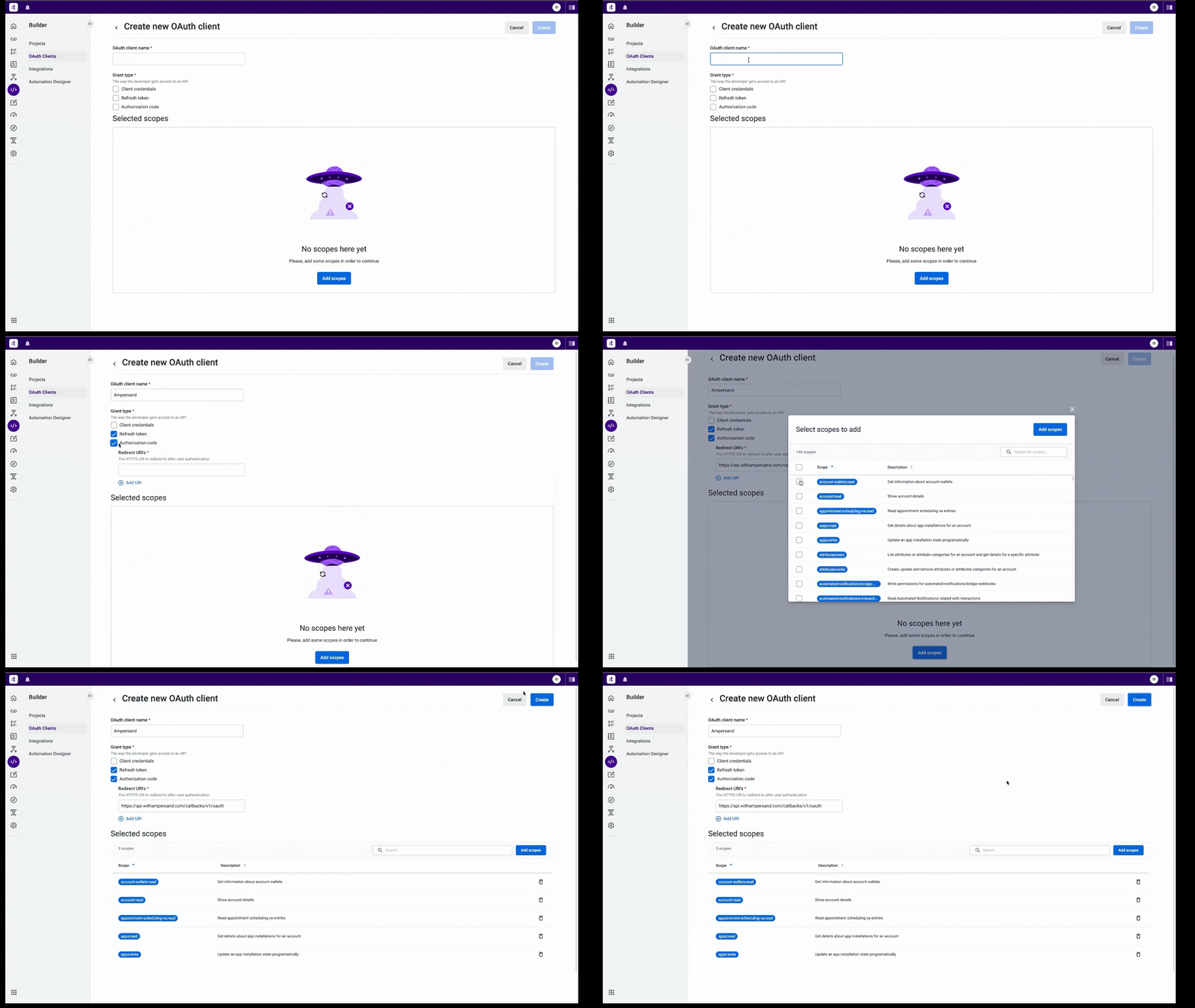 You will see the **Client ID** and **Client Secret** in a popup. Note these credentials, as you will need them to connect your app to Ampersand.
## Add Your Talkdesk App Info to Ampersand
1. Log in to your [Ampersand Dashboard](https://dashboard.withampersand.com).
2. Select the project where you want to create a *Talkdesk* integration.
3. Select **Provider Apps**.
4. Select *Talkdesk* from the **Provider** list.
5. Enter the previously obtained **Client ID** in the **Client ID** field and the **Client Secret** in the **Client Secret** field.
You will see the **Client ID** and **Client Secret** in a popup. Note these credentials, as you will need them to connect your app to Ampersand.
## Add Your Talkdesk App Info to Ampersand
1. Log in to your [Ampersand Dashboard](https://dashboard.withampersand.com).
2. Select the project where you want to create a *Talkdesk* integration.
3. Select **Provider Apps**.
4. Select *Talkdesk* from the **Provider** list.
5. Enter the previously obtained **Client ID** in the **Client ID** field and the **Client Secret** in the **Client Secret** field.
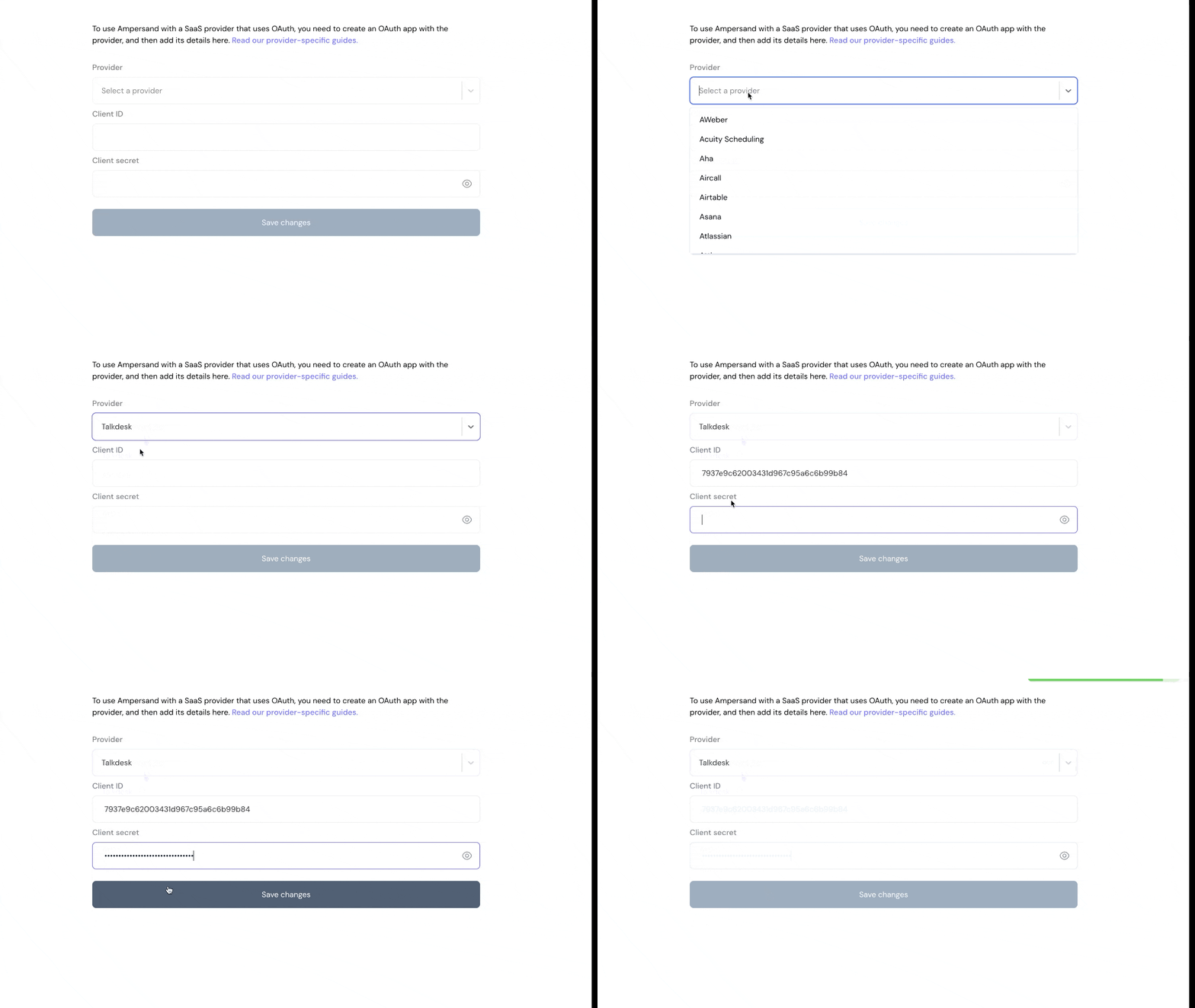 6. Enter the scopes set for your application in *Talkdesk*.
7. Click **Save Changes**.
6. Enter the scopes set for your application in *Talkdesk*.
7. Click **Save Changes**.