> ## Documentation Index
> Fetch the complete documentation index at: https://docs.withampersand.com/llms.txt
> Use this file to discover all available pages before exploring further.
# Square
## What's supported
### Supported actions
This connector supports:
* [Read Actions](/read-actions), including full historic backfill. Please note that incremental read is supported only for `gift_cards/activities`, `payments`, `payouts` and `refunds` currently. For all other objects, a full read of the Square instance will be done per scheduled read.
* [Write Actions](/write-actions).
* [Proxy Actions](/proxy-actions), using the base URL `https://connect.squareup.com`.
### Supported objects
The Square connector supports reading from and writing to the following objects:
#### Read objects
* [bank\_accounts](https://developer.squareup.com/reference/square/bank-accounts-api)
* [bookings](https://developer.squareup.com/reference/square/bookings-api)
* [bookings/custom\_attribute\_definitions](https://developer.squareup.com/reference/square/booking-custom-attributes-api)
* [bookings/location\_booking\_profiles](https://developer.squareup.com/reference/square/bookings-api)
* [bookings/team\_member\_booking\_profiles](https://developer.squareup.com/reference/square/bookings-api)
* [cards](https://developer.squareup.com/reference/square/cards-api)
* [catalog](https://developer.squareup.com/reference/square/catalog-api)
* [channels](https://developer.squareup.com/reference/square/channels-api)
* [customers](https://developer.squareup.com/reference/square/customers-api)
* [customers/custom\_attribute\_definitions](https://developer.squareup.com/reference/square/customer-custom-attributes-api)
* [customers/groups](https://developer.squareup.com/reference/square/customer-groups-api)
* [customers/segments](https://developer.squareup.com/reference/square/customer-segments-api)
* [devices](https://developer.squareup.com/reference/square/devices-api)
* [devices/codes](https://developer.squareup.com/reference/square/devices-api)
* [disputes](https://developer.squareup.com/reference/square/disputes-api)
* [events/types](https://developer.squareup.com/reference/square/events-api)
* [gift\_cards](https://developer.squareup.com/reference/square/gift-cards-api)
* [gift\_cards/activities](https://developer.squareup.com/reference/square/gift-card-activities-api)
* [labor/break\_types](https://developer.squareup.com/reference/square/labor-api)
* [labor/team\_member\_wages](https://developer.squareup.com/reference/square/labor-api)
* [labor/workweek\_configs](https://developer.squareup.com/reference/square/labor-api)
* [locations](https://developer.squareup.com/reference/square/locations-api)
* [locations/custom\_attribute\_definitions](https://developer.squareup.com/reference/square/location-custom-attributes-api)
* [loyalty/programs](https://developer.squareup.com/reference/square/loyalty-api)
* [merchants](https://developer.squareup.com/reference/square/merchants-api)
* [merchants/custom\_attribute\_definitions](https://developer.squareup.com/reference/square/merchant-custom-attributes-api)
* [online\_checkout/payment\_links](https://developer.squareup.com/reference/square/checkout-api)
* [orders/custom\_attribute\_definitions](https://developer.squareup.com/reference/square/order-custom-attributes-api)
* [payments](https://developer.squareup.com/reference/square/payments-api)
* [payouts](https://developer.squareup.com/reference/square/payouts-api)
* [refunds](https://developer.squareup.com/reference/square/refunds-api)
* [sites](https://developer.squareup.com/reference/square/sites-api)
* [team\_members/jobs](https://developer.squareup.com/reference/square/team-api)
* [webhooks/event\_types](https://developer.squareup.com/reference/square/webhook-subscriptions-api)
* [webhooks/subscriptions](https://developer.squareup.com/reference/square/webhook-subscriptions-api)
#### Write objects
* [bookings](https://developer.squareup.com/reference/square/bookings-api)
* [bookings/custom\_attribute\_definitions](https://developer.squareup.com/reference/square/booking-custom-attributes-api)
* [cards](https://developer.squareup.com/reference/square/cards-api)
* [catalog](https://developer.squareup.com/reference/square/catalog-api)
* [customers](https://developer.squareup.com/reference/square/customers-api)
* [customers/custom\_attribute\_definitions](https://developer.squareup.com/reference/square/customer-custom-attributes-api)
* [customers/groups](https://developer.squareup.com/reference/square/customer-groups-api)
* [devices/codes](https://developer.squareup.com/reference/square/devices-api)
* [gift\_cards](https://developer.squareup.com/reference/square/gift-cards-api)
* [gift\_cards/activities](https://developer.squareup.com/reference/square/gift-card-activities-api)
* [labor/break\_types](https://developer.squareup.com/reference/square/labor-api)
* [labor/workweek\_configs](https://developer.squareup.com/reference/square/labor-api)
* [locations](https://developer.squareup.com/reference/square/locations-api)
* [locations/custom\_attribute\_definitions](https://developer.squareup.com/reference/square/location-custom-attributes-api)
* [merchants/custom\_attribute\_definitions](https://developer.squareup.com/reference/square/merchant-custom-attributes-api)
* [online\_checkout/payment\_links](https://developer.squareup.com/reference/square/checkout-api)
* [orders/custom\_attribute\_definitions](https://developer.squareup.com/reference/square/order-custom-attributes-api)
* [payments](https://developer.squareup.com/reference/square/payments-api)
* [refunds](https://developer.squareup.com/reference/square/refunds-api)
* [team\_members/jobs](https://developer.squareup.com/reference/square/team-api)
* [webhooks/subscriptions](https://developer.squareup.com/reference/square/webhook-subscriptions-api)
### Example integration
For an example manifest file of a Square integration, visit our [samples repo on GitHub](https://github.com/amp-labs/samples/blob/main/square/amp.yaml).
For testing against Square's [sandbox environment](https://developer.squareup.com/docs/devtools/sandbox/overview), set `provider: squareSandbox` in your manifest file. This is identical to `square` except that it uses the base URL `https://connect.squareupsandbox.com`.
## Before you get started
To integrate Square with Ampersand, you will need a [Square account](https://squareup.com/signup).
Once your account is created, you'll need to create a Square app and obtain the following credentials from it:
* Client ID
* Client Secret
You will then use these credentials to connect your application to Ampersand.
### Creating a Square app
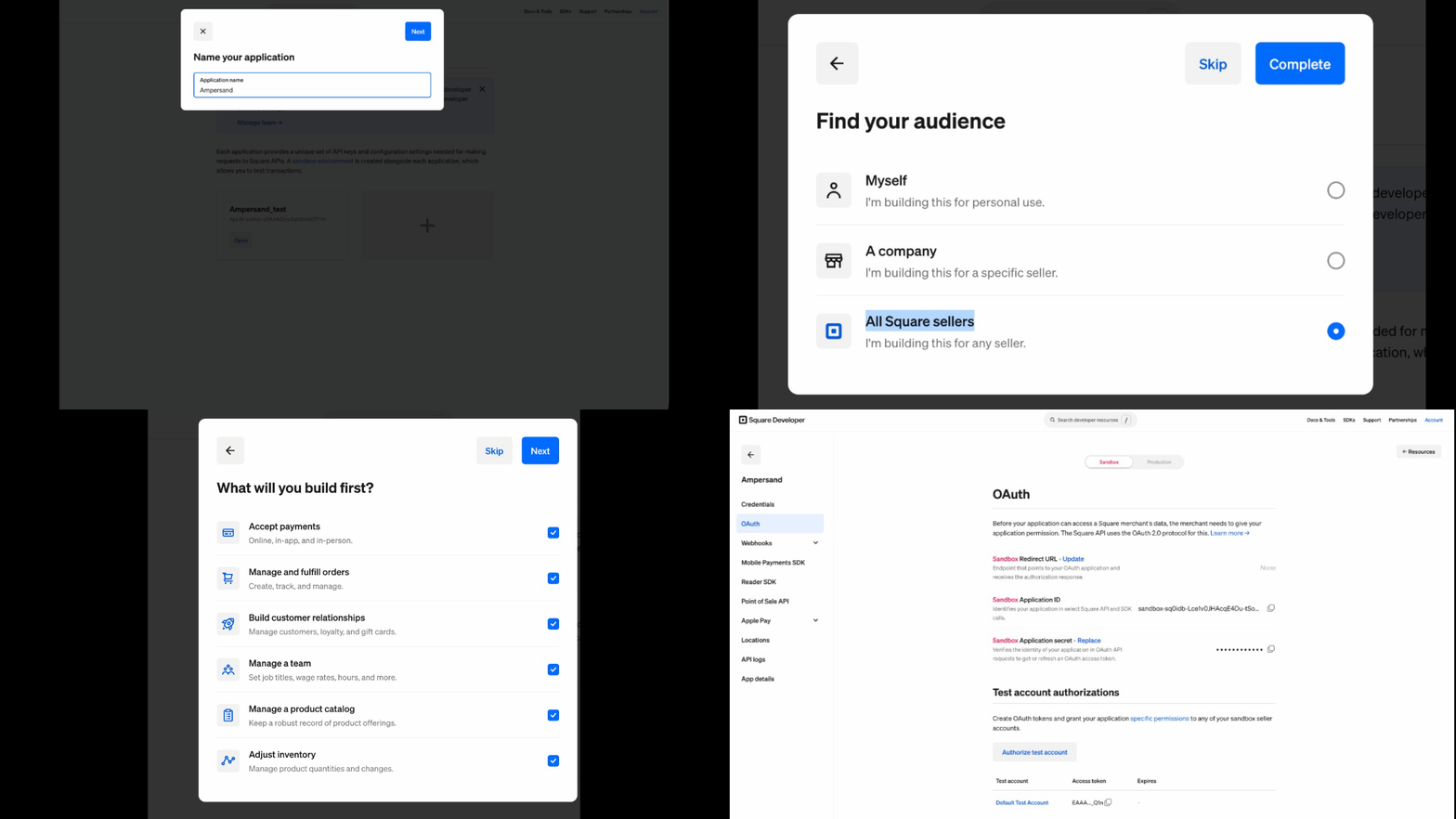
1. Log in to the [Square developer portal](https://developer.squareup.com/apps).
2. Click **+** to create a new application and give it a name.
3. Open the application and select the **OAuth** tab.
4. Set the redirect/callback URL to: `https://api.withampersand.com/callbacks/v1/oauth`
5. Copy the **Application ID** (Client ID) and **Application Secret** (Client Secret) from the **OAuth** page.
6. Note the [OAuth permissions (scopes)](https://developer.squareup.com/docs/oauth-api/square-permissions) your integration requires.
 ### Add your Square app info to Ampersand
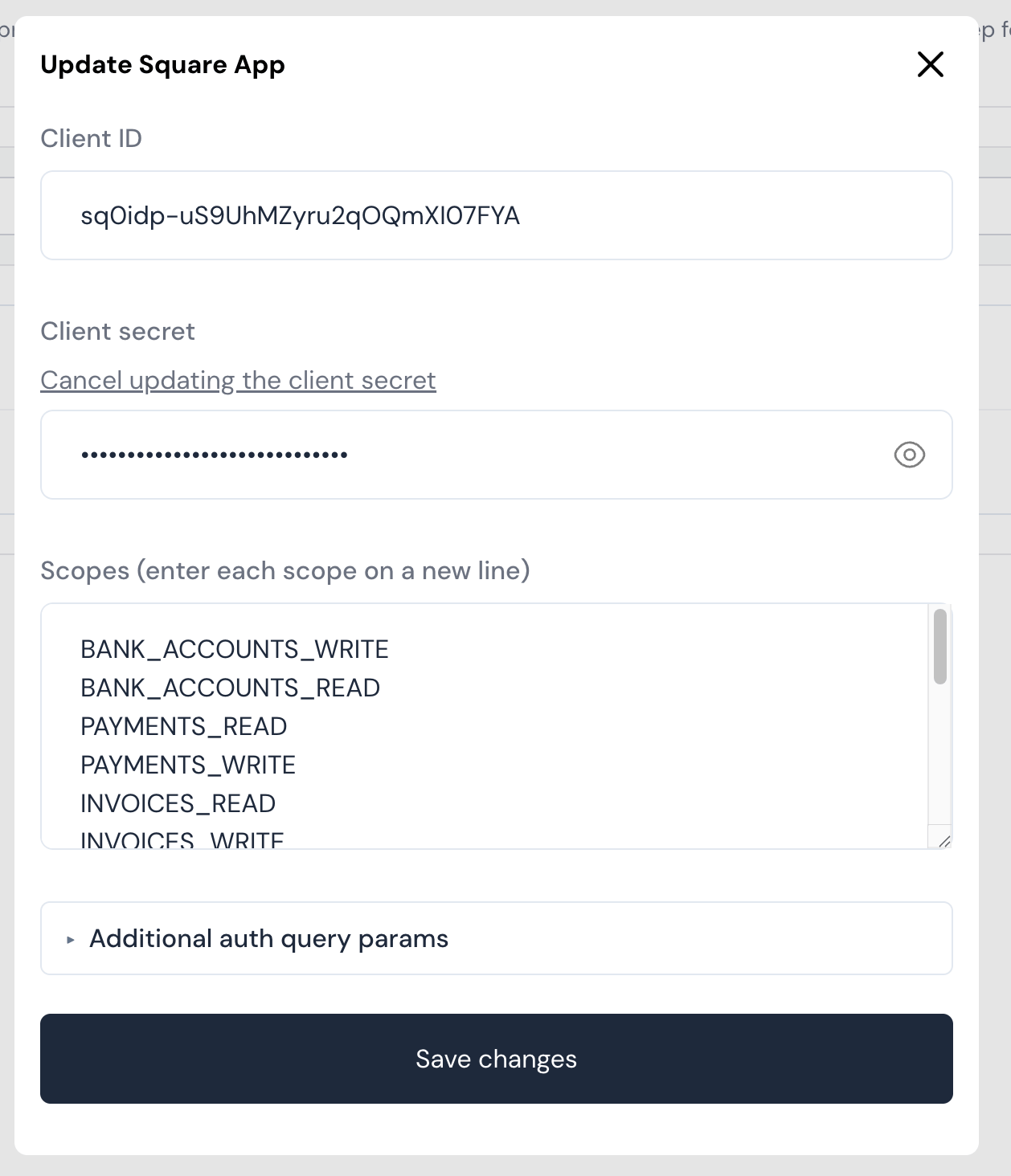
1. Log in to your [Ampersand Dashboard](https://dashboard.withampersand.com).
2. Select the project where you want to create a Square integration.
### Add your Square app info to Ampersand
1. Log in to your [Ampersand Dashboard](https://dashboard.withampersand.com).
2. Select the project where you want to create a Square integration.
 3. Select **Provider Apps**.
4. Select **Square** from the **Provider** list.
5. Enter the **Client ID** and **Client Secret** obtained from your Square app.
6. Enter the scopes your integration requires.
7. Click **Save Changes**.
3. Select **Provider Apps**.
4. Select **Square** from the **Provider** list.
5. Enter the **Client ID** and **Client Secret** obtained from your Square app.
6. Enter the scopes your integration requires.
7. Click **Save Changes**.
 ## Using the connector
To start integrating with Square:
* Create a manifest file like the [example above](#example-integration).
* Deploy it using the [amp CLI](/cli/overview).
* If you are using Read Actions, create a [destination](/destinations).
* Embed the [InstallIntegration](/embeddable-ui-components#install-integration) UI component. The UI component will prompt the customer for OAuth authorization.
* Start using the connector!
* If your integration has [Read Actions](/read-actions), you'll start getting webhook messages.
* If your integration has [Write Actions](/write-actions), you can start making API calls to our Write API.
* If your integration has [Proxy Actions](/proxy-actions), you can start making Proxy API calls.
## Using the connector
To start integrating with Square:
* Create a manifest file like the [example above](#example-integration).
* Deploy it using the [amp CLI](/cli/overview).
* If you are using Read Actions, create a [destination](/destinations).
* Embed the [InstallIntegration](/embeddable-ui-components#install-integration) UI component. The UI component will prompt the customer for OAuth authorization.
* Start using the connector!
* If your integration has [Read Actions](/read-actions), you'll start getting webhook messages.
* If your integration has [Write Actions](/write-actions), you can start making API calls to our Write API.
* If your integration has [Proxy Actions](/proxy-actions), you can start making Proxy API calls.