> ## Documentation Index
> Fetch the complete documentation index at: https://docs.withampersand.com/llms.txt
> Use this file to discover all available pages before exploring further.
# Snapchat Ads
## What's Supported
### Supported Actions
This connector supports:
* [Read Actions](/read-actions), including full historic backfill. Please note that incremental read is only supported for the `transactions` object.
* [Write Actions](/write-actions).
* [Proxy Actions](/proxy-actions), using the base URL `https://adsapi.snapchat.com`.
### Supported Objects
The Snapchat Ads connector supports writing to and reading from the following objects:
* [fundingsources](https://developers.snap.com/api/marketing-api/Ads-API/funding-sources) (read)
* [billingcenters](https://developers.snap.com/api/marketing-api/Ads-API/billing-centers) (read, write)
* [transactions](https://developers.snap.com/api/marketing-api/Ads-API/transactions) (read)
* [adaccounts](https://developers.snap.com/api/marketing-api/Ads-API/ad-accounts) (read, write)
* [members](https://developers.snap.com/api/marketing-api/Ads-API/members) (read, write)
* [roles](https://developers.snap.com/api/marketing-api/Ads-API/roles) (read, write)
* [targeting/demographics/age\_group](https://developers.snap.com/api/marketing-api/Ads-API/targeting#demographics---age-groups) (read)
* [targeting/demographics/gender](https://developers.snap.com/api/marketing-api/Ads-API/targeting#demographics---gender) (read)
* [targeting/demographics/languages](https://developers.snap.com/api/marketing-api/Ads-API/targeting#demographics---language) (read)
* [targeting/demographics/advanced\_demographics](https://developers.snap.com/api/marketing-api/Ads-API/targeting#demographics---advanced-demographics) (read)
* [targeting/device/connection\_type](https://developers.snap.com/api/marketing-api/Ads-API/targeting#device---connection-type) (read)
* [targeting/device/os\_type](https://developers.snap.com/api/marketing-api/Ads-API/targeting#device---os-type) (read)
* [targeting/device/carrier](https://developers.snap.com/api/marketing-api/Ads-API/targeting#device---carrier) (read)
* [targeting/device/marketing\_name](https://developers.snap.com/api/marketing-api/Ads-API/targeting#device---make) (read)
* [targeting/geo/country](https://developers.snap.com/api/marketing-api/Ads-API/targeting#geolocation---country) (read)
* [targeting/interests/dlxs](https://developers.snap.com/api/marketing-api/Ads-API/targeting#interests---oracle-datalogix-dlx) (read)
* [targeting/interests/dlxc](https://developers.snap.com/api/marketing-api/Ads-API/targeting#get-oracle-datalogix-dlxc-interest-targeting-options) (read)
* [targeting/interests/dlxp](https://developers.snap.com/api/marketing-api/Ads-API/targeting#get-oracle-datalogix-dlxp-interest-targeting-options) (read)
* [targeting/interests/nln](https://developers.snap.com/api/marketing-api/Ads-API/targeting#get-nielsen-interest-targeting-options) (read)
* [targeting/location/categories\_loi](https://developers.snap.com/api/marketing-api/Ads-API/targeting#location---categories) (read)
### Example Integration
For an example manifest file of a Snapchat Ads integration, visit our [samples repo on Github](https://github.com/amp-labs/samples/blob/main/snapchatAds/amp.yaml).
## Before You Get Started
To integrate Snapchat Ads with Ampersand, you will need [a Snapchat Business Account](https://business.snapchat.com/).
Once your account is created, you'll need to create a Snapchat Ads app and obtain the following credentials:
* Client ID
* Client Secret
* Scopes
You will then use these credentials to connect your application to Ampersand.
### Create a Snapchat Business Account
If you don't already have a Snapchat Business Account:
* Go to the [Snapchat Business website](https://business.snapchat.com/).
* Click on **Get Started** and follow the prompts to create your account.
### Creating a Snapchat Ads App
Follow the steps below to create a Snapchat Ads app:
1. Go to the [Snapchat Business Manager](https://business.snapchat.com/7f8bde4a-1c58-4472-aa24-5df12d43b474/dashboard).
2. Navigate to **Business Settings** > **Business Details**.
3. Under **Oauth Apps**, click **+ Oauth App**.
4. Fill in the required information:
* App Name
* OAuth 2.0 Redirect URI: Enter `https://api.withampersand.com/callbacks/v1/oauth`
5. Click **Create Oauth App**.
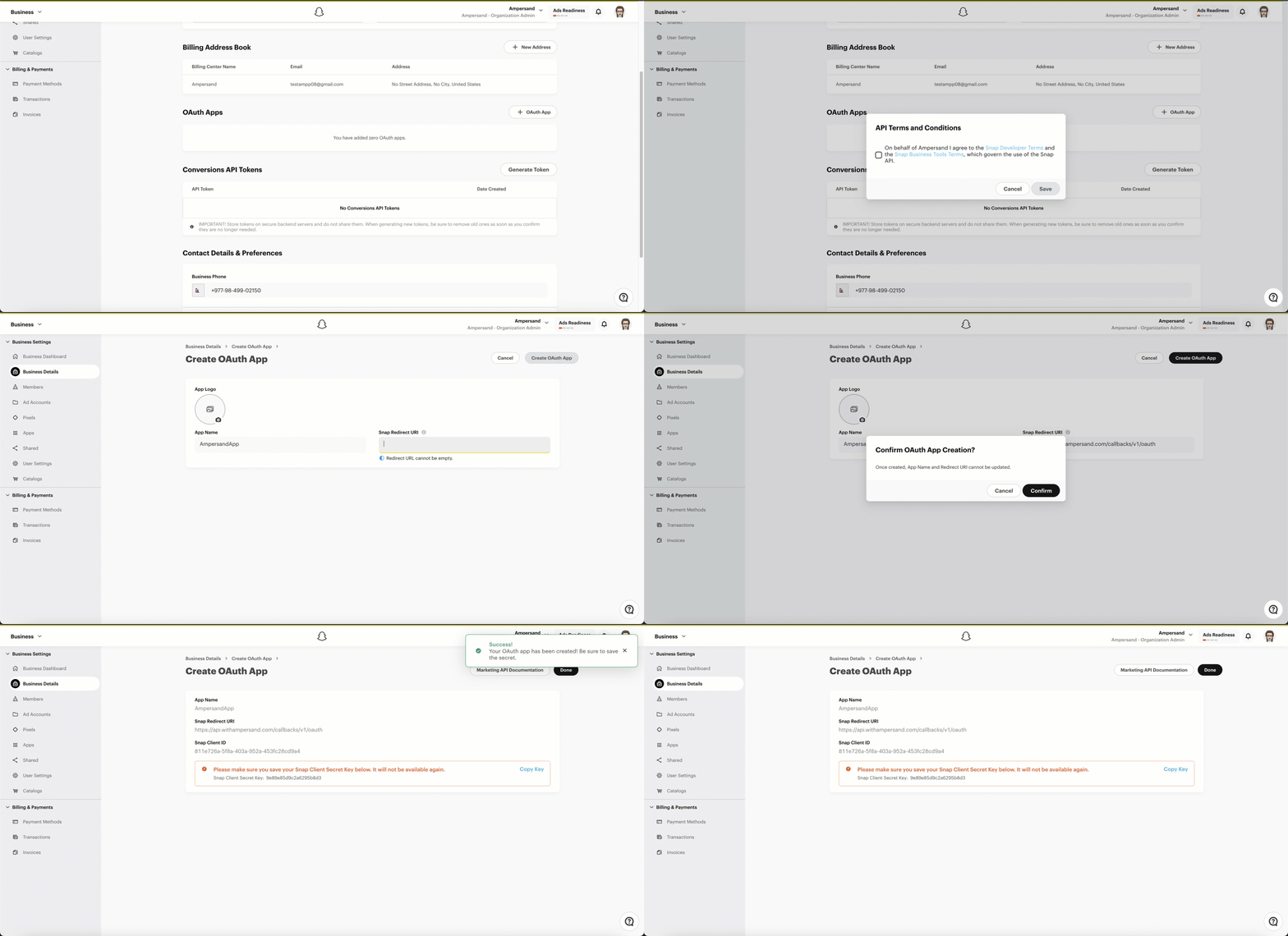 You will see the **Client ID** and **Client Secret** for your new app. Note these credentials, as you will need them to connect your app to Ampersand.
## Add Your Snapchat Ads App Info to Ampersand
1. Log in to your [Ampersand Dashboard](https://dashboard.withampersand.com).
2. Select the project where you want to create a *Snapchat Ads* integration.
3. Select **Provider Apps**.
4. Select *Snapchat Ads* from the **Provider** list.
5. Enter the previously obtained **Client ID** in the **Client ID** field and the **Client Secret** in the **Client Secret** field.
You will see the **Client ID** and **Client Secret** for your new app. Note these credentials, as you will need them to connect your app to Ampersand.
## Add Your Snapchat Ads App Info to Ampersand
1. Log in to your [Ampersand Dashboard](https://dashboard.withampersand.com).
2. Select the project where you want to create a *Snapchat Ads* integration.
3. Select **Provider Apps**.
4. Select *Snapchat Ads* from the **Provider** list.
5. Enter the previously obtained **Client ID** in the **Client ID** field and the **Client Secret** in the **Client Secret** field.
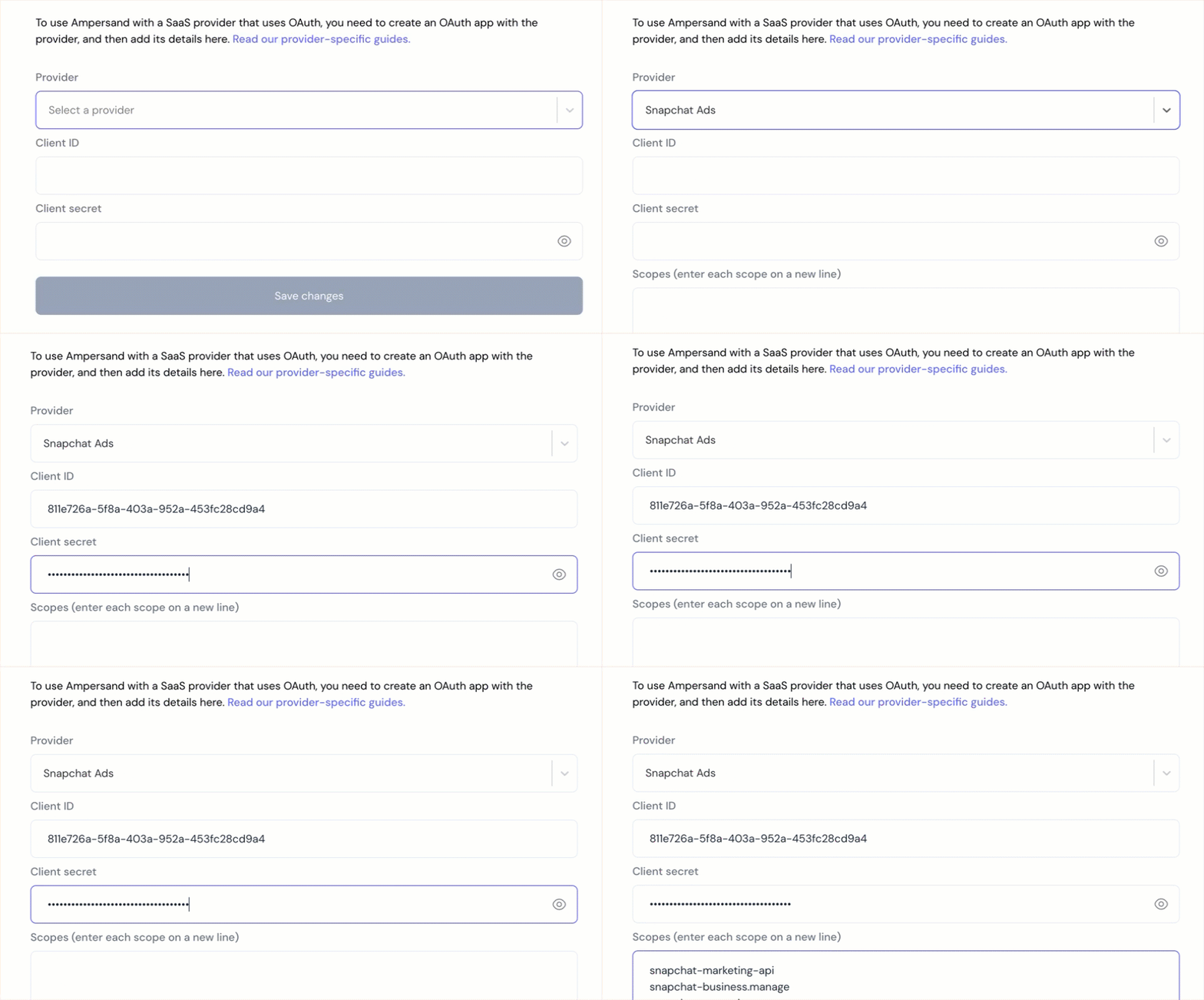 6. Enter the scopes set for your application in *Snapchat*.
7. Click **Save Changes**.
## Using the connector
To start integrating with Snapchat Ads:
* Create a manifest file using the [example](https://github.com/amp-labs/samples/blob/main/snapchatAds/amp.yaml).
* Deploy it using the [amp CLI](/cli/overview).
* If you are using Read Actions, create a [destination](/destinations).
* Embed the [InstallIntegration](/embeddable-ui-components#install-integration) UI component.
* Start using the connector!
* If your integration has [Read Actions](/read-actions), you'll start getting webhook messages.
* If your integration has [Write Actions](/write-actions), you can start making API calls to our Write API.
* If your integration has [Proxy Actions](/proxy-actions), you can start making Proxy API calls.
6. Enter the scopes set for your application in *Snapchat*.
7. Click **Save Changes**.
## Using the connector
To start integrating with Snapchat Ads:
* Create a manifest file using the [example](https://github.com/amp-labs/samples/blob/main/snapchatAds/amp.yaml).
* Deploy it using the [amp CLI](/cli/overview).
* If you are using Read Actions, create a [destination](/destinations).
* Embed the [InstallIntegration](/embeddable-ui-components#install-integration) UI component.
* Start using the connector!
* If your integration has [Read Actions](/read-actions), you'll start getting webhook messages.
* If your integration has [Write Actions](/write-actions), you can start making API calls to our Write API.
* If your integration has [Proxy Actions](/proxy-actions), you can start making Proxy API calls.