> ## Documentation Index
> Fetch the complete documentation index at: https://docs.withampersand.com/llms.txt
> Use this file to discover all available pages before exploring further.
# ServiceNow
## What's Supported
### Supported Actions
This connector supports:
* [Read Actions](/read-actions), including full historic backfill. Please note that incremental read is supported for `lead`, `contact`, `consumer`, `case`, `change` and `account` only. For all other objects, a full read of the ServiceNow instance will be done for each scheduled read.
* [Write Actions](/write-actions).
- **Proxy Actions**, using the base URL `https://{{.workspace}}.service-now.com`.
### Supported Objects
The ServiceNow connector supports reading and writing to and from the following objects:
* `lead` ([lead API](https://www.servicenow.com/docs/bundle/zurich-api-reference/page/integrate/inbound-rest/concept/lead-api.html))
* `contact` ([Contact API](https://www.servicenow.com/docs/bundle/zurich-api-reference/page/integrate/inbound-rest/concept/contact-api.html))
* `consumer` ([Consumer API](https://www.servicenow.com/docs/bundle/zurich-api-reference/page/integrate/inbound-rest/concept/consumer-api.html))
* `alarm` ([Alarm Management Open API](https://www.servicenow.com/docs/bundle/zurich-api-reference/page/integrate/inbound-rest/concept/alarm-open-api.html))
* `case` ([Case API](https://www.servicenow.com/docs/bundle/zurich-api-reference/page/integrate/inbound-rest/concept/case-api.html))
* `change` ([Change Management API](https://www.servicenow.com/docs/bundle/zurich-api-reference/page/integrate/inbound-rest/concept/change-management-api.html))
The ServiceNow connector only supports reading from the following objects:
* `account` ([Account API](https://www.servicenow.com/docs/bundle/zurich-api-reference/page/integrate/inbound-rest/concept/account-api.html))
The ServiceNow connector only supports writing to the following objects:
* `order` ([Order API](https://www.servicenow.com/docs/bundle/zurich-api-reference/page/integrate/inbound-rest/concept/order_csm-api.html))
* `email` ([Email API](https://www.servicenow.com/docs/bundle/zurich-api-reference/page/integrate/inbound-rest/concept/email-api.html))
* `entitlement` ([Entitlement API](https://www.servicenow.com/docs/bundle/zurich-api-reference/page/integrate/inbound-rest/concept/entitlement-api.html))
* `ai_prompt` ([AI Assets API](https://www.servicenow.com/docs/bundle/zurich-api-reference/page/integrate/inbound-rest/concept/ai-assets-api.html#title_ai-asset-POST-ai-prompt))
* `ai_model` ([AI Assets API](https://www.servicenow.com/docs/bundle/zurich-api-reference/page/integrate/inbound-rest/concept/ai-assets-api.html#title_ai-asset-ai-model-POST))
* `ai_dataset` ([AI Assets API](https://www.servicenow.com/docs/bundle/zurich-api-reference/page/integrate/inbound-rest/concept/ai-assets-api.html#title_ai-asset-dataset-POST-ai_dataset))
* `ai_system` ([AI Assets API](https://www.servicenow.com/docs/bundle/zurich-api-reference/page/integrate/inbound-rest/concept/ai-assets-api.html#title_ai-asset-system-POST))
### Example Integration
For an example manifest file of an ServiceNow integration, visit our [samples repo on Github](https://github.com/amp-labs/samples/blob/main/servicenow/amp.yaml).
## Before You Get Started
To integrate ServiceNow with Ampersand, you will need [a ServiceNow Instance](https://www.servicenow.com/).
Once your instance is set up, you'll need to create a ServiceNow application and obtain the following credentials:
* Client ID
* Client Secret
You will then use these credentials to connect your application to Ampersand.
### Create a ServiceNow Instance
If you don't already have a ServiceNow instance:
* Go to the [ServiceNow Developer Portal](https://developer.servicenow.com/dev.do#!/home).
* Sign up for a Personal Developer Instance (PDI).
### Creating a ServiceNow Application
Follow the steps below to create a ServiceNow application:
1. Log in to your **ServiceNow** instance.
2. Navigate to **System OAuth** > **Application Registry**.
3. Click **New** to create a new application.
4. Choose **Create an OAuth API endpoint for external clients**.
5. Fill in the required fields:
* Name: Your application name
* Client ID: Will be auto-generated
* Client Secret: Will be auto-generated
6. In the **Redirect URL** field, enter: `https://api.withampersand.com/callbacks/v1/oauth`
7. Set the appropriate access and refresh token lifespan.
8. Click **Submit**.
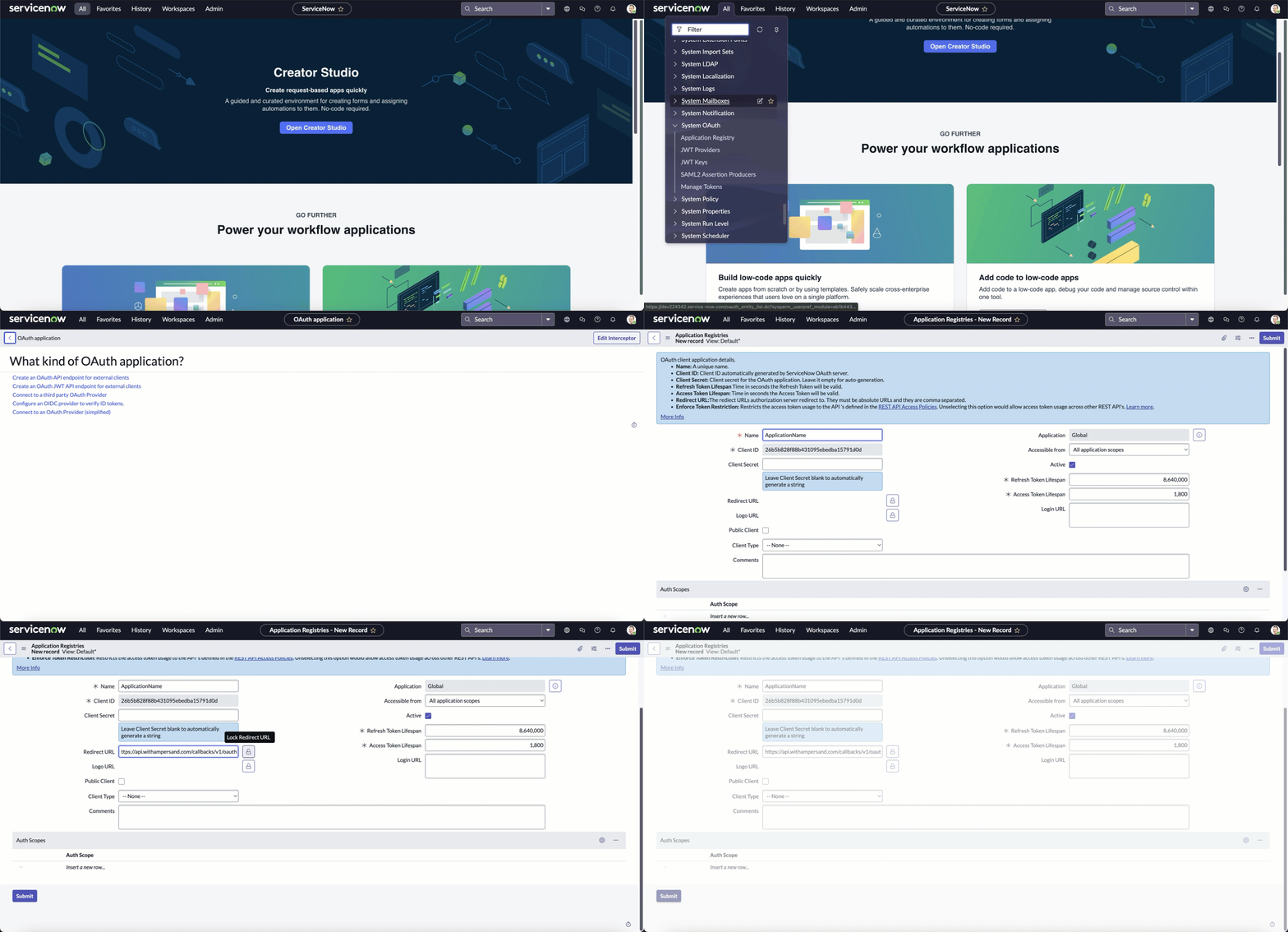 Note the **Client ID** and **Client Secret**, as you will need them to connect your app to Ampersand.
## Add Your ServiceNow App Info to Ampersand
1. Log in to your [Ampersand Dashboard](https://dashboard.withampersand.com).
2. Select the project where you want to create a *ServiceNow* integration.
3. Select **Provider Apps**.
4. Select *ServiceNow* from the **Provider** list.
5. Enter the previously obtained **Client ID** in the **Client ID** field.
6. Enter the **Client Secret** in the **Client Secret** field.
Note the **Client ID** and **Client Secret**, as you will need them to connect your app to Ampersand.
## Add Your ServiceNow App Info to Ampersand
1. Log in to your [Ampersand Dashboard](https://dashboard.withampersand.com).
2. Select the project where you want to create a *ServiceNow* integration.
3. Select **Provider Apps**.
4. Select *ServiceNow* from the **Provider** list.
5. Enter the previously obtained **Client ID** in the **Client ID** field.
6. Enter the **Client Secret** in the **Client Secret** field.
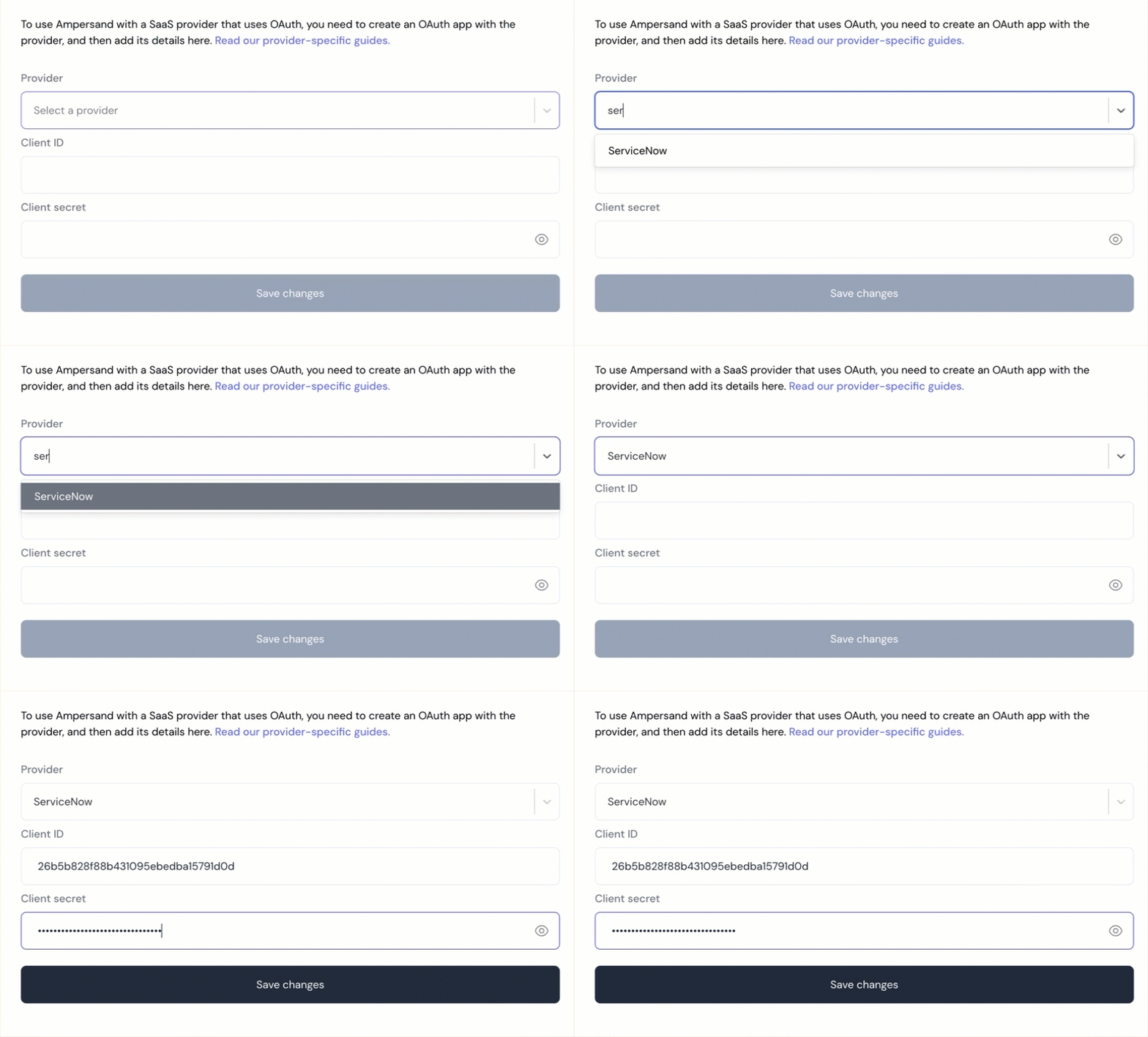 7. Click **Save Changes**.