> ## Documentation Index
> Fetch the complete documentation index at: https://docs.withampersand.com/llms.txt
> Use this file to discover all available pages before exploring further.

# Salesloft

## What's Supported

### Supported Actions

The Salesloft connector supports:

* [Read Actions](/read-actions), including full historic backfill and incremental read.
* [Write Actions](/write-actions).
* [Proxy Actions](/proxy-actions), using the base URL `https://api.salesloft.com`.
* [Subscribe Actions](/subscribe-actions).

<Note>
  If you are using Subscribe Actions, `watchFieldsAuto` is required to be set to `all` for Salesloft subscribe actions in your manifest [`amp.yaml`](https://github.com/amp-labs/samples/blob/main/salesloft/amp.yaml).
</Note>

### Example Integration

For an example manifest file of a Salesloft integration, visit our [samples repo on Github](https://github.com/amp-labs/samples/blob/main/salesloft/amp.yaml).

### Supported Objects

Refer to the [Salesloft API documentation](https://developers.salesloft.com/docs/api) for a description of each object.

export const Check = () => <span>✅</span>;
export const Cross = () => <span>🚫</span>;
export const Maybe = () => <span>🟡</span>;

<div style={{ width: '100%', overflowX: 'auto', display: 'block' }}>
  <table style={{ width: '100%', minWidth: '100%', tableLayout: 'fixed', textAlign: 'center', borderCollapse: 'collapse', display: 'table' }}>
    <thead style={{ display: 'table-header-group', width: '100%' }}>
      <tr style={{ display: 'table-row', width: '100%' }}>
        <th style={{ textAlign: 'left', width: '40%' }}>Object</th>
        <th style={{ width: '20%' }}>Read</th>
        <th style={{ width: '20%' }}>Write</th>
        <th style={{ width: '20%' }}>Subscribe</th>
      </tr>
    </thead>

    <tbody style={{ display: 'table-row-group', width: '100%' }}>
      <tr style={{ display: 'table-row' }}><td style={{ textAlign: 'left' }}><a href="https://developers.salesloft.com/docs/api/account-stages-index">Account Stages</a></td><td><Check /></td><td><Check /></td><td><Cross /></td></tr>
      <tr style={{ display: 'table-row' }}><td style={{ textAlign: 'left' }}><a href="https://developers.salesloft.com/docs/api/account-tiers-index">Account Tiers</a></td><td><Check /></td><td><Check /></td><td><Cross /></td></tr>
      <tr style={{ display: 'table-row' }}><td style={{ textAlign: 'left' }}><a href="https://developers.salesloft.com/docs/api/accounts-index">Accounts</a></td><td><Check /></td><td><Check /></td><td><Check /></td></tr>
      <tr style={{ display: 'table-row' }}><td style={{ textAlign: 'left' }}><a href="https://developers.salesloft.com/docs/api/actions-index">Actions</a></td><td><Check /></td><td><Check /></td><td><Cross /></td></tr>
      <tr style={{ display: 'table-row' }}><td style={{ textAlign: 'left' }}><a href="https://developers.salesloft.com/docs/api/bulk-jobs-index">Bulk Jobs</a></td><td><Check /></td><td><Check /></td><td><Check /></td></tr>
      <tr style={{ display: 'table-row' }}><td style={{ textAlign: 'left' }}><a href="https://developers.salesloft.com/docs/api/cadence-memberships-index">Cadence Memberships</a></td><td><Check /></td><td><Check /></td><td><Check /></td></tr>
      <tr style={{ display: 'table-row' }}><td style={{ textAlign: 'left' }}><a href="https://developers.salesloft.com/docs/api/cadences-index">Cadences</a></td><td><Check /></td><td><Check /></td><td><Check /></td></tr>
      <tr style={{ display: 'table-row' }}><td style={{ textAlign: 'left' }}><a href="https://developers.salesloft.com/docs/api/calendar-events-index">Calendar Events</a></td><td><Check /></td><td><Check /></td><td><Cross /></td></tr>
      <tr style={{ display: 'table-row' }}><td style={{ textAlign: 'left' }}><a href="https://developers.salesloft.com/docs/api/call-data-records-index">Call Data Records</a></td><td><Check /></td><td><Check /></td><td><Check /></td></tr>
      <tr style={{ display: 'table-row' }}><td style={{ textAlign: 'left' }}><a href="https://developers.salesloft.com/docs/api/call-dispositions-index">Call Dispositions</a></td><td><Check /></td><td><Check /></td><td><Cross /></td></tr>
      <tr style={{ display: 'table-row' }}><td style={{ textAlign: 'left' }}><a href="https://developers.salesloft.com/docs/api/action-details-call-instructions-index">Call Instructions</a></td><td><Check /></td><td><Check /></td><td><Cross /></td></tr>
      <tr style={{ display: 'table-row' }}><td style={{ textAlign: 'left' }}><a href="https://developers.salesloft.com/docs/api/call-sentiments-index">Call Sentiments</a></td><td><Check /></td><td><Check /></td><td><Cross /></td></tr>
      <tr style={{ display: 'table-row' }}><td style={{ textAlign: 'left' }}><a href="https://developers.salesloft.com/docs/api/phone-numbers-caller-ids-index">Caller Ids</a></td><td><Check /></td><td><Check /></td><td><Cross /></td></tr>
      <tr style={{ display: 'table-row' }}><td style={{ textAlign: 'left' }}><a href="https://developers.salesloft.com/docs/api/activities-calls-index">Calls</a></td><td><Check /></td><td><Check /></td><td><Check /></td></tr>
      <tr style={{ display: 'table-row' }}><td style={{ textAlign: 'left' }}>Conversation Recordings</td><td><Cross /></td><td><Cross /></td><td><Check /></td></tr>
      <tr style={{ display: 'table-row' }}><td style={{ textAlign: 'left' }}>Conversation Transcripts</td><td><Cross /></td><td><Cross /></td><td><Check /></td></tr>
      <tr style={{ display: 'table-row' }}><td style={{ textAlign: 'left' }}><a href="https://developers.salesloft.com/docs/api/conversations-find-all">Conversations</a></td><td><Check /></td><td><Check /></td><td><Check /></td></tr>
      <tr style={{ display: 'table-row' }}><td style={{ textAlign: 'left' }}><a href="https://developers.salesloft.com/docs/api/account-team-member-roles-index">Crm Account Team Member Roles</a></td><td><Check /></td><td><Check /></td><td><Cross /></td></tr>
      <tr style={{ display: 'table-row' }}><td style={{ textAlign: 'left' }}><a href="https://developers.salesloft.com/docs/api/crm-account-team-members-index">Crm Account Team Members</a></td><td><Check /></td><td><Check /></td><td><Cross /></td></tr>
      <tr style={{ display: 'table-row' }}><td style={{ textAlign: 'left' }}><a href="https://developers.salesloft.com/docs/api/crm-activities-index">Crm Activities</a></td><td><Check /></td><td><Check /></td><td><Cross /></td></tr>
      <tr style={{ display: 'table-row' }}><td style={{ textAlign: 'left' }}><a href="https://developers.salesloft.com/docs/api/crm-activity-fields-index">Crm Activity Fields</a></td><td><Check /></td><td><Check /></td><td><Cross /></td></tr>
      <tr style={{ display: 'table-row' }}><td style={{ textAlign: 'left' }}><a href="https://developers.salesloft.com/docs/api/crm-users-index">Crm Users</a></td><td><Check /></td><td><Check /></td><td><Cross /></td></tr>
      <tr style={{ display: 'table-row' }}><td style={{ textAlign: 'left' }}><a href="https://developers.salesloft.com/docs/api/custom-fields-index">Custom Fields</a></td><td><Check /></td><td><Check /></td><td><Cross /></td></tr>
      <tr style={{ display: 'table-row' }}><td style={{ textAlign: 'left' }}><a href="https://developers.salesloft.com/docs/api/custom-roles-index">Custom Roles</a></td><td><Check /></td><td><Check /></td><td><Cross /></td></tr>
      <tr style={{ display: 'table-row' }}><td style={{ textAlign: 'left' }}><a href="https://developers.salesloft.com/docs/api/email-template-attachments-index">Email Template Attachments</a></td><td><Check /></td><td><Check /></td><td><Cross /></td></tr>
      <tr style={{ display: 'table-row' }}><td style={{ textAlign: 'left' }}><a href="https://developers.salesloft.com/docs/api/email-templates-index">Email Templates</a></td><td><Check /></td><td><Check /></td><td><Cross /></td></tr>
      <tr style={{ display: 'table-row' }}><td style={{ textAlign: 'left' }}><a href="https://developers.salesloft.com/docs/api/activities-emails-index">Emails</a></td><td><Check /></td><td><Check /></td><td><Check /></td></tr>
      <tr style={{ display: 'table-row' }}><td style={{ textAlign: 'left' }}><a href="https://developers.salesloft.com/docs/api/groups-index">Groups</a></td><td><Check /></td><td><Check /></td><td><Cross /></td></tr>
      <tr style={{ display: 'table-row' }}><td style={{ textAlign: 'left' }}><a href="https://developers.salesloft.com/docs/api/imports-index">Imports</a></td><td><Check /></td><td><Check /></td><td><Cross /></td></tr>
      <tr style={{ display: 'table-row' }}><td style={{ textAlign: 'left' }}>Links</td><td><Cross /></td><td><Cross /></td><td><Check /></td></tr>
      <tr style={{ display: 'table-row' }}><td style={{ textAlign: 'left' }}><a href="https://developers.salesloft.com/docs/api/meetings-index">Meetings</a></td><td><Check /></td><td><Check /></td><td><Check /></td></tr>
      <tr style={{ display: 'table-row' }}><td style={{ textAlign: 'left' }}><a href="https://developers.salesloft.com/docs/api/notes-index">Notes</a></td><td><Check /></td><td><Check /></td><td><Check /></td></tr>
      <tr style={{ display: 'table-row' }}><td style={{ textAlign: 'left' }}><a href="https://developers.salesloft.com/docs/api/opportunities-index">Opportunities</a></td><td><Check /></td><td><Check /></td><td><Cross /></td></tr>
      <tr style={{ display: 'table-row' }}><td style={{ textAlign: 'left' }}><a href="https://developers.salesloft.com/docs/api/opportunity-people-index">Opportunity And Person Associations</a></td><td><Check /></td><td><Check /></td><td><Cross /></td></tr>
      <tr style={{ display: 'table-row' }}><td style={{ textAlign: 'left' }}><a href="https://developers.salesloft.com/docs/api/opportunity-stages-index">Opportunity Stages</a></td><td><Check /></td><td><Check /></td><td><Cross /></td></tr>
      <tr style={{ display: 'table-row' }}><td style={{ textAlign: 'left' }}><a href="https://developers.salesloft.com/docs/api/activity-histories-index">Past Activities</a></td><td><Check /></td><td><Check /></td><td><Cross /></td></tr>
      <tr style={{ display: 'table-row' }}><td style={{ textAlign: 'left' }}><a href="https://developers.salesloft.com/docs/api/pending-emails-index">Pending Emails</a></td><td><Check /></td><td><Check /></td><td><Cross /></td></tr>
      <tr style={{ display: 'table-row' }}><td style={{ textAlign: 'left' }}><a href="https://developers.salesloft.com/docs/api/people-index">People</a></td><td><Check /></td><td><Check /></td><td><Check /></td></tr>
      <tr style={{ display: 'table-row' }}><td style={{ textAlign: 'left' }}><a href="https://developers.salesloft.com/docs/api/person-stages-index">Person Stages</a></td><td><Check /></td><td><Check /></td><td><Cross /></td></tr>
      <tr style={{ display: 'table-row' }}><td style={{ textAlign: 'left' }}><a href="https://developers.salesloft.com/docs/api/phone-number-assignments-index">Phone Number Assignments</a></td><td><Check /></td><td><Check /></td><td><Cross /></td></tr>
      <tr style={{ display: 'table-row' }}><td style={{ textAlign: 'left' }}><a href="https://developers.salesloft.com/docs/api/integrations-signals-registrations-plays-index">Play Registrations</a></td><td><Check /></td><td><Check /></td><td><Cross /></td></tr>
      <tr style={{ display: 'table-row' }}><td style={{ textAlign: 'left' }}><a href="https://developers.salesloft.com/docs/api/data-control-requests-index">Requests</a></td><td><Check /></td><td><Check /></td><td><Cross /></td></tr>
      <tr style={{ display: 'table-row' }}><td style={{ textAlign: 'left' }}><a href="https://developers.salesloft.com/docs/api/saved-list-views-index">Saved List Views</a></td><td><Check /></td><td><Check /></td><td><Cross /></td></tr>
      <tr style={{ display: 'table-row' }}><td style={{ textAlign: 'left' }}><a href="https://developers.salesloft.com/docs/api/integrations-signals-registrations-index">Signal Registrations</a></td><td><Check /></td><td><Check /></td><td><Cross /></td></tr>
      <tr style={{ display: 'table-row' }}><td style={{ textAlign: 'left' }}><a href="https://developers.salesloft.com/docs/api/steps-index">Steps</a></td><td><Check /></td><td><Check /></td><td><Check /></td></tr>
      <tr style={{ display: 'table-row' }}><td style={{ textAlign: 'left' }}><a href="https://developers.salesloft.com/docs/api/successes-index">Successes</a></td><td><Check /></td><td><Check /></td><td><Check /></td></tr>
      <tr style={{ display: 'table-row' }}><td style={{ textAlign: 'left' }}><a href="https://developers.salesloft.com/docs/api/tasks-index">Tasks</a></td><td><Check /></td><td><Check /></td><td><Check /></td></tr>
      <tr style={{ display: 'table-row' }}><td style={{ textAlign: 'left' }}><a href="https://developers.salesloft.com/docs/api/external-configurations-index">Team Configurations</a></td><td><Check /></td><td><Check /></td><td><Cross /></td></tr>
      <tr style={{ display: 'table-row' }}><td style={{ textAlign: 'left' }}><a href="https://developers.salesloft.com/docs/api/external-mappings-index">Team Mappings</a></td><td><Check /></td><td><Check /></td><td><Cross /></td></tr>
      <tr style={{ display: 'table-row' }}><td style={{ textAlign: 'left' }}><a href="https://developers.salesloft.com/docs/api/tags-index">Team Tags</a></td><td><Check /></td><td><Check /></td><td><Cross /></td></tr>
      <tr style={{ display: 'table-row' }}><td style={{ textAlign: 'left' }}><a href="https://developers.salesloft.com/docs/api/team-template-attachments-index">Team Template Attachments</a></td><td><Check /></td><td><Check /></td><td><Cross /></td></tr>
      <tr style={{ display: 'table-row' }}><td style={{ textAlign: 'left' }}><a href="https://developers.salesloft.com/docs/api/team-templates-index">Team Templates</a></td><td><Check /></td><td><Check /></td><td><Cross /></td></tr>
      <tr style={{ display: 'table-row' }}><td style={{ textAlign: 'left' }}><a href="https://developers.salesloft.com/docs/api/conversations-transcriptions-find-all-transcripts">Transcriptions</a></td><td><Check /></td><td><Check /></td><td><Cross /></td></tr>
      <tr style={{ display: 'table-row' }}><td style={{ textAlign: 'left' }}><a href="https://developers.salesloft.com/docs/api/users-index">Users</a></td><td><Check /></td><td><Check /></td><td><Check /></td></tr>
      <tr style={{ display: 'table-row' }}><td style={{ textAlign: 'left' }}><a href="https://developers.salesloft.com/docs/api/webhook-subscriptions-index">Webhook Subscriptions</a></td><td><Check /></td><td><Check /></td><td><Cross /></td></tr>
    </tbody>
  </table>
</div>

## Before You Get Started

Before creating a **Salesloft** app, you need to sign up for a *Salesloft Developer License*. This license grants you the access and permissions needed to set up your development environment and manage your Salesloft applications.

To get started, simply contact the Salesloft team at [partners@salesloft.com](mailto:partners@salesloft.com.) and get your Developer License.

After your account is set up, you will need to create a Salesloft app and acquire the following credentials from your Salesloft app:

* Client ID
* Client Secret

You will then use these credentials to connect your application to Ampersand.

### Creating a Salesloft App

Once your Salesloft account is ready, you need to create a Salesloft application.

1. Log in to your **Salesloft** account.

2. Navigate to **Salesloft OAuth Applications**. You can do this by selecting the OAuth Applications section from your Salesloft developer dashboard.

3. If this is your first app, click **Create your first app**. Click **Create New** under OAuth applications if you have already created an app before.

4. Enter the following details for the new app:
   * **Name**: The name of your product
   * **Redirect URI**: `https://api.withampersand.com/callbacks/v1/oauth`
   * **Application Type**: select "Yes, this will be a public application"

5. Once the app is created, note down the **Application ID** and **Secret**. You will need these to connect your app with Ampersand.

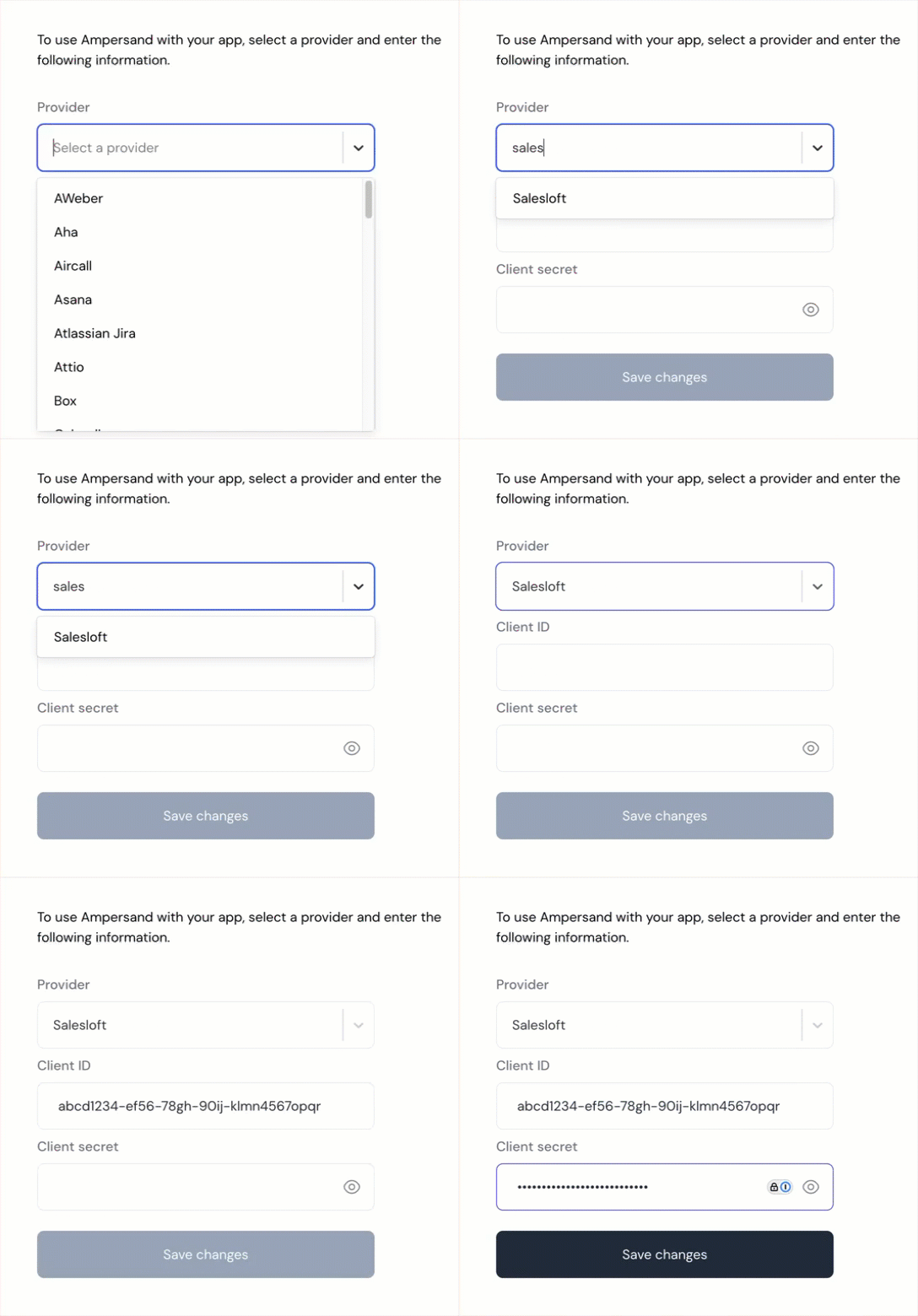
## Add Salesloft App Details in Ampersand

1. Log in to your [Ampersand Dashboard](https://dashboard.withampersand.com).

2. Select the project where you want to add the Salesloft App.

3. Select **Provider apps**.

4. Select *Salesloft* from the **Provider** list.

5. Enter the previously obtained *Application ID* in the **Client ID** field, the *Secret* in the **Client Secret** field, and the requested scopes in the **Permissions** field. See [Salesloft API Scopes](https://developers.salesloft.com/docs/platform/api-basics/scopes/) for more details on available scopes. If you are using Subscribe Actions, you will need additional scopes for webhooks; see [Salesloft Webhook Event Types](https://developers.salesloft.com/docs/platform/webhooks/event-types/) for more information.

   <img src="https://mintcdn.com/ampersand-24eb5c1a/i4a56x-Fmj6u7jdE/images/provider-guides/afc4d83-salesloft.gif?s=929d3da7ff462d4f24120fdb310ce341" alt="Add Salesloft App Details" width="544" height="520" data-path="images/provider-guides/afc4d83-salesloft.gif" />

6. Click **Save Changes**.

## Using the connector

To start integrating with Salesloft:

* Create a manifest file like the [example](https://github.com/amp-labs/samples/blob/main/salesloft/amp.yaml).
* Deploy it using the [amp CLI](/cli/overview).
* If you are using Read Actions or Subscribe Actions, create a [destination](/destinations).
* Embed the [InstallIntegration](/embeddable-ui-components#install-integration) UI component.
* Start using the connector!
  * If your integration has [Read Actions](/read-actions) or [Subscribe Actions](/subscribe-actions), you'll start getting webhook messages.
  * If your integration has [Write Actions](/write-actions), you can start making API calls to our Write API.
  * If your integration has [Proxy Actions](/proxy-actions), you can start making Proxy API calls.