> ## Documentation Index
> Fetch the complete documentation index at: https://docs.withampersand.com/llms.txt
> Use this file to discover all available pages before exploring further.
# RingCentral
## What's Supported
### Supported Actions
This connector supports:
* [Read Actions](/read-actions), including full historic backfill. Please note that incremental read is supported for `webinars`, `webinar/recordings`,`webinar/company/recordings`, `call-log`,`call-log-sync`,`message-sync` ,`message-store`, `a2p-sms/batches`, and `a2p-sms/messages` only. For all other objects, a full read of the RingCentral instance will be done for each scheduled read.
* [Write Actions](/write-actions).
* [Proxy Actions](/proxy-actions), using the base URL `https://platform.ringcentral.com`.
### Supported Objects
The RingCentral connector supports writing to and reading from the following objects:
* [caller-blocking/phone-numbers](https://developers.ringcentral.com/api-reference/Call-Blocking/listBlockedAllowedNumbers)
* [forwarding-number](https://developers.ringcentral.com/api-reference/Call-Forwarding/listForwardingNumbers)
* [answering-rule](https://developers.ringcentral.com/api-reference/Call-Handling-Rules/listAnsweringRules)
* [company-answering-rule](https://developers.ringcentral.com/api-reference/Call-Handling-Rules/listCompanyAnsweringRules)
* [comm-handling/states](https://developers.ringcentral.com/api-reference/States/listCicStates)
* [comm-handling/voice/state-rules](https://developers.ringcentral.com/api-reference/State-based-Rules/listVoiceStateBasedRules)
* [comm-handling/voice/interaction-rules](https://developers.ringcentral.com/api-reference/Interaction-Rules/listVoiceInteractionRules)
* [comm-handling/voice/forwarding-targets](https://developers.ringcentral.com/api-reference/Forwarding-Targets/listExtensionsUsingForwardingDeviceTarget)
* [call-flip-numbers](https://developers.ringcentral.com/api-reference/Call-Flip/readCallFlipSettings)
* [call-monitoring-groups](https://developers.ringcentral.com/api-reference/Call-Monitoring-Groups/listCallMonitoringGroups)
* [call-queues](https://developers.ringcentral.com/api-reference/Call-Queues/listCallQueues)
* [dictionary/greeting](https://developers.ringcentral.com/api-reference/Greetings/listStandardGreetings)
* [custom-greetings](https://developers.ringcentral.com/api-reference/Greetings/createCustomUserGreeting)
* [ivr-prompts](https://developers.ringcentral.com/api-reference/IVR/listIvrPrompts)
* [ivr-menus](https://developers.ringcentral.com/api-reference/IVR/readIVRMenuList)
* [message-store](https://developers.ringcentral.com/api-reference/Message-Store/listMessages)
* [a2p-sms/batches](https://developers.ringcentral.com/api-reference/High-Volume-SMS/listA2PBatches)
* [message-store-templates](https://developers.ringcentral.com/api-reference/SMS-Templates/listCompanyMessageTemplates)
* [user-message-store-templates](https://developers.ringcentral.com/api-reference/SMS-Templates/createUserMessageTemplate)
* [sms/consents](https://developers.ringcentral.com/api-reference/SMS-Consents/listSmsConsentRecords)
* [events](https://developers.ringcentral.com/api-reference/Calendar-Events/readGlipEventsNew)
* [conversations](https://developers.ringcentral.com/api-reference/Conversations/createGlipConversationNew)
* [data-export](https://developers.ringcentral.com/api-reference/Compliance-Exports/listDataExportTasksNew)
* [webhooks](https://developers.ringcentral.com/api-reference/Incoming-Webhooks/listGlipGroupWebhooksNew)
* [teams](https://developers.ringcentral.com/api-reference/Teams/listGlipTeamsNew)
* [webinars](https://developers.ringcentral.com/api-reference/Webinars-and-Sessions/rcwConfigCreateWebinar)
* [webinar/recordings](https://developers.ringcentral.com/api-reference/Historical-Recordings/rcwHistoryListRecordings)
* [webinar/company/recordings](https://developers.ringcentral.com/api-reference/Historical-Recordings/rcwHistoryAdminListRecordings)
* [webinar/subscriptions](https://developers.ringcentral.com/api-reference/Webinar-Subscriptions/rcwN11sListSubscriptions)
* [custom-fields](https://developers.ringcentral.com/api-reference/Custom-Fields/listCustomFields)
* [sites](https://developers.ringcentral.com/api-reference/Multi-Site/listSites)
* [accounts/phone-numbers](https://developers.ringcentral.com/api-reference/Phone-Numbers/listAccountPhoneNumbersV2)
* [account/presence](https://developers.ringcentral.com/api-reference/Presence/readAccountPresence)
* [call-queue-presence](https://developers.ringcentral.com/api-reference/Presence/readExtensionCallQueuePresence)
* [emergency-locations](https://developers.ringcentral.com/api-reference/Automatic-Location-Updates/listEmergencyLocations)
* [user/emergency-locations](https://developers.ringcentral.com/api-reference/Automatic-Location-Updates/getExtensionEmergencyLocations)
* [users](https://developers.ringcentral.com/api-reference/Automatic-Location-Updates/listAutomaticLocationUpdatesUsers)
* [wireless-points](https://developers.ringcentral.com/api-reference/Automatic-Location-Updates/listWirelessPoints)
* [networks](https://developers.ringcentral.com/api-reference/Automatic-Location-Updates/listNetworks)
* [devices](https://developers.ringcentral.com/api-reference/Automatic-Location-Updates/listDevicesAutomaticLocationUpdates)
* [switches](https://developers.ringcentral.com/api-reference/Automatic-Location-Updates/listAccountSwitches)
* [extension/devices](https://developers.ringcentral.com/api-reference/Devices/listExtensionDevices)
* [extensions](https://developers.ringcentral.com/api-reference/Extensions/listExtensions)
* [scim/users](https://developers.ringcentral.com/api-reference/SCIM/scimSearchViaGet2)
* [direct-routing/users](https://developers.ringcentral.com/api-reference/MS-Teams-Direct-Routing/listTeamsUsers)
* [contacts](https://developers.ringcentral.com/api-reference/External-Contacts/listContacts)
* [favorite/contacts](https://developers.ringcentral.com/api-reference/External-Contacts/listFavoriteContacts)
* [user/assigned-role](https://developers.ringcentral.com/api-reference/Role-Management/listUserAssignedRoles)
* [company/user-role](https://developers.ringcentral.com/api-reference/Role-Management/listUserRoles)
* [assignable-roles](https://developers.ringcentral.com/api-reference/Role-Management/listOfAvailableForAssigningRoles)
* [administered-sites](https://developers.ringcentral.com/api-reference/Site-Administration/listAdministeredSites)
* [subscriptions](https://developers.ringcentral.com/api-reference/Subscriptions/listSubscriptions)
The RingCentral connector supports reading only from the following objects:
* [call-log](https://developers.ringcentral.com/api-reference/Call-Log/readUserCallLog)
* [active-calls](https://developers.ringcentral.com/api-reference/Call-Log/listCompanyActiveCalls)
* [company-call-log](https://developers.ringcentral.com/api-reference/Call-Log/readCompanyCallLog)
* [company-active-calls](https://developers.ringcentral.com/api-reference/Call-Log/listCompanyActiveCalls)
* [call-log-sync](https://developers.ringcentral.com/api-reference/Call-Log/syncUserCallLog)
* [company-call-log-sync](https://developers.ringcentral.com/api-reference/Call-Log/syncAccountCallLog)
* [call-log-extract-sync](https://developers.ringcentral.com/api-reference/Call-Log/extractSyncAccountCallLog)
* [fax-cover-page](https://developers.ringcentral.com/api-reference/Fax/listFaxCoverPages)
* [message-sync](https://developers.ringcentral.com/api-reference/Message-Store/syncMessages)
* [a2p-sms/messages](https://developers.ringcentral.com/api-reference/High-Volume-SMS/listA2PSMS)
* [sms-registration-brands](https://developers.ringcentral.com/api-reference/SMS-Brands-Campaigns/listAllTcrBrands)
* [chats](https://developers.ringcentral.com/api-reference/Chats/listGlipChatsNew)
* [recent/chats](https://developers.ringcentral.com/api-reference/Chats/listRecentChatsNew)
* [favorites](https://developers.ringcentral.com/api-reference/Chats/listFavoriteChatsNew)
* [delegators](https://developers.ringcentral.com/api-reference/Delegation-Management/rcvListDelegators)
* [meetings](https://developers.ringcentral.com/api-reference/Meetings-History/listAccountMeetings)
* [history/meetings](https://developers.ringcentral.com/api-reference/Meetings-History/listVideoMeetings)
* [recordings](https://developers.ringcentral.com/api-reference/Meeting-Recordings/getAccountRecordings)
* [extension-recordings](https://developers.ringcentral.com/api-reference/Meeting-Recordings/getExtensionRecordings)
* [configuration/sessions](https://developers.ringcentral.com/api-reference/Webinars-and-Sessions/rcwConfigListAllSessions)
* [company/sessions](https://developers.ringcentral.com/api-reference/Webinars-and-Sessions/rcwConfigListAllCompanySessions)
* [extension/phone-number](https://developers.ringcentral.com/api-reference/Phone-Numbers/listExtensionPhoneNumbers)
* [company/phone-number](https://developers.ringcentral.com/api-reference/Phone-Numbers/listAccountPhoneNumbers)
* [languages](https://developers.ringcentral.com/api-reference/Regional-Settings/listLanguages)
* [countries](https://developers.ringcentral.com/api-reference/Regional-Settings/listCountries)
* [locations](https://developers.ringcentral.com/api-reference/Regional-Settings/listLocations)
* [states](https://developers.ringcentral.com/api-reference/Regional-Settings/listStates)
* [timezones](https://developers.ringcentral.com/api-reference/Regional-Settings/listTimezones)
* [permissions](https://developers.ringcentral.com/api-reference/User-Permissions/listPermissions)
* [permission-category](https://developers.ringcentral.com/api-reference/User-Permissions/listPermissionCategories)
* [extension/grant](https://developers.ringcentral.com/api-reference/User-Settings/listExtensionGrants)
* [user/features](https://developers.ringcentral.com/api-reference/User-Settings/readExtensionFeatures)
* [user/templates](https://developers.ringcentral.com/api-reference/Extensions/listUserTemplates)
* [resoureTpes](https://developers.ringcentral.com/api-reference/SCIM/scimListResourceTypes2)
* [schemas](https://developers.ringcentral.com/api-reference/SCIM/scimListSchemas2)
* [directory/entries](https://developers.ringcentral.com/api-reference/Internal-Contacts/listDirectoryEntries)
* [directory/federation](https://developers.ringcentral.com/api-reference/Internal-Contacts/readDirectoryFederation)
* [company/assigned-role](https://developers.ringcentral.com/api-reference/Role-Management/listAssignedRoles)
* [user-role](https://developers.ringcentral.com/api-reference/Role-Management/listStandardUserRole)
The RingCentral connector supports writing only to the following objects:
* [telephony/call-out](https://developers.ringcentral.com/api-reference/Call-Control/createCallOutCallSession)
* [client-info/sip-provision](https://developers.ringcentral.com/api-reference/Device-SIP-Registration/createSIPRegistration)
* [ring-out](https://developers.ringcentral.com/api-reference/RingOut/createRingOutCall)
* [fax](https://developers.ringcentral.com/api-reference/Fax/createFaxMessage)
* [message-store-report](https://developers.ringcentral.com/api-reference/Message-Exports/createMessageStoreReport)
* [company-pager](https://developers.ringcentral.com/api-reference/Pager-Messages/createInternalTextMessage)
* [sms](https://developers.ringcentral.com/api-reference/SMS/createSMSMessage)
* [mms](https://developers.ringcentral.com/api-reference/SMS/createMMS)
* [adaptive-cards](https://developers.ringcentral.com/api-reference/Adaptive-Cards/updateGlipAdaptiveCardNew)
* [bridges](https://developers.ringcentral.com/api-reference/Bridge-Management/createBridge)
### Example integration
For an example manifest file of a RingCentral integration, visit our [samples repo on Github](https://github.com/amp-labs/samples/blob/main/ringcentral/amp.yaml).
## Before You Get Started
To connect RingCentral with Ampersand, you will need [a RingCentral Developer Account](https://developers.ringcentral.com/sign-up).
Once your account is created, you'll need to create an app in RingCentral, configure the Ampersand redirect URI within the app, and obtain the following credentials from your app:
* Client ID
* Client Secret
* Scopes
You will then use these credentials to connect your application to Ampersand.
### Create a RingCentral Account
Here's how you can sign up for a RingCentral account:
* Go to the [RingCentral Sign Up page](https://developers.ringcentral.com/sign-up).
* Choose your preferred environment and sign up using your preferred method and verify your email.
### Creating a RingCentral App
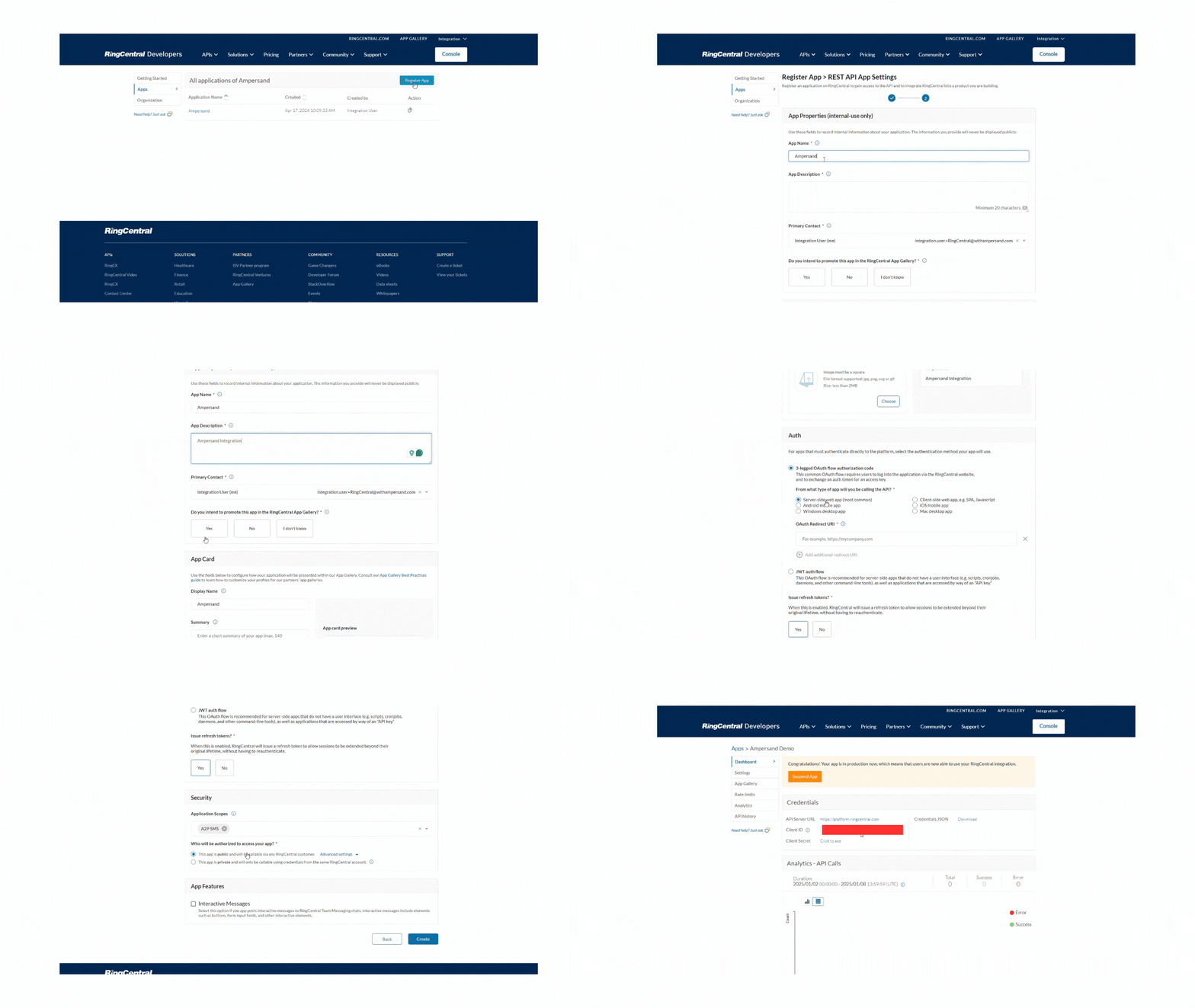
Follow the steps below to create a RingCentral app and add the Ampersand redirect URL.
1. Log in to your [RingCentral Developer](https://developers.ringcentral.com/login) account.
2. Click **Console** and then select **Register App** in the **Apps** section.
3. Select the **App Type**: Rest API App and click **Next** Button.
4. Enter the **App Name**, **App Description**.
5. Choose **3-legged OAuth flow authorization code** in the Auth section.
6. Enter callback URI as **[https://api.withampersand.com/callbacks/v1/oauth](https://api.withampersand.com/callbacks/v1/oauth)** in the **OAuth Redirect URI** field.
7. For the **Issue refresh tokens?** Select **Yes** to enable refresh token issuance or **No** to disable it, allowing users to maintain their session without re-authentication.
8. For the **Application Scopes** in the **Security** section, select the required scopes.
9. For the question **Who will be authorized to access your app?**, choose 'Public' to make the app accessible to all RingCentral customers or 'Private' to restrict access to the same RingCentral account.
10. Click **Create**.
 ## Add Your RingCentral App Info to Ampersand
1. Log in to your [Ampersand Dashboard](https://dashboard.withampersand.com).
2. Select the project where you want to create a RingCentral integration.
## Add Your RingCentral App Info to Ampersand
1. Log in to your [Ampersand Dashboard](https://dashboard.withampersand.com).
2. Select the project where you want to create a RingCentral integration.
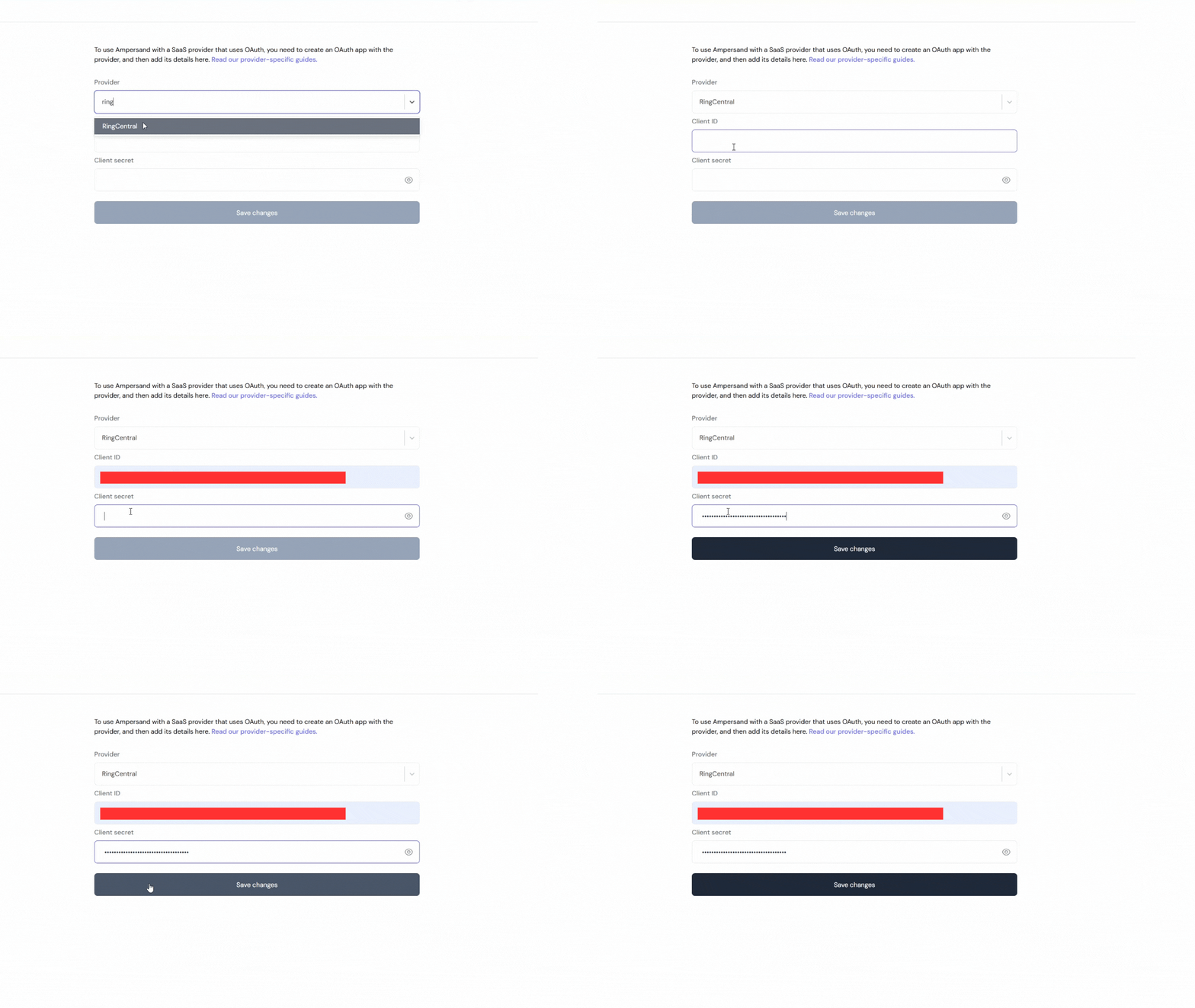
 3. Select **Provider Apps**.
4. Select RingCentral from the **Provider** list.
5. Enter the previously obtained Client ID in the **Client ID** field and the Client Secret in the **Client Secret** field.
3. Select **Provider Apps**.
4. Select RingCentral from the **Provider** list.
5. Enter the previously obtained Client ID in the **Client ID** field and the Client Secret in the **Client Secret** field.
 ## Using the connector
To start integrating with RingCentral:
* Create a manifest file like the example above.
* Deploy it using the [amp CLI](/cli/overview).
* Embed the [InstallIntegration](/embeddable-ui-components#install-integration) UI component. The UI component will prompt the customer for an API key.
* Start making [Proxy Calls](/proxy-actions), and Ampersand will automatically attach the API key supplied by the customer. Please note that this connector's base URL is `https://platform.ringcentral.com`.
## Using the connector
To start integrating with RingCentral:
* Create a manifest file like the example above.
* Deploy it using the [amp CLI](/cli/overview).
* Embed the [InstallIntegration](/embeddable-ui-components#install-integration) UI component. The UI component will prompt the customer for an API key.
* Start making [Proxy Calls](/proxy-actions), and Ampersand will automatically attach the API key supplied by the customer. Please note that this connector's base URL is `https://platform.ringcentral.com`.