> ## Documentation Index
> Fetch the complete documentation index at: https://docs.withampersand.com/llms.txt
> Use this file to discover all available pages before exploring further.
# QuickBooks
## What's Supported
QuickBooks is available as two connectors:
| Environment | Provider name | Base URL |
| ----------- | ------------------- | ------------------------------------------- |
| Production | `quickbooks` | `https://quickbooks.api.intuit.com` |
| Sandbox | `quickbooksSandbox` | `https://sandbox-quickbooks.api.intuit.com` |
Both connectors share the same supported actions, objects, and OAuth2 configuration — the only difference is the base URL used for API calls.
Use the **sandbox connector** during development and testing with your [QuickBooks sandbox company](https://developer.intuit.com/app/developer/qbo/docs/develop/sandboxes), and switch to the **production connector** when going live.
### Supported actions
* [Read Actions](/read-actions), including full historic backfill and incremental reads.
* [Write Actions](/write-actions).
* [Proxy Actions](/proxy-actions), using the base URL `https://quickbooks.api.intuit.com` (production) or `https://sandbox-quickbooks.api.intuit.com` (sandbox).
### Supported Objects
The QuickBooks connector supports reading from and writing to the following objects:
* [account](https://developer.intuit.com/app/developer/qbo/docs/api/accounting/all-entities/account#query-an-account)
* [attachable](https://developer.intuit.com/app/developer/qbo/docs/api/accounting/all-entities/attachable#query-an-attachable)
* [bill](https://developer.intuit.com/app/developer/qbo/docs/api/accounting/all-entities/bill#query-a-bill)
* [billPayment](https://developer.intuit.com/app/developer/qbo/docs/api/accounting/all-entities/billpayment#query-a-billpayment)
* [budget](https://developer.intuit.com/app/developer/qbo/docs/api/accounting/all-entities/budget#query-a-budget)
* [class](https://developer.intuit.com/app/developer/qbo/docs/api/accounting/all-entities/class#query-a-class)
* [companyCurrency](https://developer.intuit.com/app/developer/qbo/docs/api/accounting/all-entities/companycurrency#query-a-companycurrency)
* [creditMemo](https://developer.intuit.com/app/developer/qbo/docs/api/accounting/all-entities/creditmemo#query-a-credit-memo)
* [creditCardPayment](https://developer.intuit.com/app/developer/qbo/docs/api/accounting/all-entities/creditcardpayment#query-a-creditcardpayment)
* [customer](https://developer.intuit.com/app/developer/qbo/docs/api/accounting/all-entities/customer#query-a-customer)
* [department](https://developer.intuit.com/app/developer/qbo/docs/api/accounting/all-entities/department#query-a-department)
* [deposit](https://developer.intuit.com/app/developer/qbo/docs/api/accounting/all-entities/deposit#query-a-deposit)
* [employee](https://developer.intuit.com/app/developer/qbo/docs/api/accounting/all-entities/employee#query-an-employee)
* [estimate](https://developer.intuit.com/app/developer/qbo/docs/api/accounting/all-entities/estimate#query-an-estimate)
* [invoice](https://developer.intuit.com/app/developer/qbo/docs/api/accounting/all-entities/invoice#query-an-invoice)
* [item](https://developer.intuit.com/app/developer/qbo/docs/api/accounting/all-entities/item#query-an-item)
* [journalCode](https://developer.intuit.com/app/developer/qbo/docs/api/accounting/all-entities/journalcode#query-a-journalcode)
* [journalEntry](https://developer.intuit.com/app/developer/qbo/docs/api/accounting/all-entities/journalentry#query-a-journalentry)
* [payment](https://developer.intuit.com/app/developer/qbo/docs/api/accounting/all-entities/payment#query-a-payment)
* [paymentMethod](https://developer.intuit.com/app/developer/qbo/docs/api/accounting/all-entities/paymentmethod#query-a-paymentmethod)
* [purchase](https://developer.intuit.com/app/developer/qbo/docs/api/accounting/all-entities/purchase#query-a-purchase)
* [purchaseOrder](https://developer.intuit.com/app/developer/qbo/docs/api/accounting/all-entities/purchaseorder#query-a-purchaseorder)
* [recurringTransaction](https://developer.intuit.com/app/developer/qbo/docs/api/accounting/all-entities/recurringtransaction#query-a-recurring-transaction)
* [refundReceipt](https://developer.intuit.com/app/developer/qbo/docs/api/accounting/all-entities/refundreceipt#query-a-refundreceipt)
* [salesReceipt](https://developer.intuit.com/app/developer/qbo/docs/api/accounting/all-entities/salesreceipt#query-a-salesreceipt)
* [taxAgency](https://developer.intuit.com/app/developer/qbo/docs/api/accounting/all-entities/taxagency#query-a-taxagency)
* [term](https://developer.intuit.com/app/developer/qbo/docs/api/accounting/all-entities/term#query-a-term)
* [timeActivity](https://developer.intuit.com/app/developer/qbo/docs/api/accounting/all-entities/timeactivity#query-a-timeactivity-object)
* [transfer](https://developer.intuit.com/app/developer/qbo/docs/api/accounting/all-entities/transfer#query-a-transfer)
* [vendor](https://developer.intuit.com/app/developer/qbo/docs/api/accounting/all-entities/vendor#query-a-vendor)
* [vendorCredit](https://developer.intuit.com/app/developer/qbo/docs/api/accounting/all-entities/vendorcredit#query-a-vendorcredit)
The QuickBooks connector supports reading from the following objects (read-only):
* [customerType](https://developer.intuit.com/app/developer/qbo/docs/api/accounting/all-entities/customertype#query-a-customertype)
* [exchangeRate](https://developer.intuit.com/app/developer/qbo/docs/api/accounting/all-entities/exchangerate#query-exchangerate-objects)
* [reimburseCharge](https://developer.intuit.com/app/developer/qbo/docs/api/accounting/all-entities/reimbursecharge#query-a-reimbursecharge)
* [taxCode](https://developer.intuit.com/app/developer/qbo/docs/api/accounting/all-entities/taxcode#query-a-taxcode)
* [taxPayment](https://developer.intuit.com/app/developer/qbo/docs/api/accounting/all-entities/taxpayment#query-taxpayment)
* [taxRate](https://developer.intuit.com/app/developer/qbo/docs/api/accounting/all-entities/taxrate#query-a-taxrate)
The QuickBooks connector supports writing to the following objects (write-only):
* [inventoryadjustment](https://developer.intuit.com/app/developer/qbo/docs/api/accounting/all-entities/inventoryadjustment#create-an-inventory-adjustment)
* [taxservice/taxcode](https://developer.intuit.com/app/developer/qbo/docs/api/accounting/all-entities/taxservice#create-a-taxservice)
### Example Integration
For example manifest files, visit our samples repo on Github:
* [Production (quickbooks)](https://github.com/amp-labs/samples/blob/main/quickbooks/amp.yaml)
* [Sandbox (quickbooksSandbox)](https://github.com/amp-labs/samples/blob/main/quickbooks/sandbox/amp.yaml)
## Before you get started
You'll need a QuickBooks account and will need to create a QuickBooks app to obtain the necessary OAuth2 credentials.
### Creating a QuickBooks App
1. Go to the [Intuit Developer Dashboard](https://developer.intuit.com/)
2. Sign in with your Intuit account or create one if needed
3. Click **Create an app**
4. Choose **QuickBooks Online Accounting API**
5. Provide your app details:
* **App name**: Choose a descriptive name for your app
* **Description**: Brief description of your integration
6. Click **Create app**
7. Once created, navigate to the **Keys & OAuth** tab
8. Note down your credentials for both environments:
* **Development (Sandbox)**: Client ID and Client Secret listed under the **Development** section — use these with the `quickbooksSandbox` provider.
* **Production**: Client ID and Client Secret listed under the **Production** section — use these with the `quickbooks` provider.
9. Under **Redirect URIs**, add: `https://api.withampersand.com/callbacks/v1/oauth`
Common scopes include:
* `com.intuit.quickbooks.accounting` - Full access to accounting data
* `com.intuit.quickbooks.payment` - Access to payment data
For details on scopes, refer to the [QuickBooks Scopes](https://developer.intuit.com/app/developer/qbo/docs/learn/scopes) guide.
### Add your QuickBooks app info to Ampersand
1. Log in to your [Ampersand Dashboard](https://dashboard.withampersand.com).
2. Select the project where you want to create a QuickBooks integration.
 3. Select **Provider apps**.
4. Select *QuickBooks* from the **Provider** list, or *QuickBooks Sandbox* if you are setting up a development integration.
5. Enter the previously obtained *Client ID* in the **Client ID** field and the *Client Secret* in the **Client Secret** field.
6. Enter the **scopes** required for your application in **Scopes**.
3. Select **Provider apps**.
4. Select *QuickBooks* from the **Provider** list, or *QuickBooks Sandbox* if you are setting up a development integration.
5. Enter the previously obtained *Client ID* in the **Client ID** field and the *Client Secret* in the **Client Secret** field.
6. Enter the **scopes** required for your application in **Scopes**.
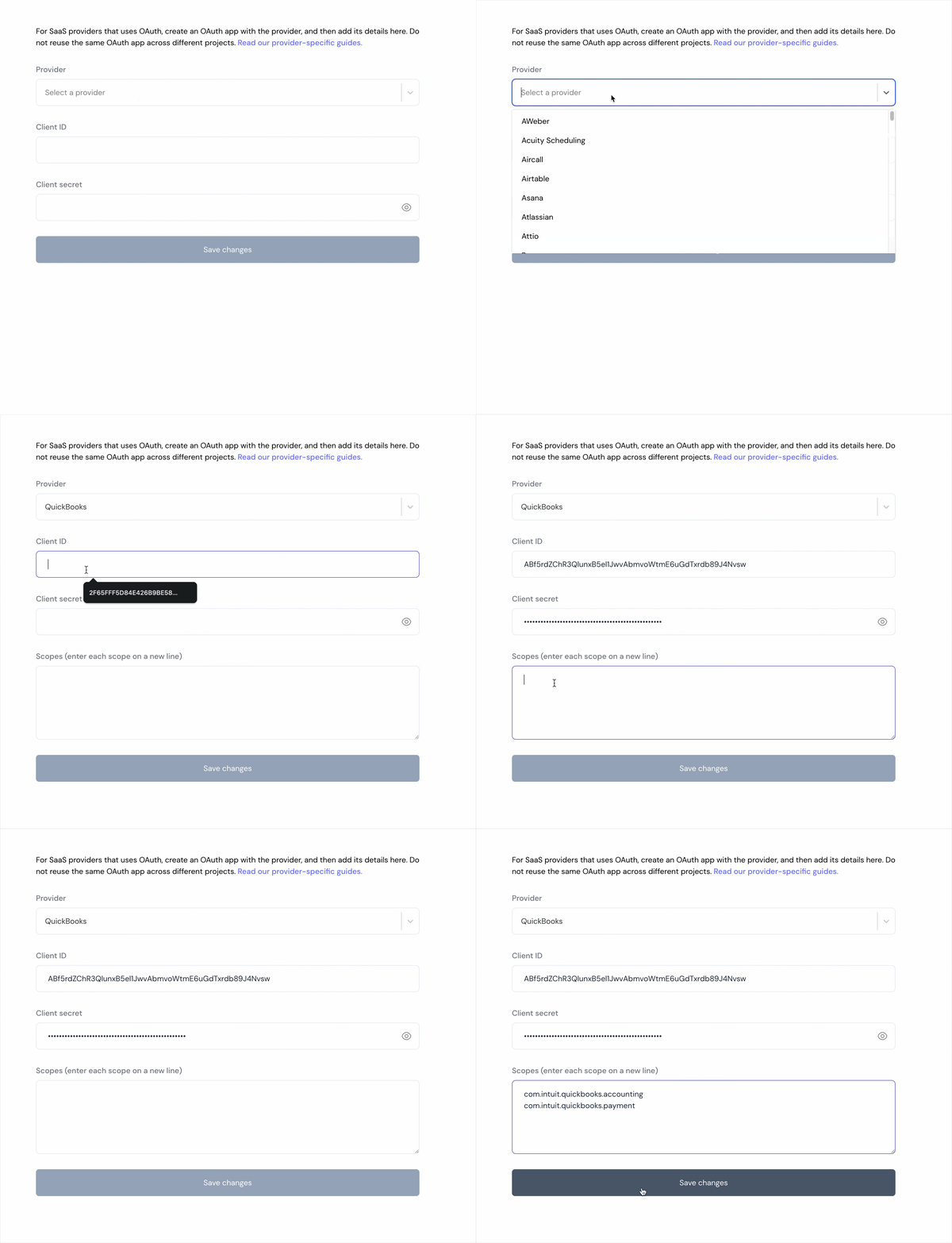 7. Click **Save Changes**.
## Using the connector
To start integrating with Kit:
* Create a manifest file as shown in the example above.
* Deploy it using the [amp CLI](/cli/overview).
* Embed the [InstallIntegration](/embeddable-ui-components#install-integration) UI component.
* Start using the connector!
* If your integration has [Proxy Actions](/proxy-actions), you can start making Proxy API calls.
QuickBooks API returns XML responses by default. To receive JSON responses, make sure to set the `Accept` header to `application/json` in your proxy API calls.
## API documentation
* [QuickBooks API](https://developer.intuit.com/app/developer/qbo/docs/api/accounting/all-entities/account#the-account-object)
7. Click **Save Changes**.
## Using the connector
To start integrating with Kit:
* Create a manifest file as shown in the example above.
* Deploy it using the [amp CLI](/cli/overview).
* Embed the [InstallIntegration](/embeddable-ui-components#install-integration) UI component.
* Start using the connector!
* If your integration has [Proxy Actions](/proxy-actions), you can start making Proxy API calls.
QuickBooks API returns XML responses by default. To receive JSON responses, make sure to set the `Accept` header to `application/json` in your proxy API calls.
## API documentation
* [QuickBooks API](https://developer.intuit.com/app/developer/qbo/docs/api/accounting/all-entities/account#the-account-object)