> ## Documentation Index
> Fetch the complete documentation index at: https://docs.withampersand.com/llms.txt
> Use this file to discover all available pages before exploring further.
# LinkedIn
## What's Supported
### Supported Actions
This connector supports:
* [Read Actions](/read-actions), including full historic backfill. Please note that incremental read is only supported for the `adAnalytics` object.
* [Write Actions](/write-actions).
* [Proxy Actions](/proxy-actions), using the base URL `https://api.linkedin.com`.
### Supported Objects
The LinkedIn connector supports reading from the following objects:
* [adTargetingFacets](https://learn.microsoft.com/en-us/linkedin/marketing/integrations/ads/advertising-targeting/ads-targeting?view=li-lms-2025-09\&tabs=http#ad-targeting-facets)
* [dmpEngagementSourceTypes](https://learn.microsoft.com/en-us/linkedin/marketing/integrations/ads/advertising-targeting/engagement-retargeting?view=li-lms-2025-09\&tabs=http#get-all-supported-engagement-source-types)
* [adCampaignGroups](https://learn.microsoft.com/en-us/linkedin/marketing/integrations/ads/account-structure/create-and-manage-campaign-groups?view=li-lms-2025-09\&tabs=http#search-for-campaign-groups)
* [adCampaigns](https://learn.microsoft.com/en-us/linkedin/marketing/integrations/ads/account-structure/create-and-manage-campaigns?view=li-lms-2025-09\&tabs=http#search-for-campaigns)
* [adAccounts](https://learn.microsoft.com/en-us/linkedin/marketing/integrations/ads/account-structure/create-and-manage-accounts?view=li-lms-2025-09\&tabs=http#search-for-accounts)
* [dmpSegments](https://learn.microsoft.com/en-us/linkedin/marketing/matched-audiences/create-and-manage-segments?view=li-lms-2025-09\&tabs=curl#find-dmp-segments-by-account)
* [adAnalytics](https://learn.microsoft.com/en-us/linkedin/marketing/integrations/ads-reporting/ads-reporting?view=li-lms-2025-09\&tabs=curl#analytics-finder)
The LinkedIn connector supports writing to the following objects:
* [adCampaignGroups](https://learn.microsoft.com/en-us/linkedin/marketing/integrations/ads/account-structure/create-and-manage-campaign-groups?view=li-lms-2025-09\&tabs=http#create-a-campaign-group)
* [adCampaigns](https://learn.microsoft.com/en-us/linkedin/marketing/integrations/ads/account-structure/create-and-manage-campaigns?view=li-lms-2025-09\&tabs=http#create-a-campaign)
* [adAccounts](https://learn.microsoft.com/en-us/linkedin/marketing/integrations/ads/account-structure/create-and-manage-accounts?view=li-lms-2025-09\&tabs=http#create-ad-account)
* [adTargetTemplates](https://learn.microsoft.com/en-us/linkedin/marketing/integrations/ads/advertising-targeting/saved-audience-templates?view=li-lms-2025-09\&tabs=http#sample-request)
* [adPublisherRestrictions](https://learn.microsoft.com/en-us/linkedin/marketing/integrations/ads/advertising-targeting/manage-audience-restrictions?view=li-lms-2025-09\&tabs=http#create-the-publisher-restriction)
* [inmailContents](https://learn.microsoft.com/en-us/linkedin/marketing/integrations/ads/advertising-targeting/version/message-ads-integrations?view=li-lms-2025-09\&tabs=http#create-inmail-content)
* [conversationAds](https://learn.microsoft.com/en-us/linkedin/marketing/integrations/ads/advertising-targeting/version/conversation-ads-integrations?view=li-lms-2025-09\&tabs=http#create-a-sponsored-conversation)
* [adLiftTests](https://learn.microsoft.com/en-us/linkedin/marketing/integrations/experimentation/brand-lift-testing/ad-lift-tests?view=li-lms-2025-09#create-ad-lift-tests)
* [adExperiments](https://learn.microsoft.com/en-us/linkedin/marketing/integrations/experimentation/ab-testing/ab-testing?view=li-lms-2025-09#create-experiments)
* [conversions](https://learn.microsoft.com/en-us/linkedin/marketing/integrations/ads-reporting/conversion-tracking?view=li-lms-2025-09\&tabs=https#create-a-conversion)
* [thirdPartyTrackingTags](https://learn.microsoft.com/en-us/linkedin/marketing/integrations/ads-reporting/third-party-tracking?view=li-lms-2025-09\&tabs=http#create-third-party-tracking-tag)
* [events](https://learn.microsoft.com/en-us/linkedin/marketing/event-management/events?view=li-lms-2025-09\&tabs=http#create-event)
* [insightTags](https://learn.microsoft.com/en-us/linkedin/marketing/integrations/ads-reporting/conversion-tracking?view=li-lms-2025-09\&tabs=https#create-an-insight-tag)
* [adPageSets](https://learn.microsoft.com/en-us/linkedin/marketing/matched-audiences/website-visitors-retargeting?view=li-lms-2025-09\&tabs=http#create-ad-page-set)
* [dmpSegments](https://learn.microsoft.com/en-us/linkedin/marketing/matched-audiences/create-and-manage-segments?view=li-lms-2025-09\&tabs=http#create-dmp-segment)
* [leadForms](https://learn.microsoft.com/en-us/linkedin/marketing/lead-sync/leadsync?view=li-lms-2025-09\&tabs=http#creating-lead-forms)
* [posts](https://learn.microsoft.com/en-us/linkedin/marketing/community-management/shares/posts-api?view=li-lms-2025-09\&tabs=http#create-a-post)
* [creatives](https://learn.microsoft.com/en-us/linkedin/marketing/integrations/ads/advertising-targeting/version/spotlight-ads?view=li-lms-2025-09\&tabs=http#create-a-dynamic-spotlight-ad-creative)
### Example integration
For an example manifest file of an LinkedIn integration, visit our [samples repo on Github](https://github.com/amp-labs/samples/blob/main/linkedin/amp.yaml).
## Before You Get Started
To connect *LinkedIn* with *Ampersand*, you will need [a LinkedIn Account](https://www.linkedin.com/).
Once your account is created, you'll need to configure an app in LinkedIn and obtain the following credentials from your app:
* Client ID
* Client Secret
You will use these credentials to connect your application to Ampersand.
### Create a LinkedIn Account
Here's how you can sign up for a LinkedIn Developer account:
* Go to the [LinkedIn Sign up page](https://www.linkedin.com/signup/cold-join?source=guest_homepage-basic_nav-header-signin).
* Sign up using your preferred method.
### Creating a LinkedIn App
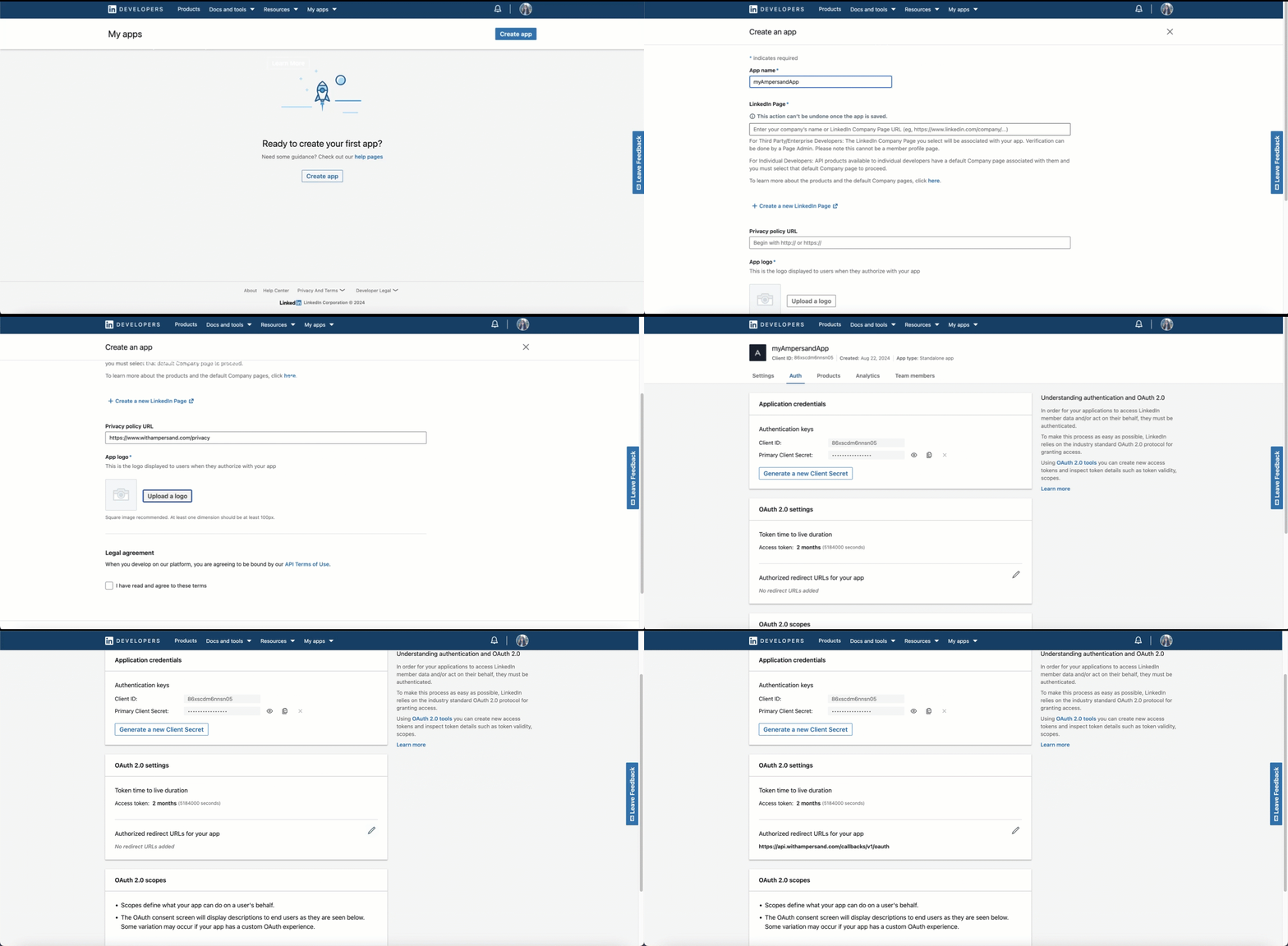
Follow the steps below to create a LinkedIn app and add the Ampersand redirect URL in the app:
1. Log in to your [LinkedIn Developer Dashboard](https://developer.linkedin.com/).
2. Go to **My Apps**.
3. Click **Create app**.
4. Enter the **App Name**.
5. Connect your LinkedIn profile in the **LinkedIn Page** section.
6. Provide the privacy policy.
7. Select a logo for your app.
8. Check the LinkedIn developer agreement.
9. Click **Create App**.
10. Once your app is created, you'll find the **Client ID** and **Client Secret** keys for your app in the **Auth** section. Note these credentials as they are necessary for connecting your app to Ampersand.
11. In the **Auth 2.0 settins**, enter the Ampersand redirect URL: `https://api.withampersand.com/callbacks/v1/oauth`.
 ## Add Your LinkedIn App info to Ampersand
1. Log in to your [Ampersand Dashboard](https://dashboard.withampersand.com).
2. Select the project where you want to create a LinkedIn integration.
## Add Your LinkedIn App info to Ampersand
1. Log in to your [Ampersand Dashboard](https://dashboard.withampersand.com).
2. Select the project where you want to create a LinkedIn integration.
 3. Select **Provider apps**.
4. Select *LinkedIn* from the **Provider** list.
5. Enter the previously obtained *Client ID* in the **Client ID** field and the *Client Secret* in the **Client Secret** field.
3. Select **Provider apps**.
4. Select *LinkedIn* from the **Provider** list.
5. Enter the previously obtained *Client ID* in the **Client ID** field and the *Client Secret* in the **Client Secret** field.
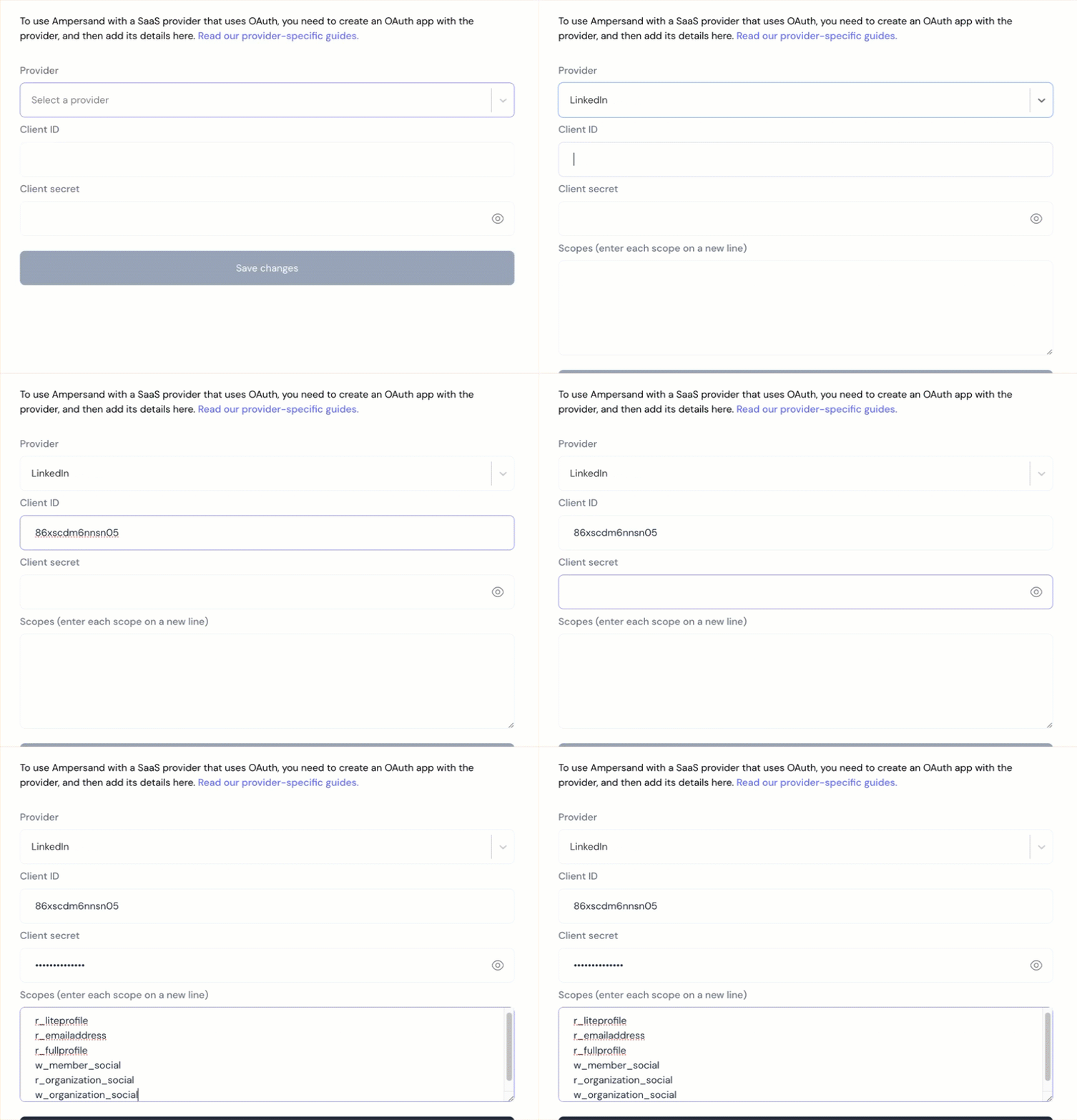 6. Click **Save changes**.
To start integrating with LinkedIn:
* Create a manifest file using the [example](https://github.com/amp-labs/samples/blob/main/linkedin/amp.yaml).
* Deploy it using the [amp CLI](/cli/overview).
* If you are using Read Actions, create a [destination](/destinations).
* Embed the [InstallIntegration](/embeddable-ui-components#install-integration) UI component.
* Start using the connector!
* If your integration has [Read Actions](/read-actions), you'll start getting webhook messages.
* If your integration has [Write Actions](/write-actions), you can start making API calls to our Write API.
* If your integration has [Proxy Actions](/proxy-actions), you can start making Proxy API calls.
6. Click **Save changes**.
To start integrating with LinkedIn:
* Create a manifest file using the [example](https://github.com/amp-labs/samples/blob/main/linkedin/amp.yaml).
* Deploy it using the [amp CLI](/cli/overview).
* If you are using Read Actions, create a [destination](/destinations).
* Embed the [InstallIntegration](/embeddable-ui-components#install-integration) UI component.
* Start using the connector!
* If your integration has [Read Actions](/read-actions), you'll start getting webhook messages.
* If your integration has [Write Actions](/write-actions), you can start making API calls to our Write API.
* If your integration has [Proxy Actions](/proxy-actions), you can start making Proxy API calls.