> ## Documentation Index
> Fetch the complete documentation index at: https://docs.withampersand.com/llms.txt
> Use this file to discover all available pages before exploring further.
# HighLevel
## What's Supported
### Supported actions
This connector supports:
* [Read Actions](/read-actions), including full historic backfill.
* [Write Actions](/write-actions).
* [Proxy Actions](/proxy-actions), using the base URL `https://services.leadconnectorhq.com`.
### Supported Objects
The HighLevel connector supports writing to and reading to the following objects:
* [businesses](https://highlevel.stoplight.io/docs/integrations/bb6b717cac89c-business-api) (read, write)
* [calendars](https://highlevel.stoplight.io/docs/integrations/5339a7ea3f2f2-calendars-api) (read, write)
* [calendars/groups](https://highlevel.stoplight.io/docs/integrations/5339a7ea3f2f2-calendars-api) (read, write)
* [campaigns](https://highlevel.stoplight.io/docs/integrations/35a5ad3408e98-campaigns-api) (read)
* [conversations/search](https://highlevel.stoplight.io/docs/integrations/d45ae3189eea8-search-conversations) (read)
* [emails/schedule](https://highlevel.stoplight.io/docs/integrations/aa18a7110c584-get-campaigns) (read)
* [forms/submissions](https://highlevel.stoplight.io/docs/integrations/a6114bd7685d1-get-forms-submissions) (read)
* [forms](https://highlevel.stoplight.io/docs/integrations/49e29c1716c61-get-forms) (read)
* [invoices](https://highlevel.stoplight.io/docs/integrations/dcaf05eb72b81-invoice-api) (read, write)
* [invoices/template](https://highlevel.stoplight.io/docs/integrations/dcaf05eb72b81-invoice-api) (read, write)
* [invoices/schedule](https://highlevel.stoplight.io/docs/integrations/dcaf05eb72b81-invoice-api) (read, write)
* [invoices/estimate/list](https://highlevel.stoplight.io/docs/integrations/18211945fb8f5-list-estimates) (read)
* [invoices/estimate/template](https://highlevel.stoplight.io/docs/integrations/dcaf05eb72b81-invoice-api) (read, write)
* [links](https://highlevel.stoplight.io/docs/integrations/85c4db13a5d69-links-api) (read, write)
* [blogs/authors](https://highlevel.stoplight.io/docs/integrations/2ad8896e803e7-get-all-authors) (read)
* [blogs/categories](https://highlevel.stoplight.io/docs/integrations/8ebd3128ee462-get-all-categories) (read)
* [funnels/lookup/redirect/list](https://highlevel.stoplight.io/docs/integrations/a1a9c79cd27ed-fetch-list-of-redirects) (read)
* [funnels/funnel/list](https://highlevel.stoplight.io/docs/integrations/80d7ad39f1e90-fetch-list-of-funnels) (read)
* [opportunities/pipelines](https://highlevel.stoplight.io/docs/integrations/a163e98c45b8d-search-opportunity) (read)
* [payments/orders](https://highlevel.stoplight.io/docs/integrations/378562f514a17-list-orders) (read)
* [payments/transactions](https://highlevel.stoplight.io/docs/integrations/4d127e6508f0a-list-transactions) (read)
* [payments/subscriptions](https://highlevel.stoplight.io/docs/integrations/33c965c6cb9da-list-subscriptions) (read)
* [payments/coupon/list](https://highlevel.stoplight.io/docs/integrations/f1a58fadab467-list-coupons) (read)
* [products](https://highlevel.stoplight.io/docs/integrations/486b7c90818f4-products-api) (read, write)
* [products/inventory](https://highlevel.stoplight.io/docs/integrations/2c26c555258c6-list-inventory) (read)
* [products/collections](https://highlevel.stoplight.io/docs/integrations/486b7c90818f4-products-api) (read, write)
* [products/reviews](https://highlevel.stoplight.io/docs/integrations/1c3f34f44689a-fetch-product-reviews) (read)
* [proposals/document](https://highlevel.stoplight.io/docs/integrations/60ec57df068f6-list-documents) (read)
* [proposals/templates](https://highlevel.stoplight.io/docs/integrations/da393f098cd9e-list-templates) (read)
* [store/shipping-zone](https://highlevel.stoplight.io/docs/integrations/8994a68c52c5c-store-api) (read, write)
* [store/shipping-carrier](https://highlevel.stoplight.io/docs/integrations/caea983361099-list-shipping-carriers) (read, write)
* [store/store-setting](https://highlevel.stoplight.io/docs/integrations/2625702057180-get-store-settings) (read)
* [surveys](https://highlevel.stoplight.io/docs/integrations/1e9fdbe3f2013-get-surveys) (read)
* [users](https://highlevel.stoplight.io/docs/integrations/7f581f780cf2f-users-api) (read, write)
* [workflows](https://highlevel.stoplight.io/docs/integrations/070d2f9be5549-get-workflow) (read)
* [locations/search](https://highlevel.stoplight.io/docs/integrations/12f3fb56990d3-search) (read)
* [custom-menus](https://highlevel.stoplight.io/docs/integrations/e377daf40adc8-custom-menus-api) (read, write)
* [marketplace/billing/charges](https://highlevel.stoplight.io/docs/integrations/c8ed91df11efc-get-all-wallet-charges) (read)
* [calendars/events/appointments](https://highlevel.stoplight.io/docs/integrations/a192f863cad27-create-appointment) (write)
* [calendars/events/block-slots](https://highlevel.stoplight.io/docs/integrations/5a52896a68879-create-block-slot) (write)
* [contacts](https://highlevel.stoplight.io/docs/integrations/4c8362223c17b-create-contact) (write)
* [objects](https://highlevel.stoplight.io/docs/integrations/ef91fb5866e4c-create-custom-object) (read, write)
* [associations](https://highlevel.stoplight.io/docs/integrations/e4e2b47e593b3-create-association) (write)
* [associations/relations](https://highlevel.stoplight.io/docs/integrations/706670bc1dafa-create-relation-for-you-associated-entities) (write)
* [custom-fields](https://highlevel.stoplight.io/docs/integrations/55c9675bf56ce-create-custom-field) (write)
* [custom-fields/folder](https://highlevel.stoplight.io/docs/integrations/52e9e97f3c50a-create-custom-field-folder) (write)
* [conversations](https://highlevel.stoplight.io/docs/integrations/8d0b19e09176e-create-conversation) (write)
* [conversations/messages](https://highlevel.stoplight.io/docs/integrations/5853cb0a54971-send-a-new-message) (write)
* [conversations/messages/inbound](https://highlevel.stoplight.io/docs/integrations/3c9036411fcc3-add-an-inbound-message) (write)
* [conversations/messages/outbound](https://highlevel.stoplight.io/docs/integrations/d032812b4e850-add-an-external-outbound-call) (write)
* [conversations/messages/upload](https://highlevel.stoplight.io/docs/integrations/cd0f7973ec1b6-upload-file-attachments) (write)
* [emails/builder](https://highlevel.stoplight.io/docs/integrations/cfa78da1d70d7-create-a-new-template) (write)
* [invoices/text2pay](https://highlevel.stoplight.io/docs/integrations/e739c3a249591-create-and-send) (write)
* [invoices/estimate](https://highlevel.stoplight.io/docs/integrations/2c9fa98b3c6e1-create-new-estimate) (write)
* [locations](https://highlevel.stoplight.io/docs/integrations/7cfc7963eda7c-create-sub-account-formerly-location) (write)
* [blogs/posts](https://highlevel.stoplight.io/docs/integrations/c24ff055e7cf8-create-blog-post) (write)
* [funnels/lookup/redirect](https://highlevel.stoplight.io/docs/integrations/98aaa4819e58b-create-redirect) (write)
* [opportunities](https://highlevel.stoplight.io/docs/integrations/802093aa63900-create-opportunity) (write)
* [payments/coupon](https://highlevel.stoplight.io/docs/integrations/d681ddae80b59-create-coupon) (write)
### Example integration
For an example manifest file of an HighLevel integration, visit our [samples repo on Github](https://github.com/amp-labs/samples/blob/main/highlevel/amp.yaml).
## Before You Get Started
To connect HighLevel with Ampersand, you need [a HighLevel Account](https://marketplace.gohighlevel.com/signup).
Once your account is created, you'll need to create an app in HighLevel and obtain the following credentials from your app:
* Client ID
* Client Secret
You will then use these credentials to connect your application to Ampersand.
### Create a HighLevel Account
Here's how you can sign up for a HighLevel account:
* Go to the [HighLevel Sign Up page](https://marketplace.gohighlevel.com/signup).
* Sign up using your preferred method.
### Creating an HighLevel App
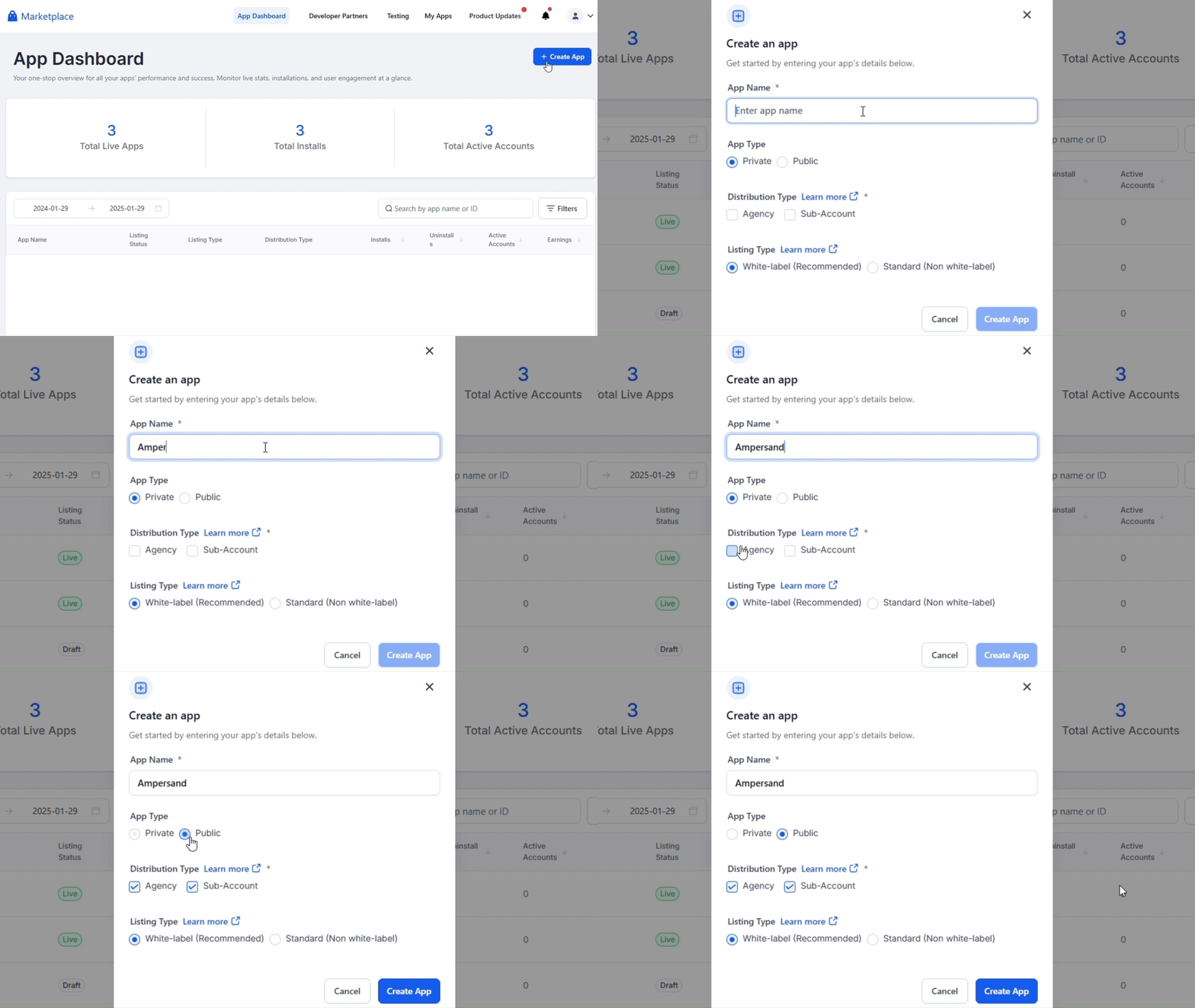
Follow the steps below to create an HighLevel app and add the Ampersand redirect URL.
1. Log in to your [HighLevel](https://marketplace.gohighlevel.com/login) account.
2. Navigate to **App Dashboard** and Click **Create App** then **Create an app** modal will open.
3. In the modal, enter the **App Name**.
4. Select **App Type**: Public, select **Distribution Type** and select the **Listing Type**.
5. Click **Create App**.
 ### Creating Client ID and Client Secret
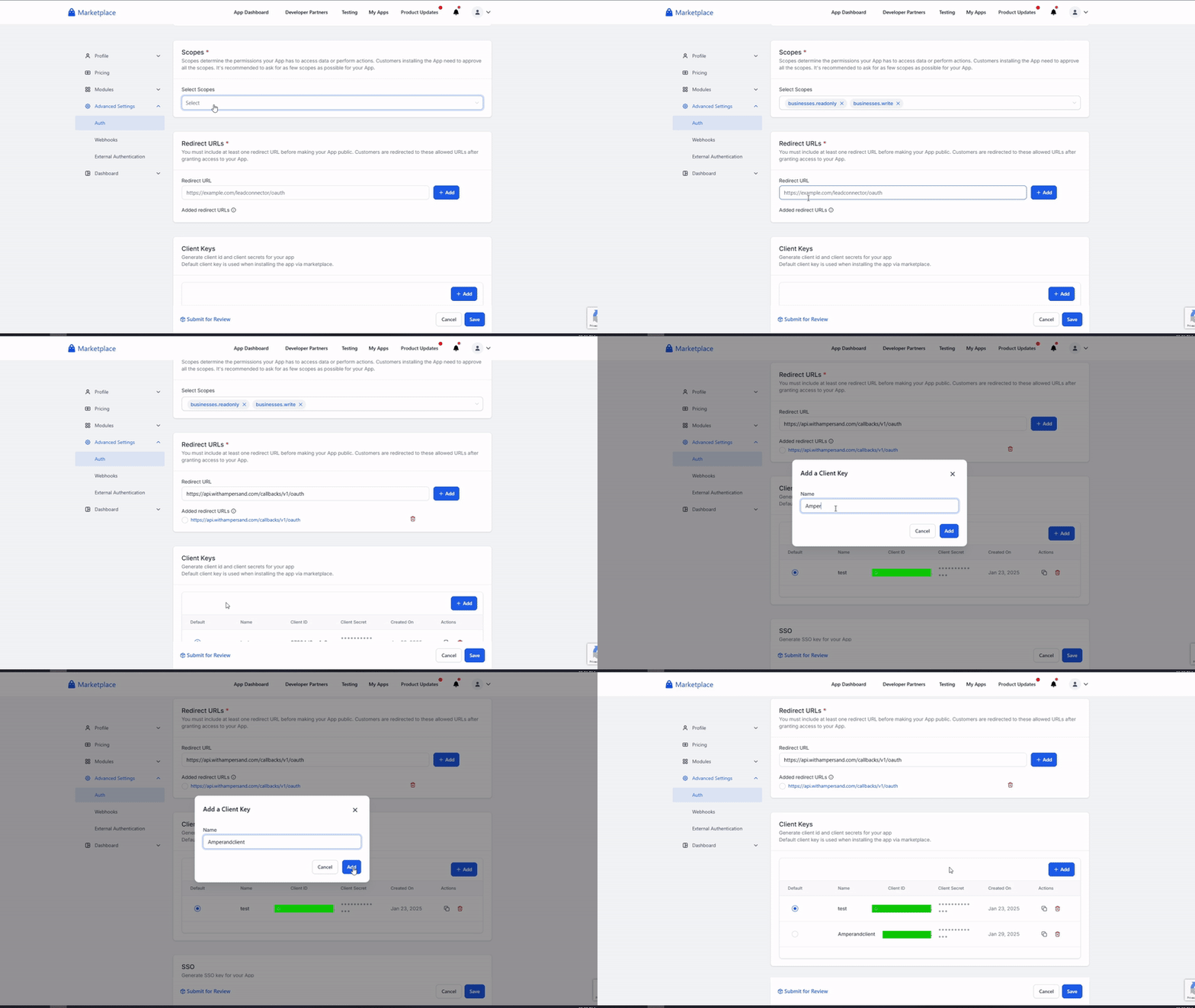
1. Click **Advanced Settings -> Auth**, select the necessary **Scopes** and enter the **Redirect URL**.
2. Click **Add** under **Client Keys** section, enter the Client Name and click **Add**.
### Creating Client ID and Client Secret
1. Click **Advanced Settings -> Auth**, select the necessary **Scopes** and enter the **Redirect URL**.
2. Click **Add** under **Client Keys** section, enter the Client Name and click **Add**.
 Provide all the required details and submit them for review. Once the review is complete, your application will go live.
## Add Your HighLevel App Info to Ampersand
1. Log in to your [Ampersand Dashboard](https://dashboard.withampersand.com).
2. Select the project where you want to create a HighLevel integration.
Provide all the required details and submit them for review. Once the review is complete, your application will go live.
## Add Your HighLevel App Info to Ampersand
1. Log in to your [Ampersand Dashboard](https://dashboard.withampersand.com).
2. Select the project where you want to create a HighLevel integration.
 3. Select **Provider Apps**.
4. Select *HighLevel* from the **Provider** list.
5. Enter the previously obtained *Client ID* in the **Client ID** field and the *Client Secret* in the **Client Secret** field.
To start integrating with HighLevel:
* Create a manifest file using the [example](https://github.com/amp-labs/samples/blob/main/highlevel/amp.yaml).
* Deploy it using the [amp CLI](/cli/overview).
* If you are using Read Actions, create a [destination](/destinations).
* Embed the [InstallIntegration](/embeddable-ui-components#install-integration) UI component.
* Start using the connector!
* If your integration has [Read Actions](/read-actions), you'll start getting webhook messages.
* If your integration has [Write Actions](/write-actions), you can start making API calls to our Write API.
* If your integration has [Proxy Actions](/proxy-actions), you can start making Proxy API calls.
3. Select **Provider Apps**.
4. Select *HighLevel* from the **Provider** list.
5. Enter the previously obtained *Client ID* in the **Client ID** field and the *Client Secret* in the **Client Secret** field.
To start integrating with HighLevel:
* Create a manifest file using the [example](https://github.com/amp-labs/samples/blob/main/highlevel/amp.yaml).
* Deploy it using the [amp CLI](/cli/overview).
* If you are using Read Actions, create a [destination](/destinations).
* Embed the [InstallIntegration](/embeddable-ui-components#install-integration) UI component.
* Start using the connector!
* If your integration has [Read Actions](/read-actions), you'll start getting webhook messages.
* If your integration has [Write Actions](/write-actions), you can start making API calls to our Write API.
* If your integration has [Proxy Actions](/proxy-actions), you can start making Proxy API calls.