> ## Documentation Index
> Fetch the complete documentation index at: https://docs.withampersand.com/llms.txt
> Use this file to discover all available pages before exploring further.
# Groove
## What's Supported
### Supported Actions
This connector supports:
* [Read Actions](/read-actions), including full historic backfill. Please note that incremental read is not supported, a full read of the Groove instance will be done for each scheduled read.
* [Write Actions](/write-actions).
* [Proxy Actions](/proxy-actions), using the base URL `https://api.groovehq.com`.
### Supported Objects
The groove connector supports reading from the following objects:
* [tickets](https://doc.groovehq.com/tickets#listing-tickets)
* [customers](https://doc.groovehq.com/customers#listing-all-customers)
* [mailboxes](https://doc.groovehq.com/mailboxes#listing-mailboxes)
* [folders](https://doc.groovehq.com/folders#listing-folders)
* [agents](https://doc.groovehq.com/agents#listing-agents)
* [groups](https://doc.groovehq.com/groups#listing-groups)
* [kb/themes](https://doc.groovehq.com/knowledge-base-themes#listing-themes)
* [widgets](https://doc.groovehq.com/widgets#listing-widgets)
* [kb](https://doc.groovehq.com/knowledge-bases#listing-knowledge-bases)
* [tickets/count](https://doc.groovehq.com/ticket-counts#listing-ticket-counts)
The groove connector supports writing from the following objects:
* [tickets](https://doc.groovehq.com/tickets#creating-a-new-ticket)
* [webhooks](https://doc.groovehq.com/webhooks#creating-a-webhook)
* [groups](https://doc.groovehq.com/groups#creating-a-new-group)
* [widgets](https://doc.groovehq.com/widgets#creating-a-widget)
### Example integration
For an example manifest file of a Groove integration, visit our [samples repo on Github](https://github.com/amp-labs/samples/blob/main/groove/amp.yaml).
## Before You Get Started
To integrate Groove with Ampersand, you must register a Groove OAuth2 application. To do this, contact [support@groovehq.com](mailto:support@groovehq.com) and provide the following details:
* **Redirect/Callback URL** is an HTTPS endpoint that will handle the secure callback. For an Ampersand integration, use the following callback URL: [https://api.withampersand.com/callbacks/v1/oauth](https://api.withampersand.com/callbacks/v1/oauth).
* You can also provide additional callback URLs to be added, but only HTTPS URLs are allowed.
Once your application is registered, you will receive two credentials: **client\_id** and **client\_secret.** These credentials are required to connect Groove with Ampersand.
## Add Your Groove App Info to Ampersand
1. Log in to your [Ampersand Dashboard](https://dashboard.withampersand.com).
2. Select the project where you want to create a Groove integration.
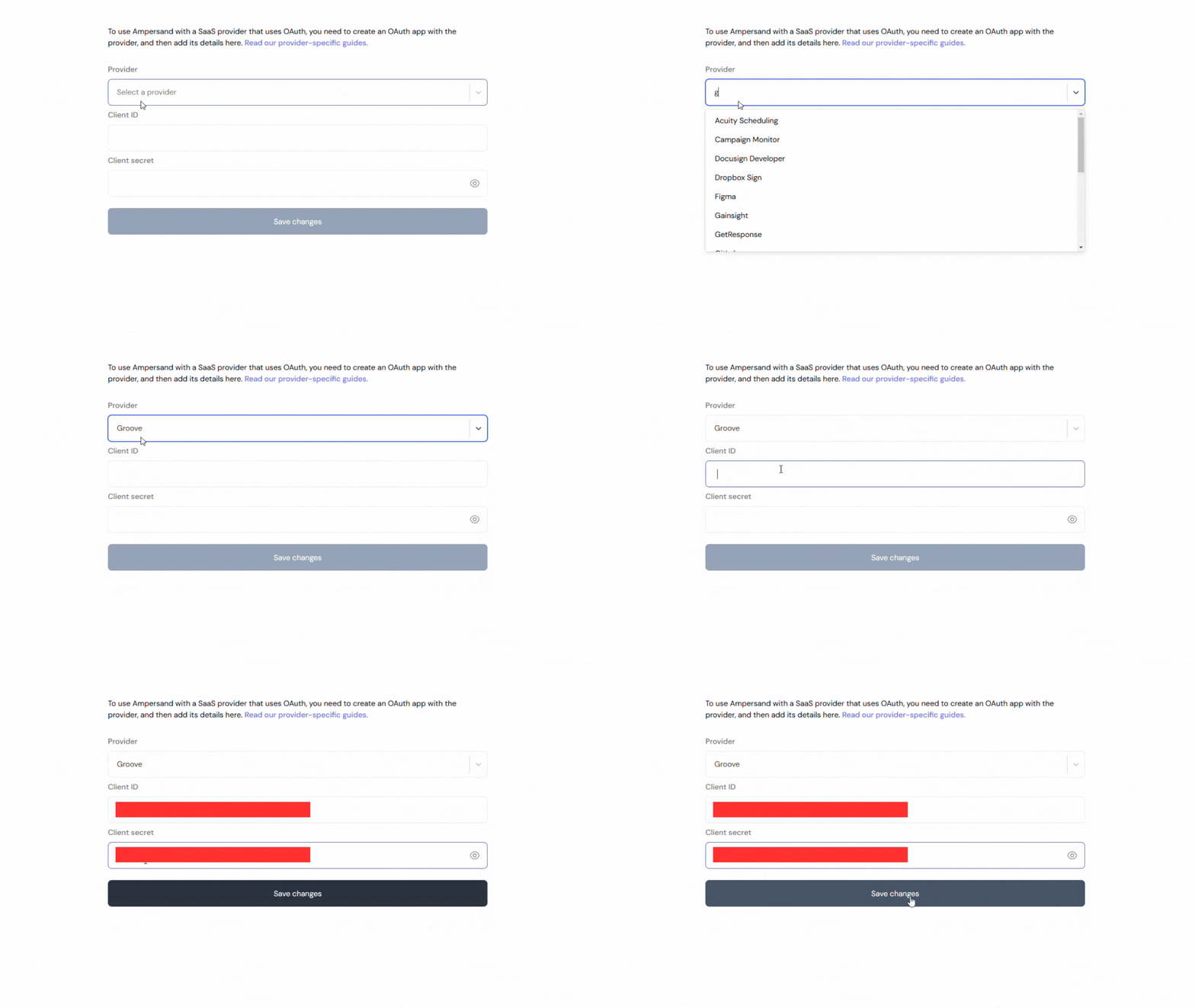
 3. Select **Provider Apps**.
4. Select *Groove* from the **Provider** list.
5. Enter the previously obtained *Client ID* in the **Client ID** field and the *Client Secret* in the **Client Secret** field.
3. Select **Provider Apps**.
4. Select *Groove* from the **Provider** list.
5. Enter the previously obtained *Client ID* in the **Client ID** field and the *Client Secret* in the **Client Secret** field.