> ## Documentation Index
> Fetch the complete documentation index at: https://docs.withampersand.com/llms.txt
> Use this file to discover all available pages before exploring further.
# Gong
## What's Supported
### Supported Actions
This connector supports:
* [Proxy Actions](/proxy-actions), using the base URL `https://api.gong.io`.
* [Read Actions](/read-actions)
* [Subscribe Actions](/subscribe-actions). Please note that [special set up](#set-up-subscribe-actions) is needed for Gong.
### Supported Objects
| Object | Read | Write | Subscribe |
| ----------- | ----------------------------------- | ----- | ----------------------- |
| Users | ✓ (full read only) | | |
| Workspaces | ✓ (full read only) | | |
| Flows | ✓ (full read only) | | |
| Calls | ✓ (incremental in private preview¹) | ✓ | ✓ (`call.created` only) |
| Transcripts | ✓ (incremental in private preview¹) | | |
¹ Contact [support@withampersand.com](mailto:support@withampersand.com) to enable incremental read for Calls and Transcripts.
**Gong processing latency.** Gong takes time to process recordings before they become available, which delays both Read Actions and Subscribe webhooks:
* **Calls** are available through through Read and Subscribe Actions after they have finished processing in Gong, which may take up to **1 hour** after a call ends.
* **Transcripts** may not be available for up to **24 hours** after a call ends.
### Example Integration
For an example manifest file of a Gong integration, visit our [samples repo on Github](https://github.com/amp-labs/samples/blob/main/gong/amp.yaml).
## Before You Get Started
To connect Gong with Ampersand, you must complete the [Gong partnership process](https://www.gong.io/partners/) and obtain a *Gong Sandbox* environment.
After your account is set up, you will need to acquire the following credentials from your Gong app:
* Client ID
* Client Secret
* Scopes
> **Important:** To read `Calls`, ensure that your Gong application includes the `api:calls:read:extensive` scope.
In the **Redirect URI** section, add the Ampersand Callback URL: `https://api.withampersand.com/callbacks/v1/oauth`.
 You will then use these credentials to connect your application to Ampersand.
Learn more about the Gong Partnership process [here](https://help.gong.io/docs/how-to-use-the-gong-developers-hub).
## Add Gong App Details in Ampersand
1. Log in to your [Ampersand Dashboard](https://dashboard.withampersand.com).
2. Select the project where you want to add the Gong App.
3. Select **Provider apps**.
4. Select Gong from the **Provider** list.
5. Enter the previously obtained *Client ID* in the **Client ID** field, the *Client Secret* in the **Client Secret** field, and the requested scopes in the **Permissions** field.
You will then use these credentials to connect your application to Ampersand.
Learn more about the Gong Partnership process [here](https://help.gong.io/docs/how-to-use-the-gong-developers-hub).
## Add Gong App Details in Ampersand
1. Log in to your [Ampersand Dashboard](https://dashboard.withampersand.com).
2. Select the project where you want to add the Gong App.
3. Select **Provider apps**.
4. Select Gong from the **Provider** list.
5. Enter the previously obtained *Client ID* in the **Client ID** field, the *Client Secret* in the **Client Secret** field, and the requested scopes in the **Permissions** field.
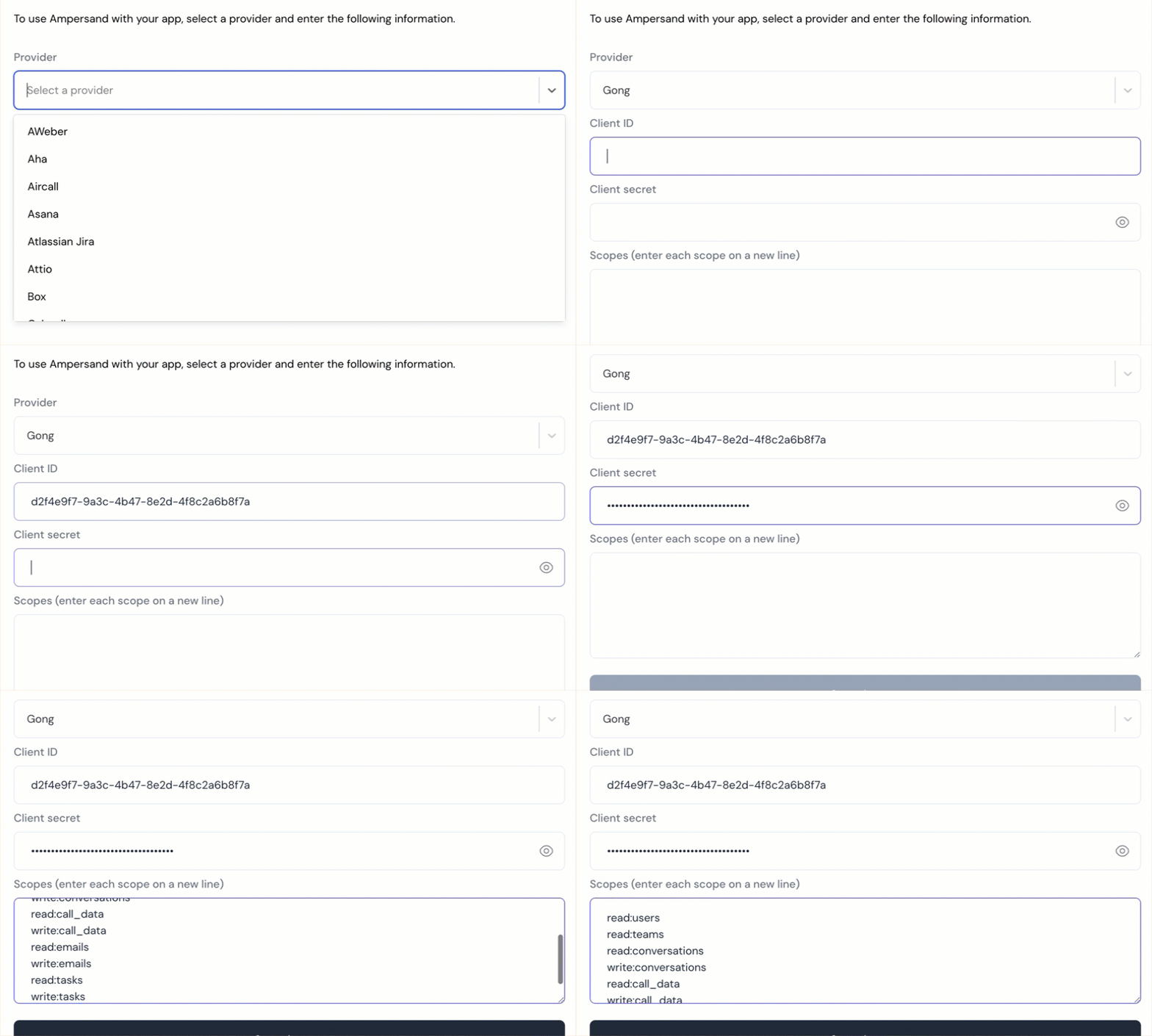 6. Enter the scopes set for your application in *Gong*.
7. Click **Save Changes**.
## Set up Subscribe Actions
1. **Define the subscribe action** in your `amp.yaml` and deploy it with the [amp CLI](/cli/overview). Gong only supports the `call.created` event, so the `calls` object should subscribe to `createEvent` only.
```yaml theme={null}
specVersion: 1.0.0
integrations:
- name: subscribeToGong
provider: gong
subscribe:
objects:
- objectName: calls
destination: gongWebhook
inheritFieldsAndMapping: true
createEvent:
enabled: always
read:
objects:
- objectName: calls
destination: gongWebhook
requiredFields:
...
```
2. **Construct a webhook URL for your customer** in this format:
```
https://subscribe-webhook.withampersand.com/v1/projects/PROJECT_ID/integrations/INTEGRATION_ID/installations/INSTALLATION_ID
```
3. **Share the [Gong customer guide](/customer-guides/gong)** with your customer along with the webhook URL from Step 2. Your customer will create an automation rule in Gong that fires a webhook when a new call is created.
6. Enter the scopes set for your application in *Gong*.
7. Click **Save Changes**.
## Set up Subscribe Actions
1. **Define the subscribe action** in your `amp.yaml` and deploy it with the [amp CLI](/cli/overview). Gong only supports the `call.created` event, so the `calls` object should subscribe to `createEvent` only.
```yaml theme={null}
specVersion: 1.0.0
integrations:
- name: subscribeToGong
provider: gong
subscribe:
objects:
- objectName: calls
destination: gongWebhook
inheritFieldsAndMapping: true
createEvent:
enabled: always
read:
objects:
- objectName: calls
destination: gongWebhook
requiredFields:
...
```
2. **Construct a webhook URL for your customer** in this format:
```
https://subscribe-webhook.withampersand.com/v1/projects/PROJECT_ID/integrations/INTEGRATION_ID/installations/INSTALLATION_ID
```
3. **Share the [Gong customer guide](/customer-guides/gong)** with your customer along with the webhook URL from Step 2. Your customer will create an automation rule in Gong that fires a webhook when a new call is created.