> ## Documentation Index
> Fetch the complete documentation index at: https://docs.withampersand.com/llms.txt
> Use this file to discover all available pages before exploring further.
# GitHub
## What's Supported
### Supported Actions
This connector supports:
* [Read Actions](/read-actions), including full historic backfill. Please note that incremental read is supported only for `gists`, `gists/starred`, `issues`, `gists/public`, `repos` and `user/issues` currently. For all other objects, a full read of the Github instance will be done per scheduled read.
* [Write Actions](/write-actions)
* [Proxy Actions](/proxy-actions), using the base URL `https://api.github.com`
### Supported Objects
The GitHub connector supports the following objects:
* [advisories](https://docs.github.com/en/rest/security-advisories/security-advisories) (Read)
* [blocks](https://docs.github.com/en/rest/users/blocking?apiVersion=2022-11-28#list-users-blocked-by-the-authenticated-user) (Read)
* [classrooms](https://docs.github.com/en/rest/classroom/classroom) (Read)
* [codes\_of\_conduct](https://docs.github.com/en/rest/codes-of-conduct) (Read)
* [conflicts](https://docs.github.com/en/rest/packages/packages?apiVersion=2022-11-28#get-list-of-conflicting-packages-during-docker-migration-for-authenticated-user) (Read)
* [deliveries](https://docs.github.com/en/rest/apps/webhooks?#list-deliveries-for-an-app-webhook) (Read)
* [events](https://docs.github.com/en/rest/activity/events?#list-public-events) (Read)
* [followers](https://docs.github.com/en/rest/users/followers?#list-followers-of-the-authenticated-user) (Read)
* [following](https://docs.github.com/en/rest/users/followers?#list-the-people-the-authenticated-user-follows) (Read)
* [gists](https://docs.github.com/en/rest/gists/gists) (Read, Write)
* [gists/public](https://docs.github.com/en/rest/gists/gists?#list-public-gists) (Read)
* [gists/starred](https://docs.github.com/en/rest/gists/gists?#list-starred-gists) (Read)
* [installation-requests](https://docs.github.com/en/rest/apps/apps?#list-installation-requests-for-the-authenticated-app) (Read)
* [installation/repositories](https://docs.github.com/en/rest/apps/installations?#list-repositories-accessible-to-the-app-installation) (Read)
* [issues](https://docs.github.com/en/rest/issues/issues?#list-issues-assigned-to-the-authenticated-user) (Read)
* [licenses](https://docs.github.com/en/rest/licenses/licenses?#get-all-commonly-used-licenses) (Read)
* [marketplace\_listing/plans](https://docs.github.com/en/rest/apps/marketplace?#list-plans) (Read)
* [marketplace\_listing/stubbed/plans](https://docs.github.com/en/rest/apps/marketplace?#list-plans-stubbed) (Read)
* [marketplace\_purchases](https://docs.github.com/en/rest/apps/marketplace?#list-subscriptions-for-the-authenticated-user) (Read)
* [migration](https://docs.github.com/en/rest/migrations/users?#list-user-migrations) (Read)
* [organizations](https://docs.github.com/en/rest/orgs/orgs) (Read)
* [orgs](https://docs.github.com/en/rest/orgs/orgs) (Read)
* [packages](https://docs.github.com/en/rest/packages) (Read)
* [public\_emails](https://docs.github.com/en/rest/users/emails?#list-public-email-addresses-for-the-authenticated-user) (Read)
* [repos](https://docs.github.com/en/rest/repos/repos?#list-repositories-for-the-authenticated-user) (Read)
* [repositories](https://docs.github.com/en/rest/repos/repos?#list-public-repositories) (Read)
* [repository\_invitations](https://docs.github.com/en/rest/collaborators/invitations?#list-repository-invitations-for-the-authenticated-user) (Read)
* [secrets](https://docs.github.com/en/rest/codespaces/secrets) (Read)
* [stubbed](https://docs.github.com/en/rest/apps/marketplace?#list-subscriptions-for-the-authenticated-user-stubbed) (Read)
* [subscriptions](https://docs.github.com/en/rest/activity/watching?#list-repositories-watched-by-the-authenticated-user) (Read)
* [teams](https://docs.github.com/en/rest/teams/teams?#list-teams-for-the-authenticated-user) (Read)
* [user/codespaces](https://docs.github.com/en/rest/codespaces) (Read, Write)
* [user/emails](https://docs.github.com/en/rest/users/emails?#list-email-addresses-for-the-authenticated-user) (Read, Write)
* [user/keys](https://docs.github.com/en/rest/users/keys) (Read, Write)
* [user/gpg\_keys](https://docs.github.com/en/rest/users/gpg-keys) (Read, Write)
* [user/installations](https://docs.github.com/en/rest/apps/installations?#list-app-installations-accessible-to-the-user-access-token) (Read)
* [user/issues](https://docs.github.com/en/rest/issues/issues?#list-user-account-issues-assigned-to-the-authenticated-user) (Read)
* [user/memberships/orgs](https://docs.github.com/en/rest/orgs/members?#list-organization-memberships-for-the-authenticated-user) (Read)
* [user/starred](https://docs.github.com/en/rest/activity/starring?#list-repositories-starred-by-the-authenticated-user) (Read)
* [user/ssh\_signing\_keys](https://docs.github.com/en/rest/users/ssh-signing-keys) (Read, Write)
* [user/social\_accounts](https://docs.github.com/en/rest/users/social-accounts) (Read, Write)
* [users](https://docs.github.com/en/rest/users/users) (Read)
## Before you get started
To integrate GitHub with Ampersand, you will need a [GitHub Account](https://github.com/signup).
Once your account is created, you'll need to create a GitHub OAuth app and obtain the following credentials:
* OAuth Client ID
* OAuth Client Secret
You will then use these credentials to connect your application to Ampersand.
### Creating a GitHub OAuth App
1. Go to [GitHub Developer Settings](https://github.com/settings/developers)
2. Click on "OAuth Apps" in the sidebar
3. Click "New OAuth App"
4. Fill in the application details:
* **Application name**: Your application name
* **Homepage URL**: Your application's homepage URL
* **Application description**: (Optional) Description of your application
* **Authorization callback URL**: `https://api.withampersand.com/callbacks/v1/oauth`
5. Click "Register application"
6. On the next screen, click "Generate a new client secret"
7. Save your Client ID and Client Secret - you'll need these for the next step
## Add your GitHub App info to Ampersand
1. Log in to your [Ampersand Dashboard](https://dashboard.withampersand.com)
2. Select your project
 3. Go to **Provider apps**
4. Select **GitHub** from the **Provider list**
5. Enter your OAuth app credentials:
* Client ID
* Client Secret
3. Go to **Provider apps**
4. Select **GitHub** from the **Provider list**
5. Enter your OAuth app credentials:
* Client ID
* Client Secret
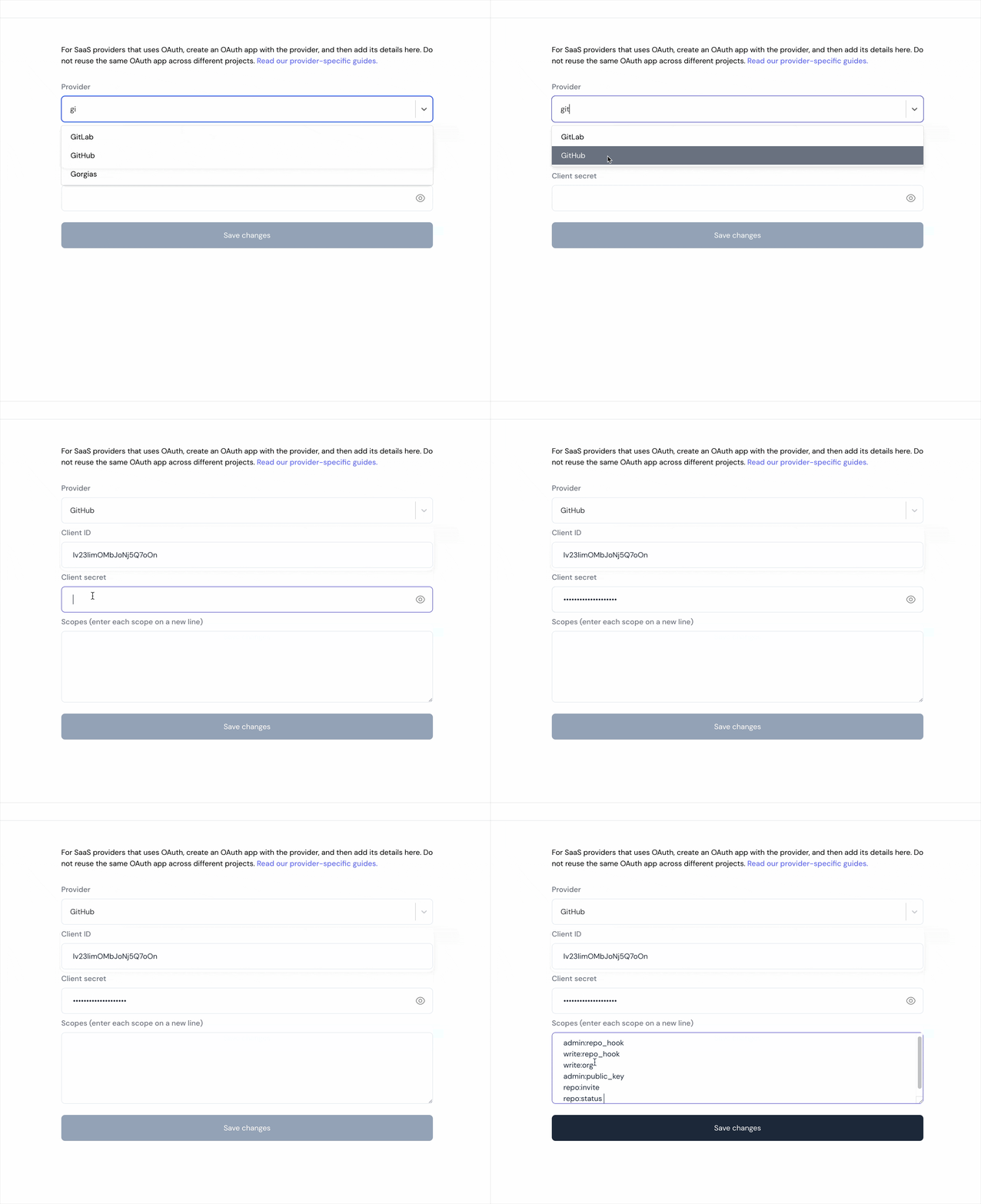 6. Click **Save changes**
## Using the connector
To start integrating with Github:
* Create a manifest file like the [example](https://github.com/amp-labs/samples/blob/main/github/amp.yaml).
* Deploy it using the [amp CLI](/cli/overview).
* If you are using Read Actions, create a [destination](/destinations).
* Embed the [InstallIntegration](/embeddable-ui-components#install-integration) UI component.
* Start using the connector!
* If your integration has [Read Actions](/read-actions), you'll start getting webhook messages.
* If your integration has [Write Actions](/write-actions), you can start making API calls to our Write API.
* If your integration has [Proxy Actions](/proxy-actions), you can start making Proxy API calls.
6. Click **Save changes**
## Using the connector
To start integrating with Github:
* Create a manifest file like the [example](https://github.com/amp-labs/samples/blob/main/github/amp.yaml).
* Deploy it using the [amp CLI](/cli/overview).
* If you are using Read Actions, create a [destination](/destinations).
* Embed the [InstallIntegration](/embeddable-ui-components#install-integration) UI component.
* Start using the connector!
* If your integration has [Read Actions](/read-actions), you'll start getting webhook messages.
* If your integration has [Write Actions](/write-actions), you can start making API calls to our Write API.
* If your integration has [Proxy Actions](/proxy-actions), you can start making Proxy API calls.