> ## Documentation Index
> Fetch the complete documentation index at: https://docs.withampersand.com/llms.txt
> Use this file to discover all available pages before exploring further.
# Fireflies
## What's supported
### Supported actions
This connector supports:
* [Read Actions](/read-actions), including full historic backfill. Please note that incremental read is supported for `transcripts` and `analytics` objects.
* [Write Actions](/write-actions).
* [Proxy Actions](/proxy-actions), using the base URL `https://api.fireflies.ai`.
You will need to use the `graphql` endpoint to make proxy requests. (i.e. `https://proxy.withampersand.com/graphql`)
### Supported Objects
The Fireflies connector supports reading to the following objects:
* [users](https://docs.fireflies.ai/graphql-api/query/users)
* [transcripts](https://docs.fireflies.ai/graphql-api/query/transcripts)
* [bites](https://docs.fireflies.ai/graphql-api/query/bites)
* [userGroups](https://docs.fireflies.ai/graphql-api/query/user-groups)
* [activeMeetings](https://docs.fireflies.ai/graphql-api/query/active-meetings)
* [analytics](https://docs.fireflies.ai/graphql-api/query/analytics)
The Fireflies connector supports writing to the following objects:
* [transcripts](https://docs.fireflies.ai/graphql-api/mutation/delete-transcript)
* [bites](https://docs.fireflies.ai/graphql-api/mutation/create-bite)
* [liveMeetings](https://docs.fireflies.ai/graphql-api/mutation/add-to-live)
* [meetingTitle](https://docs.fireflies.ai/graphql-api/mutation/update-meeting-title)
* [userRole](https://docs.fireflies.ai/graphql-api/mutation/set-user-role)
* [audio](https://docs.fireflies.ai/graphql-api/mutation/upload-audio)
* [meetingPrivacy](https://docs.fireflies.ai/graphql-api/mutation/update-meeting-privacy)
### Example integration
For an example manifest file of a Fireflies integration, visit our [samples repo on Github](https://github.com/amp-labs/samples/blob/main/fireflies/amp.yaml).
## Using the connector
This connector uses **API Key authentication**, so you do not need to configure a Provider App before getting started. (Provider Apps are only required for providers using the **OAuth2 Authorization Code grant type**.)
To integrate with Fireflies:
* Create a manifest file similar to the example above.
* Deploy it using the [amp CLI](/cli/overview).
* Embed the [InstallIntegration](/embeddable-ui-components#install-integration) UI component, which will prompt the customer for an API key.
* Start using the connector!
* If your integration has [Read Actions](/read-actions), you'll start getting webhook messages.
* If your integration has [Write Actions](/write-actions), you can start making API calls to our Write API.
* If your integration has [Proxy Actions](/proxy-actions), you can start making Proxy API calls.
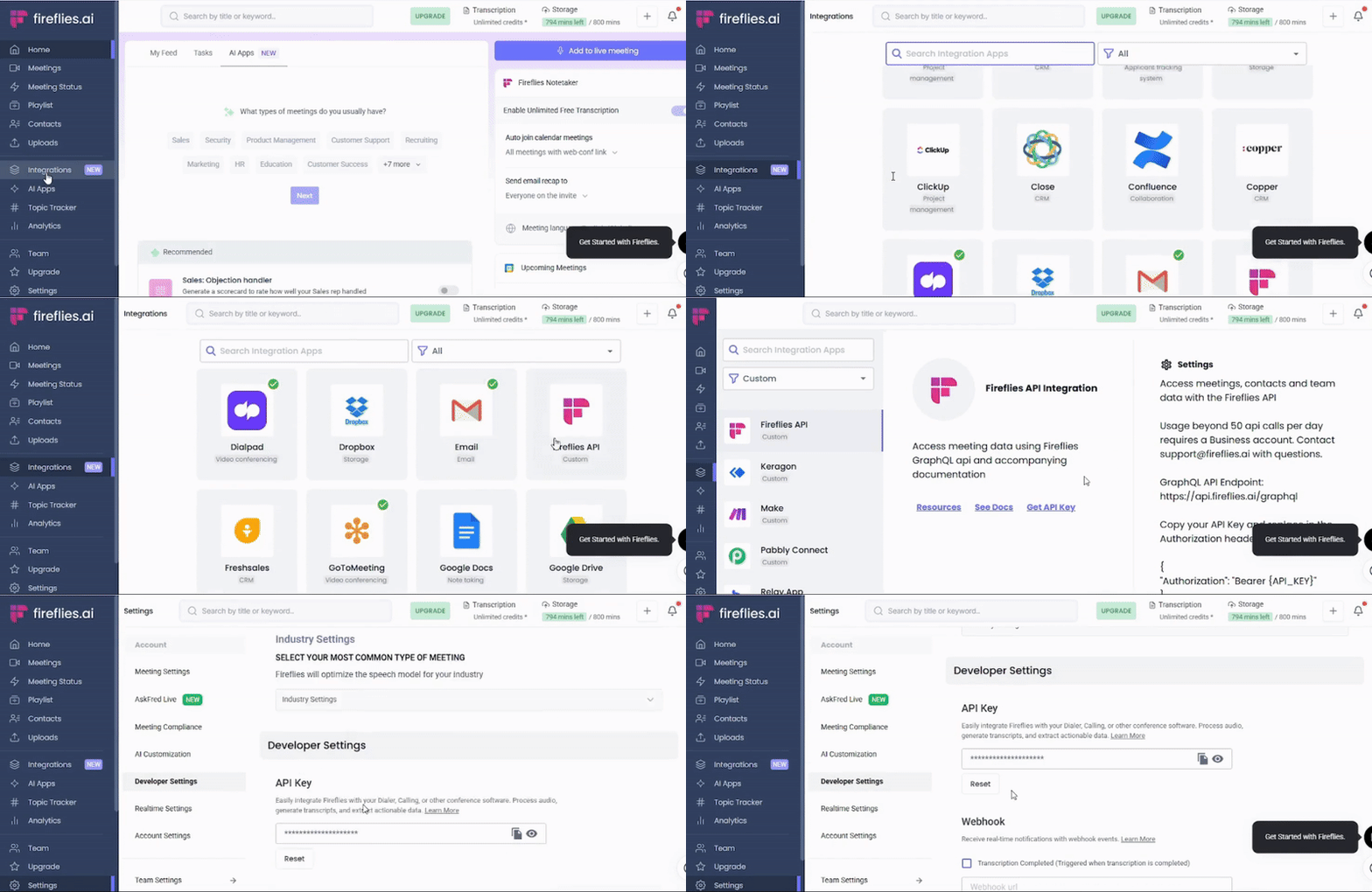
## Creating an API key for Fireflies
1. Log in to your [Fireflies account](https://app.fireflies.ai/login).
2. Navigate to **Integrations** and select **Fireflies API**.
3. click on **Get API Key**