> ## Documentation Index
> Fetch the complete documentation index at: https://docs.withampersand.com/llms.txt
> Use this file to discover all available pages before exploring further.
# Dynamics 365 CRM
## What's Supported
### Supported Actions
This connector supports:
* [Read Actions](/read-actions), including full historic backfill. Please note that incremental read is not supported, a full read of the DynamicsCRM instance will be done for each scheduled read.
* [Write Actions](/write-actions).
* [Proxy Actions](/proxy-actions), using the base URL `https://{{.workspace}}.api.crm.dynamics.com/api/data`.
### Supported Objects
The Microsoft Dynamics 365 CRM connector supports reading from and writing to all available objects in the
Microsoft Dynamics 365 Sales, Customer Service, and Field Service modules,
which together contain more than 1000 tables, some examples include:
* [catalogs](https://learn.microsoft.com/en-us/power-apps/developer/data-platform/webapi/reference/catalog?view=dataverse-latest) ([read-only fields](https://learn.microsoft.com/en-us/power-apps/developer/data-platform/reference/entities/catalog#read-only-columnsattributes), [write-only fields](https://learn.microsoft.com/en-us/power-apps/developer/data-platform/reference/entities/catalog#writable-columnsattributes))
* [contacts](https://learn.microsoft.com/en-us/power-apps/developer/data-platform/webapi/reference/contact?view=dataverse-latest) ([read-only fields](https://learn.microsoft.com/en-us/dynamics365/sales/developer/entities/contact#read-only-columnsattributes), [writable fields](https://learn.microsoft.com/en-us/dynamics365/sales/developer/entities/contact#writable-columnsattributes))
* discounts ([read-only fields](https://learn.microsoft.com/en-us/dynamics365/sales/developer/entities/discount#read-only-columnsattributes), [writable fields](https://learn.microsoft.com/en-us/dynamics365/sales/developer/entities/discount#writable-columnsattributes))
* [goal](https://learn.microsoft.com/en-us/power-apps/developer/data-platform/webapi/reference/goal?view=dataverse-latest) ([read-only fields](https://learn.microsoft.com/en-us/dynamics365/sales/developer/entities/goal#read-only-columnsattributes), [writable fields](https://learn.microsoft.com/en-us/dynamics365/sales/developer/entities/goal#writable-columnsattributes))
* leads ([read-only fields](https://learn.microsoft.com/en-us/dynamics365/sales/developer/entities/lead#read-only-columnsattributes), [writable fields](https://learn.microsoft.com/en-us/dynamics365/sales/developer/entities/lead#writable-columnsattributes))
* lists (Marketing list [read-only fields](https://learn.microsoft.com/en-us/dynamics365/sales/developer/entities/list#read-only-columnsattributes), [writable fields](https://learn.microsoft.com/en-us/dynamics365/sales/developer/entities/list#writable-columnsattributes))
* [msdyn\_aitemplates](https://learn.microsoft.com/en-us/power-apps/developer/data-platform/webapi/reference/msdyn_aitemplate?view=dataverse-latest) ([read-only fields](https://learn.microsoft.com/en-us/power-apps/developer/data-platform/reference/entities/msdyn_aitemplate#read-only-columnsattributes), [write-only fields](https://learn.microsoft.com/en-us/power-apps/developer/data-platform/reference/entities/msdyn_aitemplate#writable-columnsattributes))
* opportunities ([read-only fields](https://learn.microsoft.com/en-us/dynamics365/sales/developer/entities/opportunity#read-only-columnsattributes), [write-only fields](https://learn.microsoft.com/en-us/dynamics365/sales/developer/entities/opportunity#writable-columnsattributes))
* products ([read-only fields](https://learn.microsoft.com/en-us/dynamics365/sales/developer/entities/product#read-only-columnsattributes), [write-only fields](https://learn.microsoft.com/en-us/dynamics365/sales/developer/entities/product#writable-columnsattributes))
* quotes ([read-only fields](https://learn.microsoft.com/en-us/dynamics365/sales/developer/entities/quote#read-only-columnsattributes), [write-only fields](https://learn.microsoft.com/en-us/dynamics365/sales/developer/entities/quote#writable-columnsattributes))
* salesorders ([read-only fields](https://learn.microsoft.com/en-us/dynamics365/sales/developer/entities/salesorder#read-only-columnsattributes), [write-only fields](https://learn.microsoft.com/en-us/dynamics365/sales/developer/entities/salesorder#writable-columnsattributes))
Product‑specific objects are supported:
* Objects in the [Dynamics 365 Sales tables reference](https://learn.microsoft.com/en-us/dynamics365/sales/developer/about-entity-reference)
* Objects in the [Dynamics 365 Customer Service tables reference](https://learn.microsoft.com/en-us/dynamics365/customer-service/develop/reference/about-entity-reference)
* Objects in the [Dynamics 365 Field Service tables reference](https://learn.microsoft.com/en-us/dynamics365/field-service/developer/reference/about-entity-reference)
In addition, the connector supports all the objects in the [Dataverse tables reference](https://learn.microsoft.com/en-us/power-apps/developer/data-platform/reference/about-entity-reference),
which are available in every Dynamics 365 environment regardless of the specific app you have licensed, you can think of them as core out-of-the-box objects.
### Example Integration
For an example manifest file of an Dynamics CRM integration, visit our [samples repo on Github](https://github.com/amp-labs/samples/blob/main/dynamicsCRM/%20amp.yaml).
## Before You Get Started
To connect **Microsoft Dynamics 365 CRM** with **Ampersand**, you will need an active [Microsoft Dynamics 365 CRM Account](https://dynamics.microsoft.com/en-us/crm/).
Once your account is set up, you'll need to register an application in the **Microsoft Entra** developer portal. After registering your app, you will need to configure it and obtain the following credentials:
* **Application (client) ID**
* **Client Secret**
You will then use these credentials to connect Dynamics 365 CRM to Ampersand.
### Create a Microsoft Dynamics 365 CRM Account
Here's how you can sign up for a Microsoft Dynamics 365 CRM account:
* Go to the [Microsoft Dynamics 365 CRM website](https://www.microsoft.com/en-us/dynamics-365/free-trial) and sign up for a new account or start a free trial.
* If you don't have a **Microsoft Entra** (formerly Azure Active Directory) tenant, follow the instructions in [Set up Microsoft Entra ID access for your Developer Site](https://learn.microsoft.com/en-us/entra/identity-platform/quickstart-create-new-tenant) to associate your Microsoft 365 subscription with an Azure subscription.
### Register a Microsoft Dynamics 365 CRM App
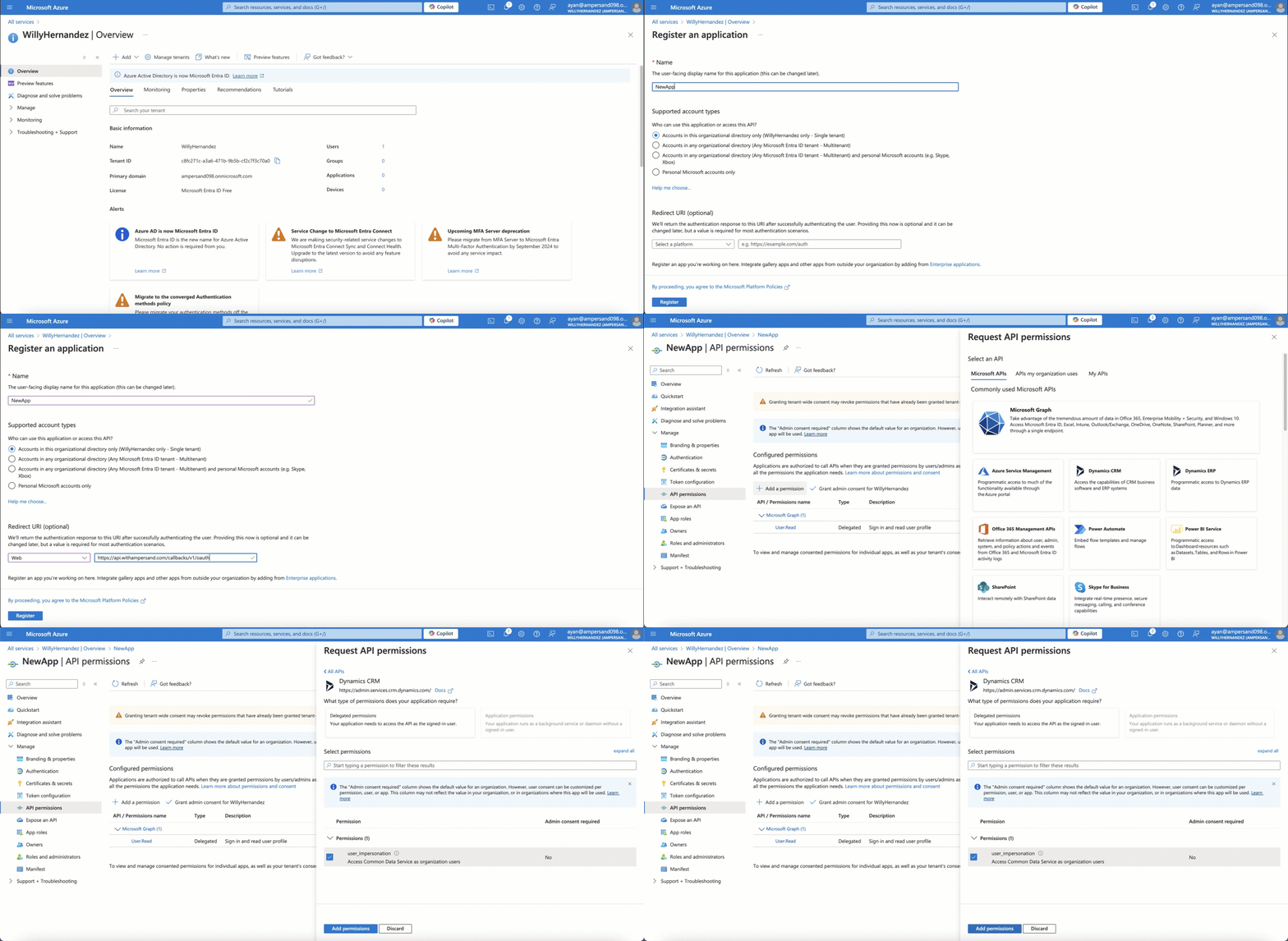
Follow the steps below to register a **Microsoft Dynamics 365 CRM** app:
1. Go to the [Microsoft Azure portal](https://portal.azure.com/#home) and sign in with an administrator account from your Microsoft 365 subscription.
2. On the Home page, under **Azure services**, select **Microsoft Entra ID**.
3. In the left navigation pane, select **App registrations**.
4. Click **+ New registration**.
5. Enter Application Details:
* **Name**: Enter a meaningful name for the application.
* **Supported account types**: Select **Accounts in any or this organizational directory**.
6. In the **Redirect URIs** section, enter the **Ampersand** redirect URL: `https://api.withampersand.com/callbacks/v1/oauth`.
7. In the left navigation panel, select **API permissions > Add a permission**.
8. Under the **APIs my organization uses** tab, select **Microsoft Dynamics 365 CRM**.
9. Select the applicable permissions.
 ### Obtain Client ID and Client Secret
1. On the **Overview** page, you'll find the **Application (client) ID**. Copy it.
2. In the left navigation pane, select **Certificates & secrets**.
3. Click **+ New client secret**, provide a description and expiration period, then click **Add**. Copy the client secret value.
## Add Your Dynamics 365 CRM App Info to Ampersand
1. Log in to your [Ampersand Dashboard](https://dashboard.withampersand.com).
2. Select the project where you want to create a Dynamics 365 CRM integration.
### Obtain Client ID and Client Secret
1. On the **Overview** page, you'll find the **Application (client) ID**. Copy it.
2. In the left navigation pane, select **Certificates & secrets**.
3. Click **+ New client secret**, provide a description and expiration period, then click **Add**. Copy the client secret value.
## Add Your Dynamics 365 CRM App Info to Ampersand
1. Log in to your [Ampersand Dashboard](https://dashboard.withampersand.com).
2. Select the project where you want to create a Dynamics 365 CRM integration.
 3. Select **Provider Apps**.
4. Select **Dynamics 365** from the **Provider** list.
5. Enter the previously obtained **Client ID** in the **Client ID** field and the **Client Secret** in the **Client Secret** field.
3. Select **Provider Apps**.
4. Select **Dynamics 365** from the **Provider** list.
5. Enter the previously obtained **Client ID** in the **Client ID** field and the **Client Secret** in the **Client Secret** field.
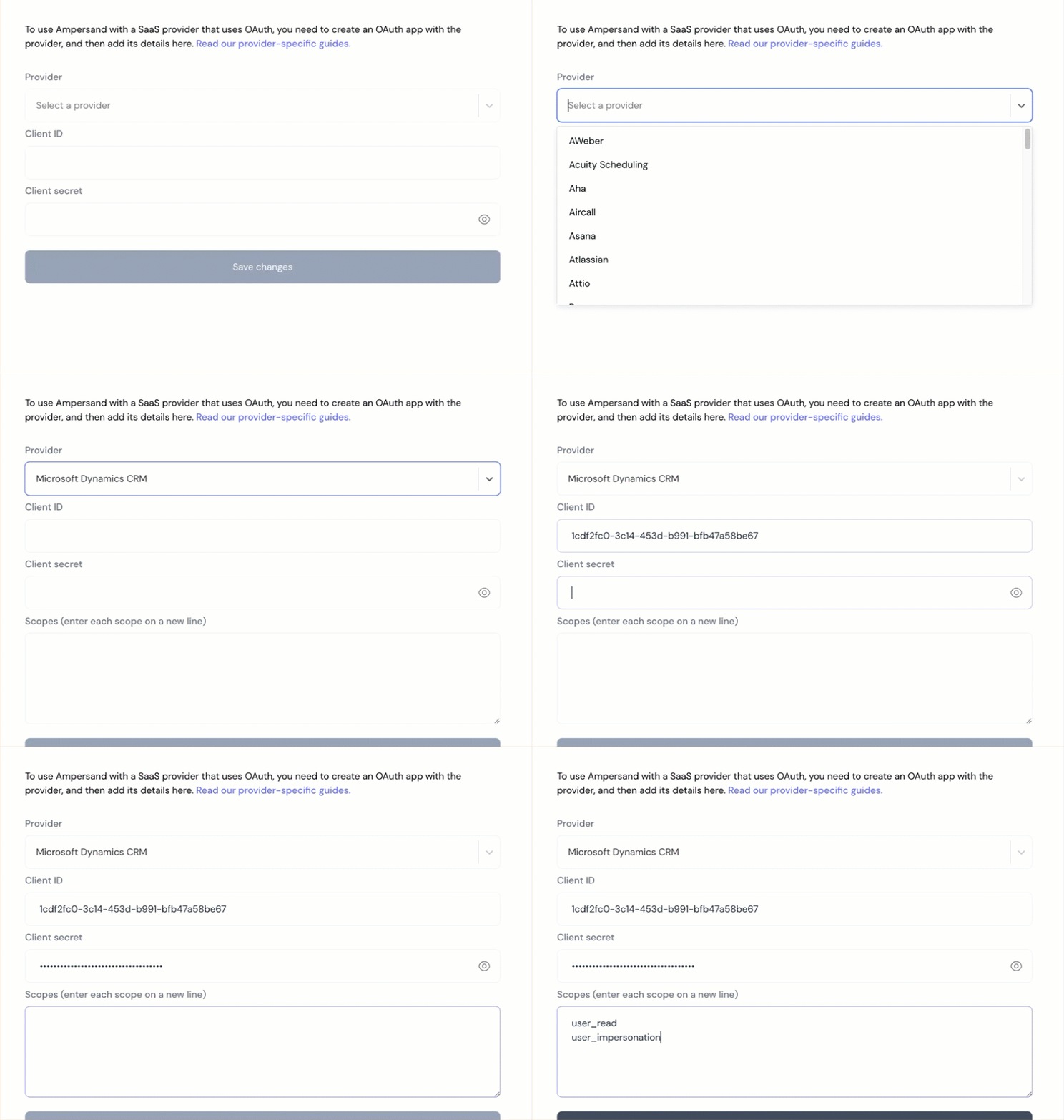 6. In the **Scopes** field, enter the scopes your integration requires.
You must include `offline_access` in the Scopes field. Without it, Ampersand will not receive a refresh token and your customers will need to reauthenticate each time their access token expires.
Dynamics requires certain scopes to have the resource prefixed to the scope, which in this case is the consumer's instance URL. Ampersand will prefix the instance URL for you, so you only need to provide the scope name.
For example, if you provide `.default` as the scope name and your customer's Dynamics instance URL is `https://org.crm.dynamics.com`, then Ampersand will transform this scope to be `https://org.crm.dynamics.com/.default`.
7. Click **Save Changes**.
## Using the connector
To start integrating with Dynamics CRM:
* Create a manifest file like the [example](https://github.com/amp-labs/samples/blob/main/dynamicsCRM/%20amp.yaml).
* Deploy it using the [amp CLI](/cli/overview).
* If you are using Read Actions, create a [destination](/destinations).
* Embed the [InstallIntegration](/embeddable-ui-components#install-integration) UI component.
* Start using the connector!
* If your integration has [Read Actions](/read-actions), you'll start getting webhook messages.
* If your integration has [Write Actions](/write-actions), you can start making API calls to our Write API.
* If your integration has [Proxy Actions](/proxy-actions), you can start making Proxy API calls.
6. In the **Scopes** field, enter the scopes your integration requires.
You must include `offline_access` in the Scopes field. Without it, Ampersand will not receive a refresh token and your customers will need to reauthenticate each time their access token expires.
Dynamics requires certain scopes to have the resource prefixed to the scope, which in this case is the consumer's instance URL. Ampersand will prefix the instance URL for you, so you only need to provide the scope name.
For example, if you provide `.default` as the scope name and your customer's Dynamics instance URL is `https://org.crm.dynamics.com`, then Ampersand will transform this scope to be `https://org.crm.dynamics.com/.default`.
7. Click **Save Changes**.
## Using the connector
To start integrating with Dynamics CRM:
* Create a manifest file like the [example](https://github.com/amp-labs/samples/blob/main/dynamicsCRM/%20amp.yaml).
* Deploy it using the [amp CLI](/cli/overview).
* If you are using Read Actions, create a [destination](/destinations).
* Embed the [InstallIntegration](/embeddable-ui-components#install-integration) UI component.
* Start using the connector!
* If your integration has [Read Actions](/read-actions), you'll start getting webhook messages.
* If your integration has [Write Actions](/write-actions), you can start making API calls to our Write API.
* If your integration has [Proxy Actions](/proxy-actions), you can start making Proxy API calls.