> ## Documentation Index
> Fetch the complete documentation index at: https://docs.withampersand.com/llms.txt
> Use this file to discover all available pages before exploring further.
# Blackbaud
## What's supported
### Supported actions
This connector supports:
* [Read Actions](/read-actions), Please note pagination is not supported because the functionality of getting the next page is missed by the blackbaud engineering team. The team has acknowledged this gap and plans to address it in a future service pack release.
* [Write Actions](/write-actions).
* [Proxy Actions](/proxy-actions), using the base URL [https://api.sky.blackbaud.com](https://api.sky.blackbaud.com).
### Supported Objects
The Blackbaud connector supports writing to and reading from the following objects:
* [crm-adnmg/batches](https://developer.sky.blackbaud.com/api#api=crm-adnmg\&operation=CreateBatch) (write)
* [crm-adnmg/batches/revenue](https://developer.sky.blackbaud.com/api#api=crm-adnmg\&operation=CreateRevenueBatchRow) (write)
* [crm-adnmg/batchtemplates](https://developer.sky.blackbaud.com/api#api=crm-adnmg\&operation=ListBatchTemplates) (read)
* [crm-adnmg/businessprocess/launch](https://developer.sky.blackbaud.com/api#api=crm-adnmg\&operation=LaunchBusinessProcess) (write)
* [crm-adnmg/businessprocessinstances](https://developer.sky.blackbaud.com/api#api=crm-adnmg\&operation=ListBusinessProcessInstances) (read)
* [crm-adnmg/businessprocessparameterset](https://developer.sky.blackbaud.com/api#api=crm-adnmg\&operation=SearchBusinessProcessParameters) (read)
* [crm-adnmg/businessprocessstatus](https://developer.sky.blackbaud.com/api#api=crm-adnmg\&operation=ListBusinessProcessStatuses) (read)
* [crm-adnmg/currencies](https://developer.sky.blackbaud.com/api#api=crm-adnmg\&operation=ListCurrencies) (read )
* [crm-adnmg/notifications](https://developer.sky.blackbaud.com/api#api=crm-adnmg\&operation=CreateNotification) (write)
* [crm-adnmg/sites](https://developer.sky.blackbaud.com/api#api=crm-adnmg\&operation=SearchSites) (read)
* [crm-conmg/addresses](https://developer.sky.blackbaud.com/api#api=crm-conmg\&operation=CreateConstituentAddress) (write)
* [crm-conmg/alternatelookupids](https://developer.sky.blackbaud.com/api#api=crm-conmg\&operation=CreateConstituentAlternateLookupId) (write)
* [crm-conmg/constituentappeals](https://developer.sky.blackbaud.com/api#api=crm-conmg\&operation=CreateConstituentAppeal) (write)
* [crm-conmg/constituentappealresponses](https://developer.sky.blackbaud.com/api#api=crm-conmg\&operation=CreateConstituentAppealResponse) (write)
* [crm-conmg/constituentattributes](https://developer.sky.blackbaud.com/api#api=crm-conmg\&operation=CreateConstituentAttribute) (write)
* [crm-conmg/constituentcorrespondencecode](https://developer.sky.blackbaud.com/api#api=crm-conmg\&operation=CreateConstituentCorrespondenceCode) (write)
* [crm-conmg/constituentnotes](https://developer.sky.blackbaud.com/api#api=crm-conmg\&operation=CreateConstituentNote) (write)
* [crm-conmg/constituents](https://developer.sky.blackbaud.com/api#api=crm-conmg\&operation=CreateConstituent) (write)
* [crm-conmg/educationalhistories](https://developer.sky.blackbaud.com/api#api=crm-conmg\&operation=CreateEducation) (write)
* [crm-conmg/emailaddresses](https://developer.sky.blackbaud.com/api#api=crm-conmg\&operation=CreateConstituentEmailAddress) (write)
* [crm-conmg/fundraisers](https://developer.sky.blackbaud.com/api#api=crm-conmg\&operation=CreateConstituentFundraiser) (write)
* [crm-conmg/individuals](https://developer.sky.blackbaud.com/api#api=crm-conmg\&operation=CreateIndividual) (write)
* [crm-conmg/interaction](https://developer.sky.blackbaud.com/api#api=crm-conmg\&operation=CreateConstituentInteraction) (write)
* [crm-conmg/mergetwoconstituents](https://developer.sky.blackbaud.com/api#api=crm-conmg\&operation=CreateMergeTwoConstituents) (write)
* [crm-conmg/organizations](https://developer.sky.blackbaud.com/api#api=crm-conmg\&operation=CreateOrganization) (write)
* [crm-conmg/phones](https://developer.sky.blackbaud.com/api#api=crm-conmg\&operation=CreateConstituentPhone) (write)
* [crm-conmg/relationshipjobsinfo](https://developer.sky.blackbaud.com/api#api=crm-conmg\&operation=CreateRelationshipJobInfo) (write)
* [crm-conmg/solicitcodes](https://developer.sky.blackbaud.com/api#api=crm-conmg\&operation=CreateConstituentSolicitCode) (write)
* [crm-conmg/tribute](https://developer.sky.blackbaud.com/api#api=crm-conmg\&operation=CreateTribute) (write)
* [crm-evtmg/events](https://developer.sky.blackbaud.com/api#api=crm-evtmg\&operation=SearchEvents) (read, write)
* [crm-evtmg/locations](https://developer.sky.blackbaud.com/api#api=crm-evtmg\&operation=LocationSearch) (read, write)
* [crm-evtmg/registrants](https://developer.sky.blackbaud.com/api#api=crm-evtmg\&operation=SearchEventRegistrants) (read, write)
* [crm-evtmg/registrationoptions](https://developer.sky.blackbaud.com/api#api=crm-evtmg\&operation=CreateEventRegistrationOption) (write)
* [crm-evtmg/registrationtypes](https://developer.sky.blackbaud.com/api#api=crm-evtmg\&operation=SearchEventRegistrationTypes) (read, write)
* [crm-fndmg/designations/hierarchies](https://developer.sky.blackbaud.com/api#api=crm-fndmg\&operation=ListDesignationHierarchies) (read)
* [crm-fndmg/educationalhistory](https://developer.sky.blackbaud.com/api#api=crm-fndmg\&operation=SearchEducationalHistories) (read )
* [crm-fndmg/fundraisingpurposes](https://developer.sky.blackbaud.com/api#api=crm-fndmg\&operation=SearchFundraisingPurposes) (read, write)
* [crm-fndmg/fundraisingpurposerecipients](https://developer.sky.blackbaud.com/api#api=crm-fndmg\&operation=SearchFundraisingPurposeRecipients) (read, write)
* [crm-fndmg/fundraisingpurposetypes](https://developer.sky.blackbaud.com/api#api=crm-fndmg\&operation=ListFundraisingPurposeTypes) (read)
* [crm-mktmg/appeals](https://developer.sky.blackbaud.com/api#api=crm-mktmg\&operation=SearchMarketingAppeals) (read, write)
* [crm-mktmg/correspondencecodes](https://developer.sky.blackbaud.com/api#api=crm-mktmg\&operation=ListCorrespondenceCodes) (read, write)
* [crm-mktmg/responsecategories](https://developer.sky.blackbaud.com/api#api=crm-mktmg\&operation=CreateResponseCategory) (write)
* [crm-mktmg/segments](https://developer.sky.blackbaud.com/api#api=crm-mktmg\&operation=CreateMarketingSegment) (write)
* [crm-mktmg/segments/recordsources](https://developer.sky.blackbaud.com/api#api=crm-mktmg\&operation=ListMarketingSegments) (read)
* [crm-mktmg/solicitcodes](https://developer.sky.blackbaud.com/api#api=crm-mktmg\&operation=ListMarketingSolicitCodes) (read)
* [crm-prsmg/prospectcontactreports](https://developer.sky.blackbaud.com/api#api=crm-prsmg\&operation=CreateProspectContactReport) (write)
* [crm-prsmg/prospectmanagers](https://developer.sky.blackbaud.com/api#api=crm-prsmg\&operation=SearchProspectManagers) (read)
* [crm-prsmg/prospectopportunities](https://developer.sky.blackbaud.com/api#api=crm-prsmg\&operation=SearchProspectOpportunities) (read, write)
* [crm-prsmg/prospectplans](https://developer.sky.blackbaud.com/api#api=crm-prsmg\&operation=CreateProspectPlan) (write)
* [crm-prsmg/prospects](https://developer.sky.blackbaud.com/api#api=crm-prsmg\&operation=CreateProspect) (read, write)
* [crm-prsmg/prospectsconstituency](https://developer.sky.blackbaud.com/api#api=crm-prsmg\&operation=CreateProspectConstituency) (write)
* [crm-prsmg/prospectsegmentations](https://developer.sky.blackbaud.com/api#api=crm-prsmg\&operation=CreateProspectManager) (write)
* [crm-prsmg/prospectsteps](https://developer.sky.blackbaud.com/api#api=crm-prsmg\&operation=CreateProspectSteps) (write)
* [crm-prsmg/stewardshipplans](https://developer.sky.blackbaud.com/api#api=crm-prsmg\&operation=CreateStewardshipPlan) (write)
* [crm-prsmg/stewardshipplansteps](https://developer.sky.blackbaud.com/api#api=crm-prsmg\&operation=SearchStewardshipPlanSteps) (read, write)
* [crm-revmg/payments](https://developer.sky.blackbaud.com/api#api=crm-revmg\&operation=SearchRevenuePayments) (read, write)
* [crm-revmg/recurringgifts](https://developer.sky.blackbaud.com/api#api=crm-revmg\&operation=CreateRecurringGift) (write)
* [crm-revmg/revenuenotes](https://developer.sky.blackbaud.com/api#api=crm-revmg\&operation=CreateRevenueNote) (write)
* [crm-revmg/revenuetransactions](https://developer.sky.blackbaud.com/api#api=crm-revmg\&operation=SearchRevenueTransactions) (read)
* [crm-volmg/jobs](https://developer.sky.blackbaud.com/api#api=crm-volmg\&operation=SearchJobs) (read, write)
* [crm-volmg/occurrences](https://developer.sky.blackbaud.com/api#api=crm-volmg\&operation=SearchJobOccurrences) (read, write)
* [crm-volmg/volunteerassignments](https://developer.sky.blackbaud.com/api#api=crm-volmg\&operation=SearchAssignments) (read, write)
* [crm-volmg/volunteers](https://developer.sky.blackbaud.com/api#api=crm-volmg\&operation=SearchVolunteers) (read, write)
* [crm-volmg/volunteerschedules](https://developer.sky.blackbaud.com/api#api=crm-volmg\&operation=CreateVolunteerSchedule) (write)
## Before You Get Started
To connect Blackbaud with Ampersand, you need [a Blackbaud Account](https://developer.blackbaud.com/).
Once your account is created, you'll need to create an app in Blackbaud and obtain the following credentials from your app:
* Application ID
* Application secret
You will then use these credentials to connect your application to Ampersand.
### Creating a Blackbaud App
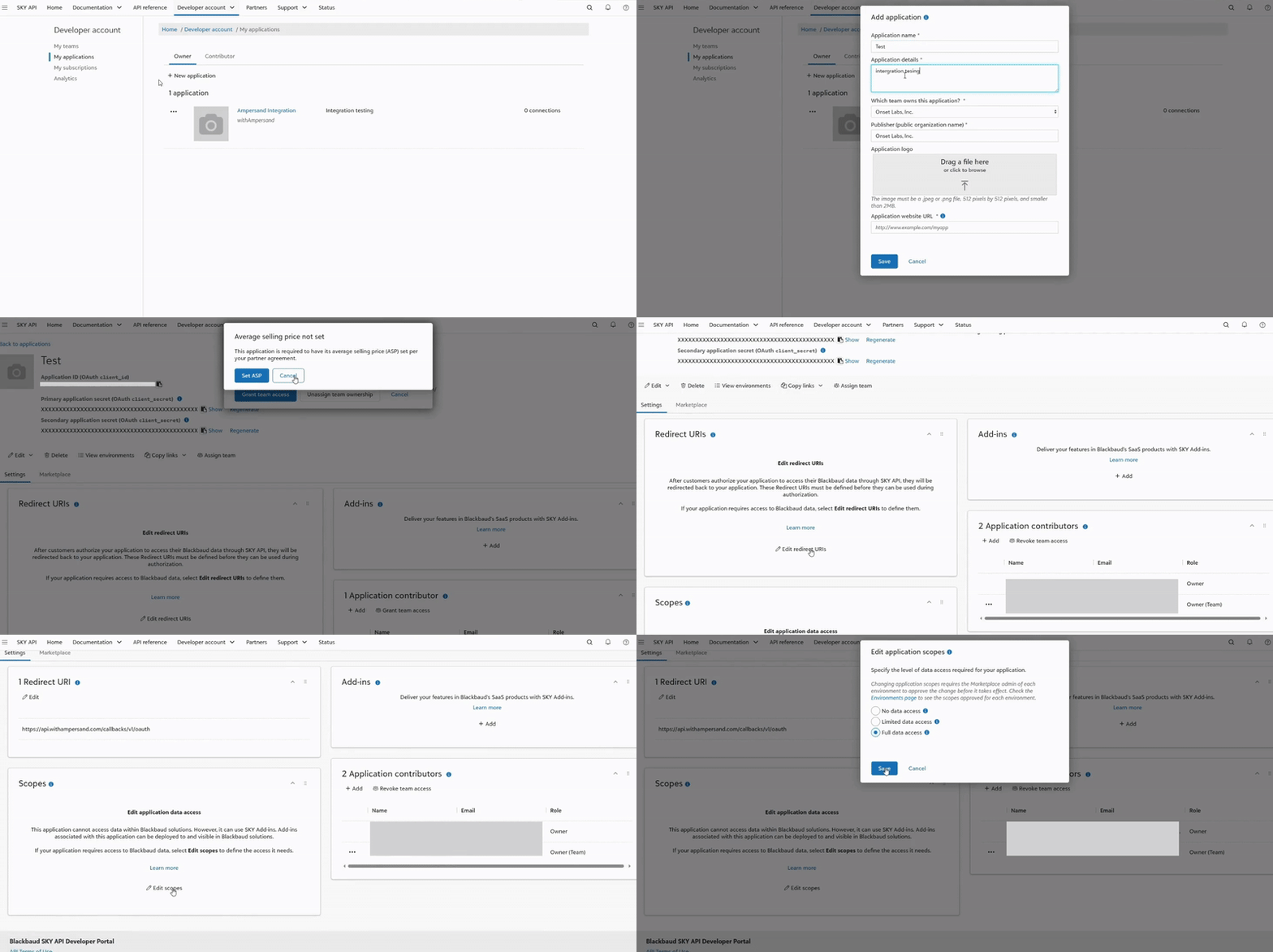
Follow the steps below to create a Blackbaud app.
1. Log in to your [Blackbaud](https://developer.blackbaud.com/) account.
2. After logging in, navigate to **SKY API -> My account**.
3. Click **My applications -> New application**
4. In the **Application name** field, enter the name of your application and provide additional details in the **Application details** section.
5. In the **Application website URL** field, enter your website URL, then click **Save**.
6. Under **Settings**, click **Edit redirect URIs** in the **Redirect URIs** section. Add the required redirect URIs and click **Save**.
7. Under **Settings**, click **Edit scopes** in the **Scopes** section. Select the required scopes and click **Save**.
 ### Example integration
For an example manifest file of an Blackbaud integration, visit our [samples repo on Github](https://github.com/amp-labs/samples/blob/main/blackbaud/amp.yaml).
## Add Your Blackbaud App Info to Ampersand
1. Log in to your [Ampersand Dashboard](https://dashboard.withampersand.com).
2. Select the project where you want to create a Blackbaud integration.
### Example integration
For an example manifest file of an Blackbaud integration, visit our [samples repo on Github](https://github.com/amp-labs/samples/blob/main/blackbaud/amp.yaml).
## Add Your Blackbaud App Info to Ampersand
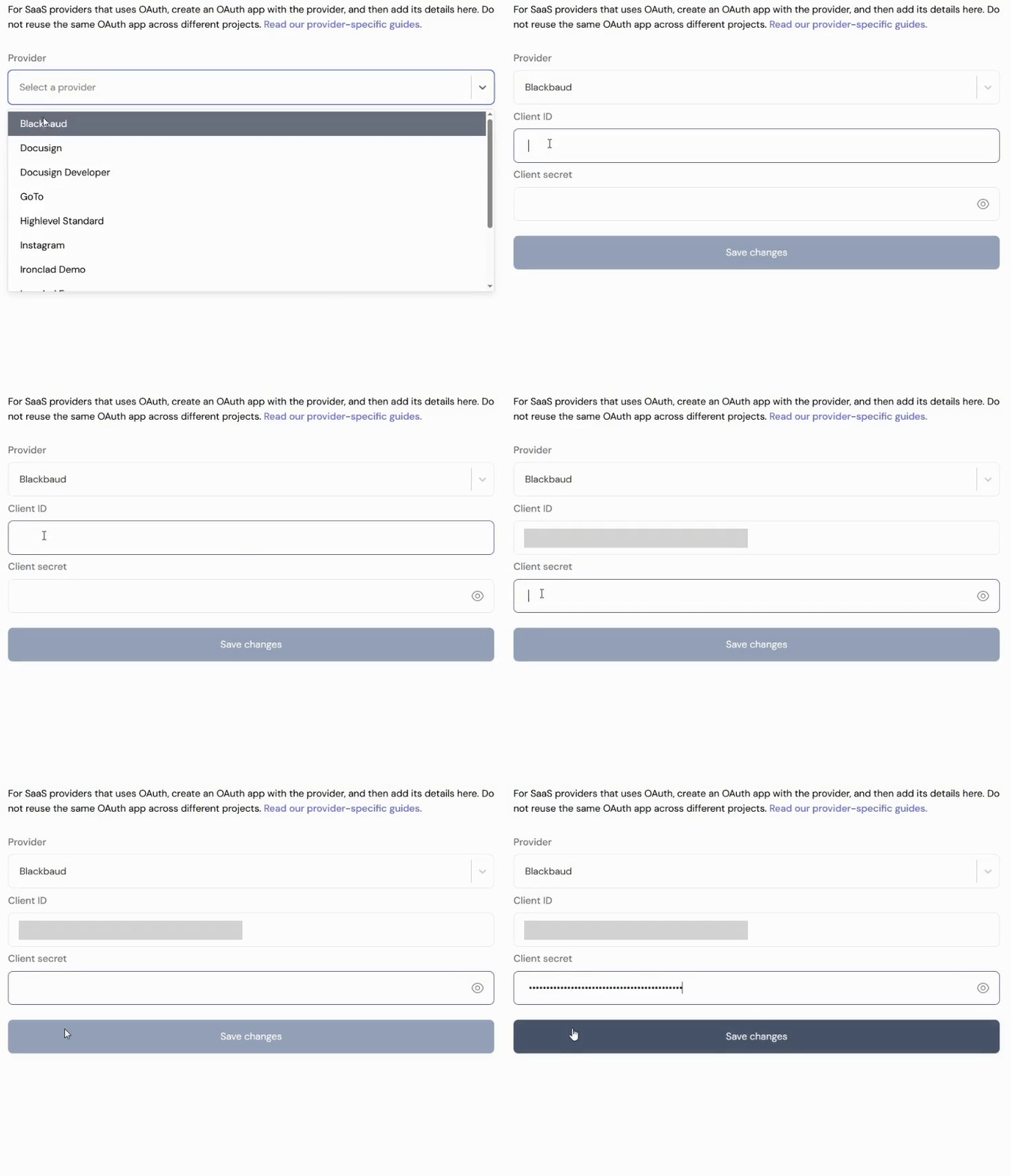
1. Log in to your [Ampersand Dashboard](https://dashboard.withampersand.com).
2. Select the project where you want to create a Blackbaud integration.
 3. Select **Provider Apps**.
4. Select Blackbaud from the **Provider** list.
5. Enter the previously obtained Application ID in the **Client ID** field, the Application Secret in the **Client Secret** field.
3. Select **Provider Apps**.
4. Select Blackbaud from the **Provider** list.
5. Enter the previously obtained Application ID in the **Client ID** field, the Application Secret in the **Client Secret** field.
 To start integrating with Blackbaud:
* Create a manifest file using the [example](https://github.com/amp-labs/samples/blob/main/blackbaud/amp.yaml).
* Deploy it using the [amp CLI](/cli/overview).
* If you are using Read Actions, create a [destination](/destinations).
* Embed the [InstallIntegration](/embeddable-ui-components#install-integration) UI component.
* Start using the connector!
* If your integration has [Read Actions](/read-actions), you'll start getting webhook messages.
* If your integration has [Write Actions](/write-actions), you can start making API calls to our Write API.
* If your integration has [Proxy Actions](/proxy-actions), you can start making Proxy API calls.
To start integrating with Blackbaud:
* Create a manifest file using the [example](https://github.com/amp-labs/samples/blob/main/blackbaud/amp.yaml).
* Deploy it using the [amp CLI](/cli/overview).
* If you are using Read Actions, create a [destination](/destinations).
* Embed the [InstallIntegration](/embeddable-ui-components#install-integration) UI component.
* Start using the connector!
* If your integration has [Read Actions](/read-actions), you'll start getting webhook messages.
* If your integration has [Write Actions](/write-actions), you can start making API calls to our Write API.
* If your integration has [Proxy Actions](/proxy-actions), you can start making Proxy API calls.