> ## Documentation Index
> Fetch the complete documentation index at: https://docs.withampersand.com/llms.txt
> Use this file to discover all available pages before exploring further.
# Bentley
## What's supported
### Supported actions
This connector supports:
* [Read Actions](/read-actions), including full historic backfill. Please note that incremental reading is only supported for `contextcapture/jobs`, `reality-analysis/jobs`, and `realityconversion/jobs`. For all other objects, a full read of the Bentley instance will be done per scheduled read.
* [Write Actions](/write-actions).
* [Proxy Actions](/proxy-actions), using the base URL `https://api.bentley.com`.
### Supported objects
The Bentley connector supports reading from the following objects:
* [contextcapture/jobs](https://developer.bentley.com/apis/contextcapture/operations/jobs-get-all/) (incremental read)
* [curated-content/cesium](https://developer.bentley.com/apis/cesium-curated-content/operations/list-content/)
* [edfs/packages](https://developer.bentley.com/apis/edfs/operations/subscribed-packages-get/)
* [itwins](https://developer.bentley.com/apis/itwins/operations/get-my-itwins/)
* [itwins/exports](https://developer.bentley.com/apis/itwins/operations/get-my-exports/)
* [itwins/favorites](https://developer.bentley.com/apis/itwins/operations/get-my-favorite-itwins/)
* [itwins/recents](https://developer.bentley.com/apis/itwins/operations/get-my-recently-used-itwins/)
* [library/applications](https://developer.bentley.com/apis/library/operations/get-applications/)
* [library/brands](https://developer.bentley.com/apis/library/operations/get-brands/)
* [library/catalogs](https://developer.bentley.com/apis/library/operations/get-catalogs/)
* [library/categories](https://developer.bentley.com/apis/library/operations/get-categories/)
* [library/components](https://developer.bentley.com/apis/library/operations/get-components/)
* [library/manufacturers](https://developer.bentley.com/apis/library/operations/get-manufacturers/)
* [reality-analysis/detectors](https://developer.bentley.com/apis/reality-analysis/operations/detectors-get-all/)
* [reality-analysis/files](https://developer.bentley.com/apis/reality-analysis/operations/files-get-all/)
* [reality-analysis/jobs](https://developer.bentley.com/apis/reality-analysis/operations/jobs-get-all/) (incremental read)
* [reality-management/reality-data](https://developer.bentley.com/apis/reality-management/operations/get-all-reality-data/)
* [realityconversion/jobs](https://developer.bentley.com/apis/realityconversion/operations/jobs-get-all/) (incremental read)
* [webhooks](https://developer.bentley.com/apis/webhooks-v2/operations/get-webhooks/)
The Bentley connector supports writing to the following objects:
* [contextcapture/jobs](https://developer.bentley.com/apis/contextcapture/operations/jobs-create/)
* [contextcapture/workspaces](https://developer.bentley.com/apis/contextcapture/operations/workspaces-create/)
* [itwins](https://developer.bentley.com/apis/itwins/operations/create-itwin/)
* [itwins/exports](https://developer.bentley.com/apis/itwins/operations/create-export/)
* [grouping-and-mapping/datasources/imodel-mappings](https://developer.bentley.com/apis/grouping-and-mapping/operations/create-mapping/)
* [imodels](https://developer.bentley.com/apis/imodels-v2/operations/update-imodel/)
* [library/applications](https://developer.bentley.com/apis/library/operations/create-application/)
* [library/catalogs](https://developer.bentley.com/apis/library/operations/create-catalog/)
* [library/categories](https://developer.bentley.com/apis/library/operations/create-category/)
* [library/components](https://developer.bentley.com/apis/library/operations/create-component/)
* [library/manufacturers](https://developer.bentley.com/apis/library/operations/create-manufacturer/)
* [named-groups](https://developer.bentley.com/apis/named-groups/operations/create-group/)
* [savedviews/groups](https://developer.bentley.com/apis/savedviews/operations/create-group/)
* [savedviews](https://developer.bentley.com/apis/savedviews/operations/create-savedview/)
* [savedviews/tags](https://developer.bentley.com/apis/savedviews/operations/create-tag/)
* [schedules](https://developer.bentley.com/apis/schedules/operations/post-schedule/)
* [reality-management/reality-data](https://developer.bentley.com/apis/reality-management/operations/create-reality-data/)
* [reality-analysis/detectors](https://developer.bentley.com/apis/reality-analysis/operations/detectors-create/)
* [reality-analysis/jobs](https://developer.bentley.com/apis/reality-analysis/operations/jobs-create/)
* [realityconversion/jobs](https://developer.bentley.com/apis/realityconversion/operations/jobs-create/)
* [insights/reporting/reports](https://developer.bentley.com/apis/insights/operations/create-report/)
* [insights/carbon-calculation/ec3/configurations](https://developer.bentley.com/apis/carbon-calculation/operations/create-ec3-configuration/)
* [insights/carbon-calculation/ec3/jobs](https://developer.bentley.com/apis/carbon-calculation/operations/create-ec3-job/)
* [insights/carbon-calculation/oneclicklca/jobs](https://developer.bentley.com/apis/carbon-calculation/operations/create-oneclicklca-job/)
* [changedelements/comparisonjob](https://developer.bentley.com/apis/changed-elements-v2/operations/create-comparison-job/)
* [forms](https://developer.bentley.com/apis/forms-v2/operations/create-form-data/)
* [export/connections](https://developer.bentley.com/apis/export/operations/create-export-connection/)
* [synchronization/imodels/manifestconnections](https://developer.bentley.com/apis/synchronization/operations/create-manifest-connection/)
* [synchronization/pnidtoitwin/inferences](https://developer.bentley.com/apis/pnid-to-itwin-v2/operations/create-inference/)
* [synchronization/imodels/storageconnections](https://developer.bentley.com/apis/synchronization/operations/create-storage-connection/)
* [transformations](https://developer.bentley.com/apis/transformations/operations/create-transformation/)
* [transformations/configurations/createfork](https://developer.bentley.com/apis/transformations/operations/createfork/)
* [mesh-export](https://developer.bentley.com/apis/mesh-export/operations/start-export/)
* [webhooks](https://developer.bentley.com/apis/webhooks-v2/operations/create-webhook/)
### Example integration
For an example manifest file of a Bentley integration, visit our [samples repo on Github](https://github.com/amp-labs/samples/blob/main/bentley/amp.yaml).
## Before you get started
To connect Bentley with Ampersand, you will need [a Bentley Account](https://developer.bentley.com).
Once your account is created, you'll need to register an application in the Bentley developer portal and obtain the following credentials:
* Client ID
* Client Secret
* Scopes
You will then use these credentials to connect your application to Ampersand.
### Creating a Bentley app
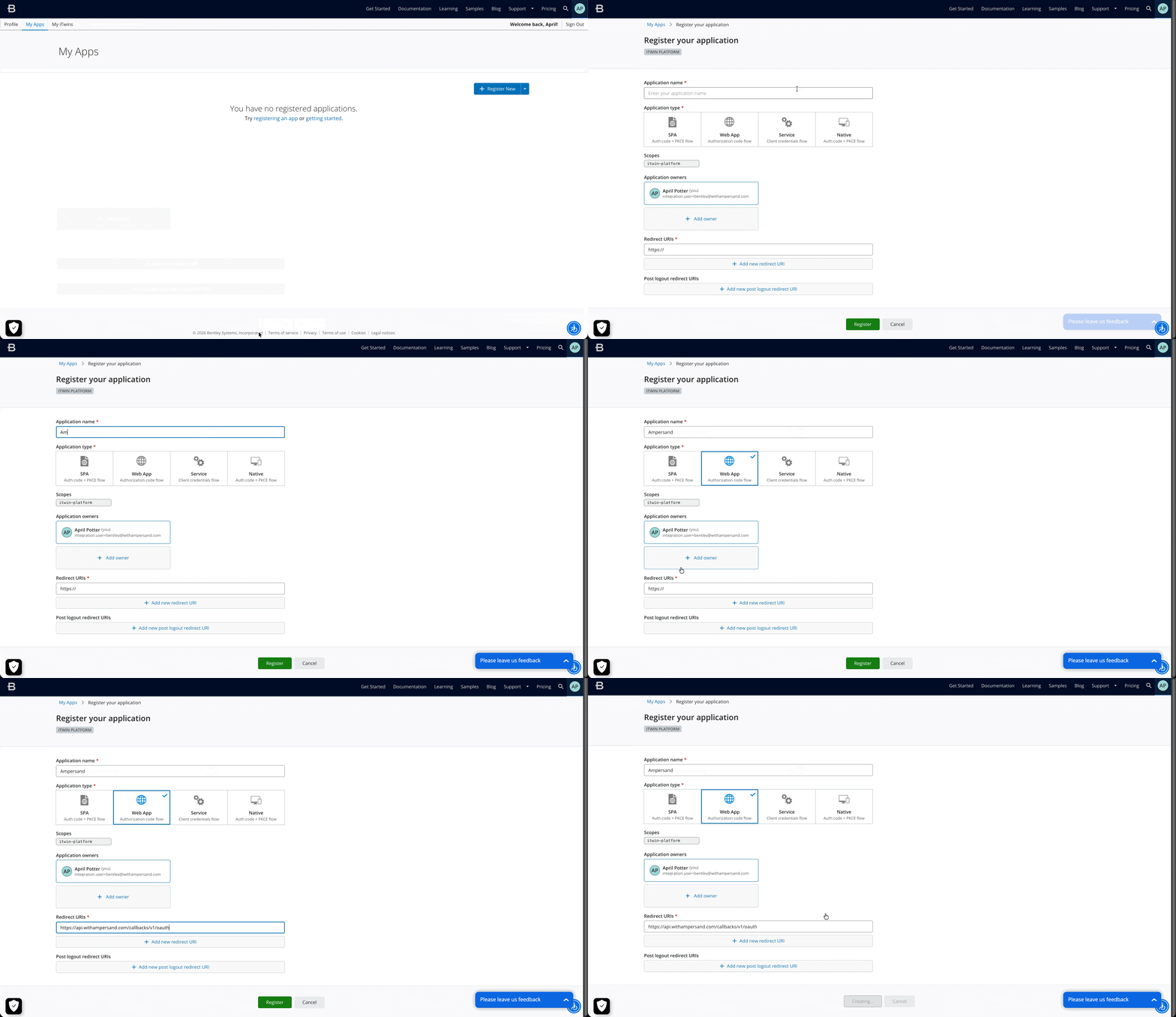
1. Log in to the [Bentley Developer Portal](https://developer.bentley.com).
2. Navigate to **[My Apps](https://developer.bentley.com/my-apps/)** and click **Register New**.
3. Enter the following details for your application:
* **Application Name**: The name of your app.
* **Application Type**: Select **Web App** (for Authorization Code grant).
4. Under **Redirect URIs**, add: `https://api.withampersand.com/callbacks/v1/oauth`
5. Select the scopes required for your integration.
6. Click **Register**. Note the **Client ID** and **Client Secret**. You will need these to connect your app to Ampersand.
 ### Add your Bentley app info to Ampersand
1. Log in to your [Ampersand Dashboard](https://dashboard.withampersand.com).
2. Select the project where you want to create a Bentley integration.
### Add your Bentley app info to Ampersand
1. Log in to your [Ampersand Dashboard](https://dashboard.withampersand.com).
2. Select the project where you want to create a Bentley integration.
 3. Select **Provider Apps**.
4. Select **Bentley** from the **Provider** list.
5. Enter the **Client ID** and **Client Secret** obtained from your Bentley app.
6. Enter the scopes configured for your application in Bentley.
3. Select **Provider Apps**.
4. Select **Bentley** from the **Provider** list.
5. Enter the **Client ID** and **Client Secret** obtained from your Bentley app.
6. Enter the scopes configured for your application in Bentley.
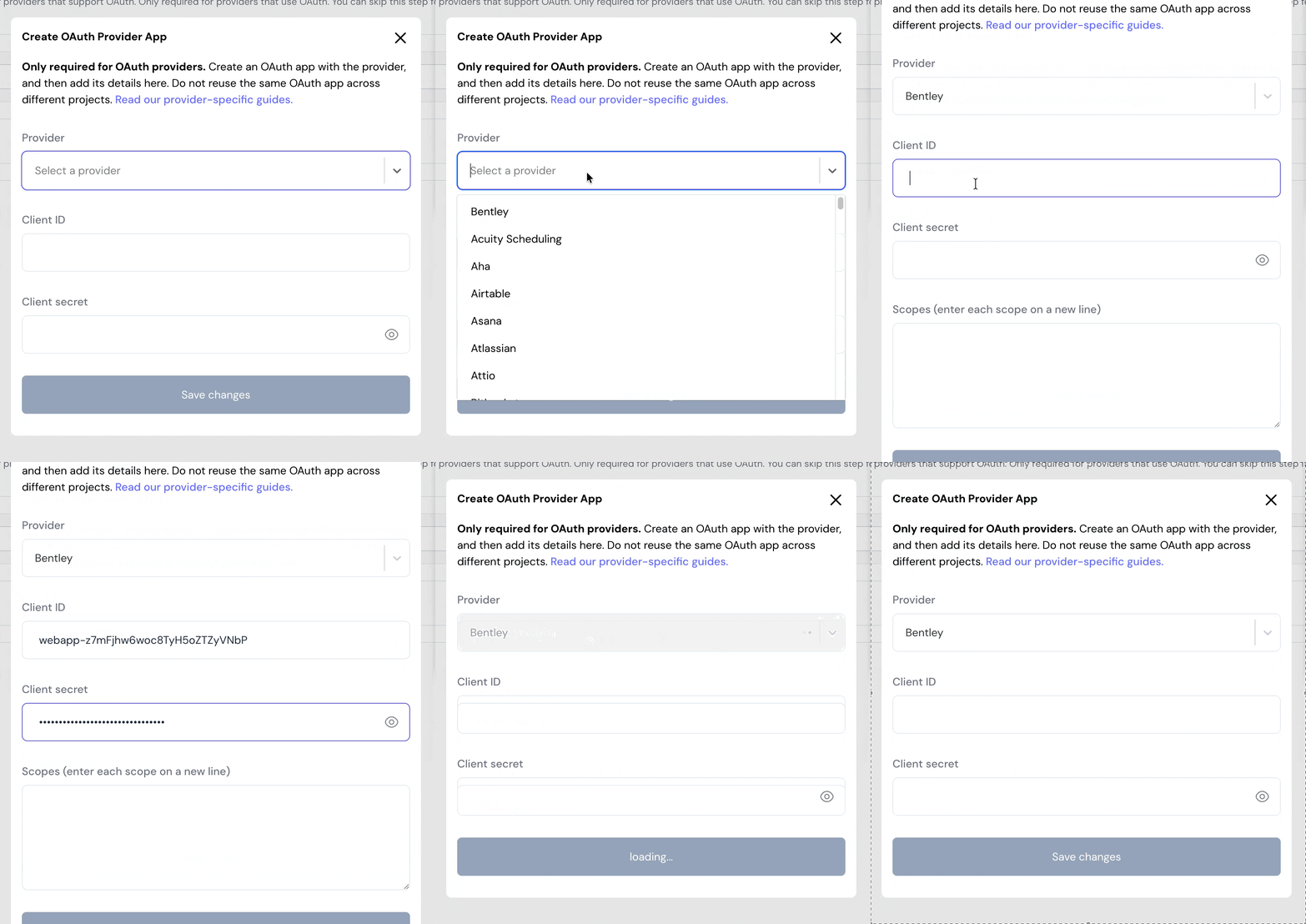 7. Click **Save Changes**.
## Using the connector
To start integrating with Bentley:
* Create a manifest file like the [example above](#example-integration).
* Deploy it using the [amp CLI](/cli/overview).
* If you are using Read Actions, create a [destination](/destinations).
* Embed the [InstallIntegration](/embeddable-ui-components#install-integration) UI component. The UI component will prompt the customer for OAuth authorization.
* Start using the connector!
* If your integration has [Read Actions](/read-actions), you'll start getting webhook messages.
* If your integration has [Write Actions](/write-actions), you can start making API calls to our Write API.
* If your integration has [Proxy Actions](/proxy-actions), you can start making Proxy API calls.
7. Click **Save Changes**.
## Using the connector
To start integrating with Bentley:
* Create a manifest file like the [example above](#example-integration).
* Deploy it using the [amp CLI](/cli/overview).
* If you are using Read Actions, create a [destination](/destinations).
* Embed the [InstallIntegration](/embeddable-ui-components#install-integration) UI component. The UI component will prompt the customer for OAuth authorization.
* Start using the connector!
* If your integration has [Read Actions](/read-actions), you'll start getting webhook messages.
* If your integration has [Write Actions](/write-actions), you can start making API calls to our Write API.
* If your integration has [Proxy Actions](/proxy-actions), you can start making Proxy API calls.