> ## Documentation Index
> Fetch the complete documentation index at: https://docs.withampersand.com/llms.txt
> Use this file to discover all available pages before exploring further.
# Overview
Ampersand notifications deliver real-time messages about important lifecycle changes in your project. They allow you to track when customers install, update, or delete integrations; when backfills complete; and when sync issues occur.
If you want to be notified when there are changes in your customer's SaaS instances, use [Subscribe Actions](/subscribe-actions).
## How notifications work
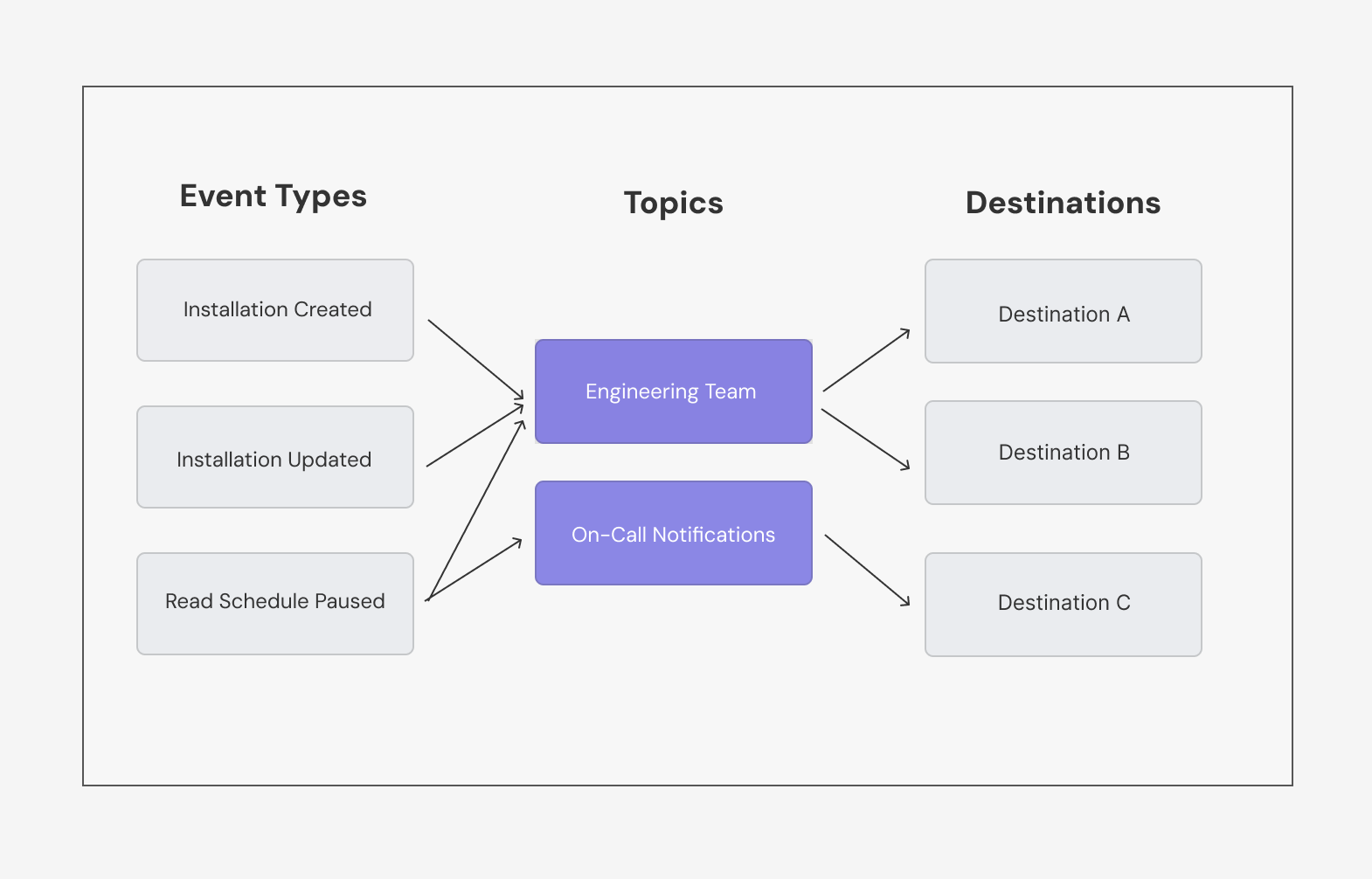
Notifications use topics to give you fine-grained control over which events reach which destinations. You can configure each topic to receive specific event types and route notifications to one or more destinations.
 ## Available events
Ampersand supports the following notification event types:
**Installation lifecycle**
* **`installation.created`**: Fires when a customer installs your integration to their SaaS instance
* **`installation.updated`**: Fires when a customer modifies their integration configuration (e.g., changes field mappings)
* **`installation.deleted`**: Fires when a customer uninstalls your integration from their SaaS instance
**Read operations**
* **`read.backfill.done`**: Fires when historical data sync completes so you know backfill data is ready to process
* **`read.schedule.paused`**: Fires when a scheduled data sync is paused, often due to authentication issues or other errors
* **`read.triggered.done`**: Fires when an on-demand triggered read completes successfully
* **`read.triggered.error`**: Fires when an on-demand triggered read fails
**Write operations**
* **`write.async.done`**: Fires when an asynchronous write operation completes, indicating success or failure and which records were written or had errors
**Subscribe**
* **`subscribe.create.error`**: Fires when Ampersand fails to set up a subscribe action for an installation
**Connection**
* **`connection.created`**: Fires when a new OAuth connection is established with a SaaS provider
* **`connection.refreshed`**: Fires when a connection's OAuth access token is refreshed
* **`connection.deleted`**: Fires when a connection is deleted
* **`connection.error`**: Fires when there's an error with an OAuth connection, such as authentication failures or token refresh issues
**Destination**
* **`destination.webhook.disabled`**: Fires when a webhook destination endpoint is disabled
## Setting up notifications
There are two ways to set up notifications:
* **[Using the Dashboard](#set-up-via-dashboard)**: Visual interface for quick setup
* **[Using the API](#set-up-via-api)**: Programmatic setup for automation and integration
### Set up via Dashboard
1. **Create destinations**
* Go to [Destinations](https://dashboard.withampersand.com/projects/_/settings/destinations/)
* Click **New Destination** and configure:
* **Name**: A descriptive name (e.g., "production-alerts")
* **Type**: Choose webhook, Kinesis, Amazon S3, or log destination
* **Configuration**: Provide the endpoint URL or stream details
* Click **Create Destination**
2. **Create topics**
* Go to [Notifications](https://dashboard.withampersand.com/projects/_/notifications/)
* Click **New Topic**
* Configure your topic:
* **Name**: A descriptive name (e.g., "installation-events")
* **Event types**: Select the events this topic should receive
* **Destinations**: Select which destinations should receive notifications
* Click **Create Topic**
### Set up via API
When using the API, you need to create routes explicitly to connect events to topics and topics to destinations. The dashboard handles this automatically when you create a topic.
See the API Reference for complete endpoint documentation.
```bash theme={null}
POST https://api.withampersand.com/v1/projects/{projectIdOrName}/destinations
{
"name": "production-alerts",
"type": "webhook",
"metadata": {
"url": "https://your-webhook.com"
}
}
```
```bash theme={null}
POST https://api.withampersand.com/v1/projects/{projectIdOrName}/topics
{
"name": "installation-events"
}
```
**Notification-Event-Topic Routes** connect specific event types to topics. This determines which events are sent to each topic.
```bash theme={null}
POST https://api.withampersand.com/v1/projects/{projectIdOrName}/notification-event-topic-routes
{
"topicId": "your-topic-id",
"eventType": "installation.created"
}
```
**Topic-Destination Routes** connect topics to destinations. This determines which destinations receive notifications for each topic.
```bash theme={null}
POST https://api.withampersand.com/v1/projects/{projectIdOrName}/topic-destination-routes
{
"topicId": "your-topic-id",
"destinationId": "your-destination-id"
}
```
## Available events
Ampersand supports the following notification event types:
**Installation lifecycle**
* **`installation.created`**: Fires when a customer installs your integration to their SaaS instance
* **`installation.updated`**: Fires when a customer modifies their integration configuration (e.g., changes field mappings)
* **`installation.deleted`**: Fires when a customer uninstalls your integration from their SaaS instance
**Read operations**
* **`read.backfill.done`**: Fires when historical data sync completes so you know backfill data is ready to process
* **`read.schedule.paused`**: Fires when a scheduled data sync is paused, often due to authentication issues or other errors
* **`read.triggered.done`**: Fires when an on-demand triggered read completes successfully
* **`read.triggered.error`**: Fires when an on-demand triggered read fails
**Write operations**
* **`write.async.done`**: Fires when an asynchronous write operation completes, indicating success or failure and which records were written or had errors
**Subscribe**
* **`subscribe.create.error`**: Fires when Ampersand fails to set up a subscribe action for an installation
**Connection**
* **`connection.created`**: Fires when a new OAuth connection is established with a SaaS provider
* **`connection.refreshed`**: Fires when a connection's OAuth access token is refreshed
* **`connection.deleted`**: Fires when a connection is deleted
* **`connection.error`**: Fires when there's an error with an OAuth connection, such as authentication failures or token refresh issues
**Destination**
* **`destination.webhook.disabled`**: Fires when a webhook destination endpoint is disabled
## Setting up notifications
There are two ways to set up notifications:
* **[Using the Dashboard](#set-up-via-dashboard)**: Visual interface for quick setup
* **[Using the API](#set-up-via-api)**: Programmatic setup for automation and integration
### Set up via Dashboard
1. **Create destinations**
* Go to [Destinations](https://dashboard.withampersand.com/projects/_/settings/destinations/)
* Click **New Destination** and configure:
* **Name**: A descriptive name (e.g., "production-alerts")
* **Type**: Choose webhook, Kinesis, Amazon S3, or log destination
* **Configuration**: Provide the endpoint URL or stream details
* Click **Create Destination**
2. **Create topics**
* Go to [Notifications](https://dashboard.withampersand.com/projects/_/notifications/)
* Click **New Topic**
* Configure your topic:
* **Name**: A descriptive name (e.g., "installation-events")
* **Event types**: Select the events this topic should receive
* **Destinations**: Select which destinations should receive notifications
* Click **Create Topic**
### Set up via API
When using the API, you need to create routes explicitly to connect events to topics and topics to destinations. The dashboard handles this automatically when you create a topic.
See the API Reference for complete endpoint documentation.
```bash theme={null}
POST https://api.withampersand.com/v1/projects/{projectIdOrName}/destinations
{
"name": "production-alerts",
"type": "webhook",
"metadata": {
"url": "https://your-webhook.com"
}
}
```
```bash theme={null}
POST https://api.withampersand.com/v1/projects/{projectIdOrName}/topics
{
"name": "installation-events"
}
```
**Notification-Event-Topic Routes** connect specific event types to topics. This determines which events are sent to each topic.
```bash theme={null}
POST https://api.withampersand.com/v1/projects/{projectIdOrName}/notification-event-topic-routes
{
"topicId": "your-topic-id",
"eventType": "installation.created"
}
```
**Topic-Destination Routes** connect topics to destinations. This determines which destinations receive notifications for each topic.
```bash theme={null}
POST https://api.withampersand.com/v1/projects/{projectIdOrName}/topic-destination-routes
{
"topicId": "your-topic-id",
"destinationId": "your-destination-id"
}
```